
Join the Conversation
- Find Answers
- :
- Apps & Add-ons
- :
- All Apps and Add-ons
- :
- All Apps and Add-ons
- :
- Re: Snort field extractions not functioning
- Subscribe to RSS Feed
- Mark Topic as New
- Mark Topic as Read
- Float this Topic for Current User
- Bookmark Topic
- Subscribe to Topic
- Mute Topic
- Printer Friendly Page
- Mark as New
- Bookmark Message
- Subscribe to Message
- Mute Message
- Subscribe to RSS Feed
- Permalink
- Report Inappropriate Content
Snort field extractions not functioning

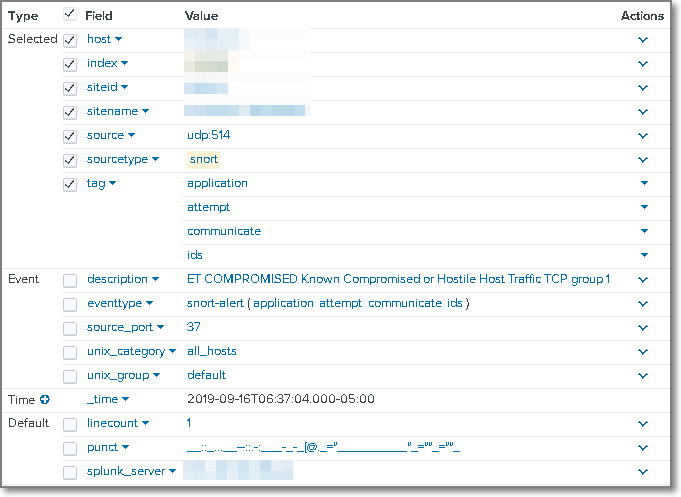
Having issues with Splunk extracting the fields from Snort events being forwarded to Universal Forwarders. UF is configured to receive events on UDP 514 as soucetype=snort. The scenario is as follows:
Snort sensor--(sends event UDP 514)-->Splunk UF---(sends event TCP 9997)-->Splunk Indexers
Environment: Splunk v 7.3.1
Snort for Splunk is on the UF, SH, and Indexers.
Raw event
Sep 16 11:37:04 %REDACTED_IP% 2019-09-16T07:37:04.291385-04:00 SystemX ids_alerts - - [[email protected] msg="ET COMPROMISED Known Compromised or Hostile Host Traffic TCP group 1" pad2="0" appid="" impact="0" blocked="0" vlan-id="0" event-id="210" priority="2" protocol="6" sensor-id="SystemX" source-ip="%REDACTED_IP%" mpls-label="0" dport-icode="22" impact-flag="0" sport-itype="54974" event-second="1568633823" generator-id="1" signature-id="2500000" classification="Misc Attack" destination-ip="%REDACTED_IP%" sensor-interface="WAN Ethernet Port" classification-id="30" event-microsecond="302356" signature-revision="5175" _id="4904" _timestamp="2019-09-16 07:37:04.224183" _source="SystemX"] ET COMPROMISED Known Compromised or Hostile Host Traffic TCP group 1
Screenshot from Splunk of field extractions. Yes, verbose is set and app permissions are set to globally with all apps.
What am I doing wrong?
- Mark as New
- Bookmark Message
- Subscribe to Message
- Mute Message
- Subscribe to RSS Feed
- Permalink
- Report Inappropriate Content
event data was not in "true" snort format. data fields were cooked with different field names. had to create custom mappings to make it function properly.
- Mark as New
- Bookmark Message
- Subscribe to Message
- Mute Message
- Subscribe to RSS Feed
- Permalink
- Report Inappropriate Content
event data was not in "true" snort format. data fields were cooked with different field names. had to create custom mappings to make it function properly.



Join the Splunk Community Slack to learn, troubleshoot, and make connections with fellow Splunk practitioners in real time!
Join Splunk User Groups to connect and learn in-person by region or remotely by topic or industry.
Painting a Clearer Picture: Unifying Your Investigations with Cisco AI Canvas
Hello POJO, meet nocode
Announcing Modern Navigation: A New Era of Splunk User Experience
