
Join the Conversation
- Find Answers
- :
- Apps & Add-ons
- :
- All Apps and Add-ons
- :
- All Apps and Add-ons
- :
- Re: Single panel with multiple values
- Subscribe to RSS Feed
- Mark Topic as New
- Mark Topic as Read
- Float this Topic for Current User
- Bookmark Topic
- Subscribe to Topic
- Mute Topic
- Printer Friendly Page
- Mark as New
- Bookmark Message
- Subscribe to Message
- Mute Message
- Subscribe to RSS Feed
- Permalink
- Report Inappropriate Content

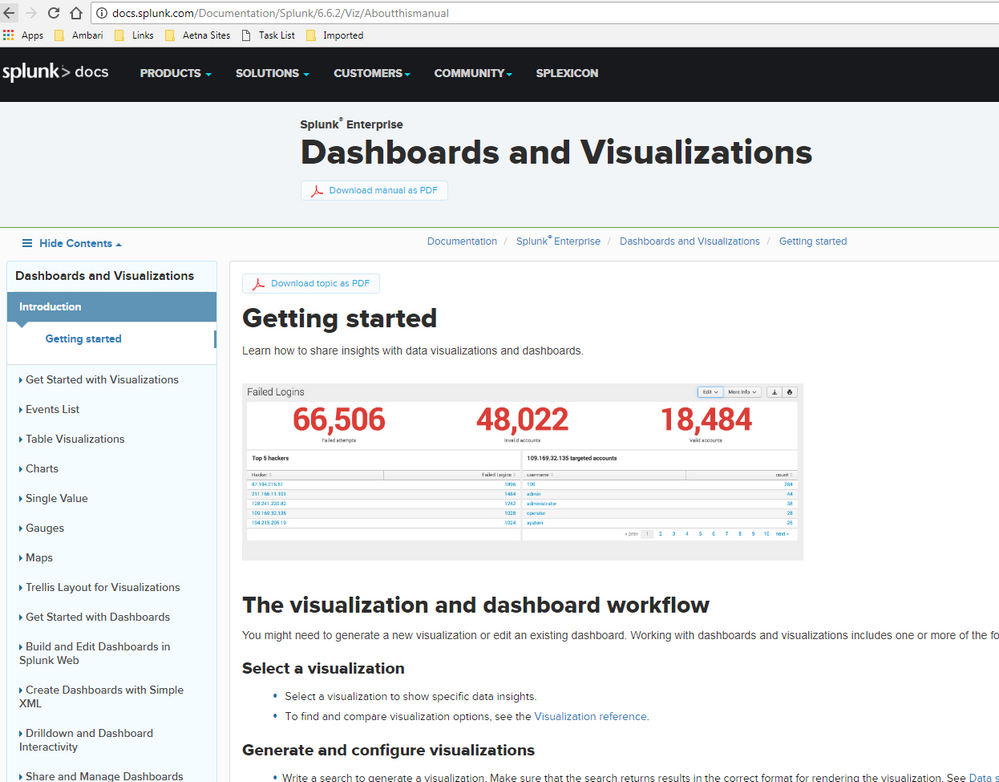
I am interested in creating a dashboard which has a row with one panel with multiple single values similar to the first row in the documentation -> http://docs.splunk.com/Documentation/Splunk/6.6.2/Viz/Aboutthismanual
Can someone please let me know how to do it....
- Mark as New
- Bookmark Message
- Subscribe to Message
- Mute Message
- Subscribe to RSS Feed
- Permalink
- Report Inappropriate Content

If I understand what you're looking for, all you need to do is all the single values into the same panel in the source code. Try something similar to this:
<panel>
  <single>
     <search>
         <query>....</query>
     </search>
   </single>
   <single>
     <search>
         <query>....</query>
     </search>
   </single>.....
</panel>
If you want to break a new row into the panel, add
   <html tokens="true" encoded="true">
       <![CDATA[
           <br/>
           ]]>
    </html>
- Mark as New
- Bookmark Message
- Subscribe to Message
- Mute Message
- Subscribe to RSS Feed
- Permalink
- Report Inappropriate Content
To convert my original dashboard with a "row of panels" into a "single panel" with a row of visualizations, all I had to do was Edit > Source and move the "title" tags of these panels to be inside the "single" tags, then remove the "panel" (close and open) tags in between each visualization.
I found this reference in the "Splunk Dashboard Examples" app: https://splunkbase.splunk.com/app/1603/
Open the "Splunk Dashboard Examples" app and scroll down to "Layout Elements" > "Panel Grouping with Single Values". This is available in Splunk 6.4+.
<dashboard>
    <label>Panel Grouping with Single Values</label>
    <description>Group multiple single value elements, aligning horizontally.</description>
    <row>
        <panel>
            <!-- 2 elements are grouped into 1 column -->
            <single>
                <title>Single panel 1</title>
                <search>
                    <query>index=_internal earliest=-h | stats count</query>
                </search>
                ...
            </single>
            <single>
                <title>Single panel 2</title>
                <search>
                    <query>index=_internal earliest=-24h | stats count</query>
                </search>
                ...
            </single>
        </panel>
    </row>
...
- Mark as New
- Bookmark Message
- Subscribe to Message
- Mute Message
- Subscribe to RSS Feed
- Permalink
- Report Inappropriate Content
How does the panel fit in the html tag? Can you provide full example
- Mark as New
- Bookmark Message
- Subscribe to Message
- Mute Message
- Subscribe to RSS Feed
- Permalink
- Report Inappropriate Content
Please see the example I added below from the Splunk Dashboard Examples app. Nesting tags: dashboard > row > panel > single > title > search.
- Mark as New
- Bookmark Message
- Subscribe to Message
- Mute Message
- Subscribe to RSS Feed
- Permalink
- Report Inappropriate Content
If I understand what you're looking for, all you need to do is all the single values into the same panel in the source code. Try something similar to this:
<panel>
  <single>
     <search>
         <query>....</query>
     </search>
   </single>
   <single>
     <search>
         <query>....</query>
     </search>
   </single>.....
</panel>
If you want to break a new row into the panel, add
   <html tokens="true" encoded="true">
       <![CDATA[
           <br/>
           ]]>
    </html>
- Mark as New
- Bookmark Message
- Subscribe to Message
- Mute Message
- Subscribe to RSS Feed
- Permalink
- Report Inappropriate Content
Exactly what I was looking for!!!
- Mark as New
- Bookmark Message
- Subscribe to Message
- Mute Message
- Subscribe to RSS Feed
- Permalink
- Report Inappropriate Content

- Mark as New
- Bookmark Message
- Subscribe to Message
- Mute Message
- Subscribe to RSS Feed
- Permalink
- Report Inappropriate Content


Hi @bohrasaurabh, your link is for a deleted page. Can you please update it?
- Mark as New
- Bookmark Message
- Subscribe to Message
- Mute Message
- Subscribe to RSS Feed
- Permalink
- Report Inappropriate Content
@lfedak: The page still exists. I think the issue is the period at the end of the link is becoming part of the URL when you click it and hence page does not exist error. I am unable to edit the question any more to remove that period sign.
- Mark as New
- Bookmark Message
- Subscribe to Message
- Mute Message
- Subscribe to RSS Feed
- Permalink
- Report Inappropriate Content
@lfedak this should be a comment. Comments are for clarifying questions and more details whereas answers are to post Solutions. Thanks 🙂
- Mark as New
- Bookmark Message
- Subscribe to Message
- Mute Message
- Subscribe to RSS Feed
- Permalink
- Report Inappropriate Content
Woops, thought I did post it as a comment. Thanks for catching that 🙂

Join the Splunk Community Slack to learn, troubleshoot, and make connections with fellow Splunk practitioners in real time!
Join Splunk User Groups to connect and learn in-person by region or remotely by topic or industry.
Announcing Modern Navigation: A New Era of Splunk User Experience
Kubernetes Alerts That Work Out of the Box with AutoDetect detectors in Splunk ...
Observability at Your Fingertips Directly From Splunk Platform—for Free
