
Join the Conversation
- Find Answers
- :
- Apps & Add-ons
- :
- All Apps and Add-ons
- :
- All Apps and Add-ons
- :
- ServerSideInclude Module Error! Invalid template p...
- Subscribe to RSS Feed
- Mark Topic as New
- Mark Topic as Read
- Float this Topic for Current User
- Bookmark Topic
- Subscribe to Topic
- Mute Topic
- Printer Friendly Page
- Mark as New
- Bookmark Message
- Subscribe to Message
- Mute Message
- Subscribe to RSS Feed
- Permalink
- Report Inappropriate Content
ServerSideInclude Module Error! Invalid template path after splunk upgrade to 7.3.1

Hi everyone! I installed v7.3.1 recently in my local machine (locahost:8001) and one of the apps I have installed shows the error ServerSideInclude Module Error! Invalid template path: Do you have any suggestions on how I can fix this?
- Mark as New
- Bookmark Message
- Subscribe to Message
- Mute Message
- Subscribe to RSS Feed
- Permalink
- Report Inappropriate Content

Hi @lekshmi279, I'm having the same error after upgrading my Splunk Enterprise (Windows) to version 7.3.1.
Our module-based dashboard page is throwing an error:
ServerSideInclude Moduel Error!
Invalid template path. C:\APP\myapplication\appserver\static\mydashboard.html
After searching for the ServerSideInclude Module error in Splunk logs (web_service.log)
It brought me to this HTML file > C:\Program Files\Splunk\share\splunk\search_mrsparkle\modules\include\ServerSideInclude.html
Inside this HTML file is a Python script that fetches the dashboard's HTML.
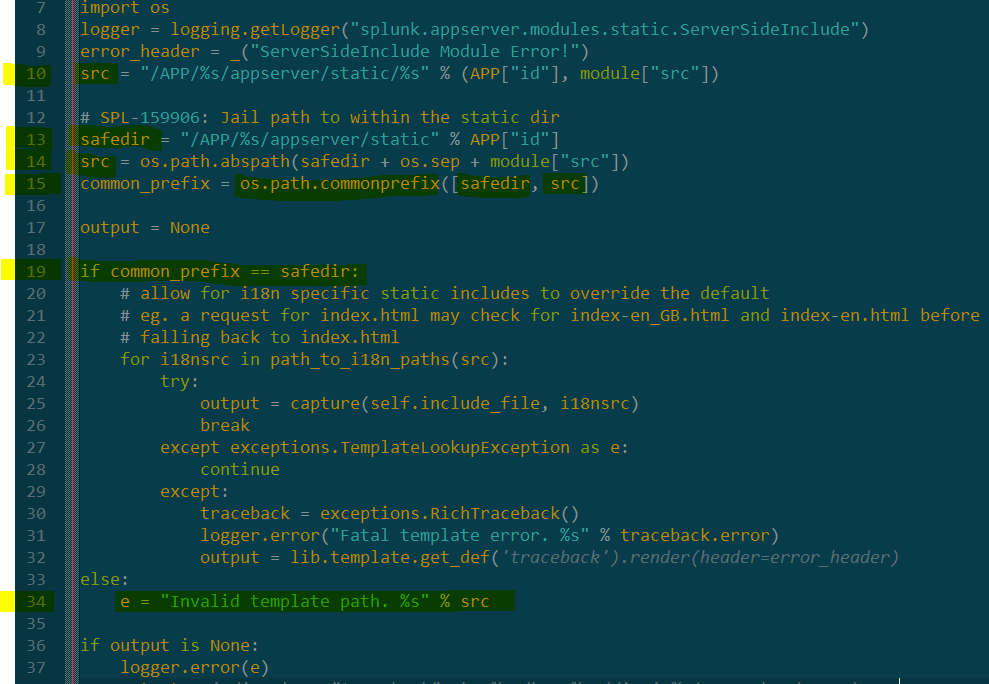
Noticed in line 19, it has a condition to check if common_prefix == safedir else, it will throw the message in line 34 (which the dashboard page is showing).
In line 14, it is getting the src as an absolute path and safedir as a hard-coded path, which will have:
src = C:\APP\myapplication\appserver\static\mydashboard.html
safedir = /APP/myapplication/appserver/static
However at line 15, common_prefix is obtained by os.path.commonprefix() method which checks for common prefix by comparing character by character in the path of safedir and src. Since it compares path by characters it will give a null value for the common_prefix and once it goes to condition it will not satisfy the condition thus giving the error message.
As a workaround on this error - I just comment-out line 14, so that src value will remain as it was in line 10, which will have:
src = /APP/myapplication/appserver/static/mydashboard.html
safedir = /APP/myapplication/appserver/static
common_prefix = /APP/myapplication/appserver/static
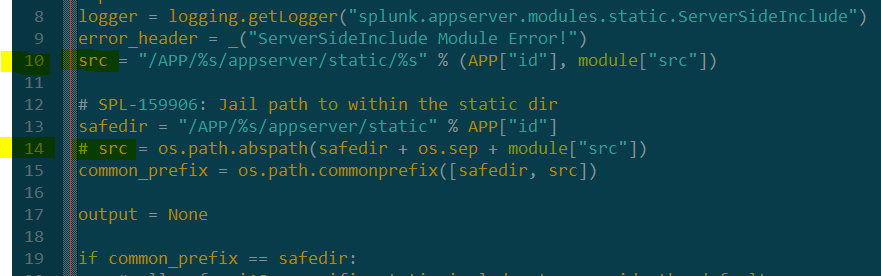
After saving the file, the dashboard began to show.
However, I think it is not appropriate to make this changes in Splunk internal files every time we are deploying Splunk application in Windows (in Linux enviroment the changes is not required). Hope Splunk team will be able to check about this. THANKS!




Join the Splunk Community Slack to learn, troubleshoot, and make connections with fellow Splunk practitioners in real time!
Join Splunk User Groups to connect and learn in-person by region or remotely by topic or industry.
Vibe-coding, AI, and Splunkcraft: Highlights from the .conf26 Builder Bar
Thanks for the Memories: .conf26 Took Learning to New Heights
Best Practices: Splunk auto adjust pipeline queue
