
Join the Conversation
- Find Answers
- :
- Apps & Add-ons
- :
- All Apps and Add-ons
- :
- All Apps and Add-ons
- :
- Re: See User Activity by App and View
- Subscribe to RSS Feed
- Mark Topic as New
- Mark Topic as Read
- Float this Topic for Current User
- Bookmark Topic
- Subscribe to Topic
- Mute Topic
- Printer Friendly Page
- Mark as New
- Bookmark Message
- Subscribe to Message
- Mute Message
- Subscribe to RSS Feed
- Permalink
- Report Inappropriate Content


Please see accepted answer below for search that shows what apps and views (dashboards in those apps) users are going to, by user app and view.
Please let me know if this is helpful or improvements you would suggest.
Thanks!
- Mark as New
- Bookmark Message
- Subscribe to Message
- Mute Message
- Subscribe to RSS Feed
- Permalink
- Report Inappropriate Content
Accepted Solution
   index=_internal sourcetype="splunk_web_access" method="GET" status="200" user!=-
    | stats count latest(_time) as ViewTime by user app view
    | sort -count
    | eventstats sum(count) as countByApp list(view) as view list(count) as count list(ViewTime) as ViewTime by user app
    | convert timeformat="%a %m/%d/%Y %I:%M:%S %p" ctime(ViewTime)
    | dedup app
    | appendpipe [stats sum(count) as count by user | eval view = "Total Views"]
    | sort + user -countByApp
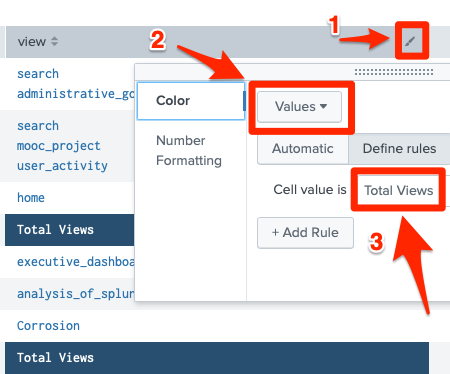
One suggestion is to play with the table format to highlight the total views by user as per the screenshot below:
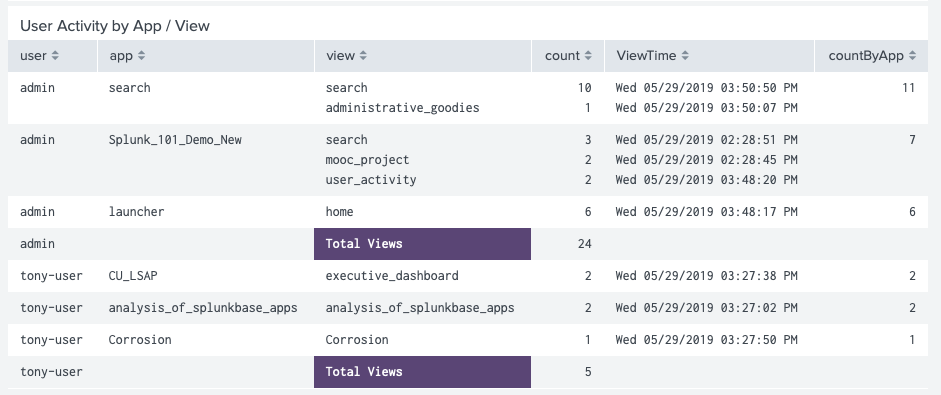
Here is an example of what your results might look like:


- Mark as New
- Bookmark Message
- Subscribe to Message
- Mute Message
- Subscribe to RSS Feed
- Permalink
- Report Inappropriate Content
Accepted Solution
   index=_internal sourcetype="splunk_web_access" method="GET" status="200" user!=-
    | stats count latest(_time) as ViewTime by user app view
    | sort -count
    | eventstats sum(count) as countByApp list(view) as view list(count) as count list(ViewTime) as ViewTime by user app
    | convert timeformat="%a %m/%d/%Y %I:%M:%S %p" ctime(ViewTime)
    | dedup app
    | appendpipe [stats sum(count) as count by user | eval view = "Total Views"]
    | sort + user -countByApp
One suggestion is to play with the table format to highlight the total views by user as per the screenshot below:
Here is an example of what your results might look like:
- Mark as New
- Bookmark Message
- Subscribe to Message
- Mute Message
- Subscribe to RSS Feed
- Permalink
- Report Inappropriate Content


Hi @tnesavich_splunk,
Please look for Dashboard Examples App (https://splunkbase.splunk.com/app/1603/) to check the complete example of how to highlight some cell in the table with JS.
Hope this helps!!!
- Mark as New
- Bookmark Message
- Subscribe to Message
- Mute Message
- Subscribe to RSS Feed
- Permalink
- Report Inappropriate Content

Hi,
This is a very interesting query actually. A while ago I was looking exactly for something like that.
My suggestion would be to use
| dedup app, user
Instead of
| dedup app
This would allow you to see if more than one user accessed the same app. Like, If user A and user B accessed the search app in the last hour and you dedup by app, you will see just one user in your table. When you dedup by app and user you see both users listed, even if they used the same app.
- Mark as New
- Bookmark Message
- Subscribe to Message
- Mute Message
- Subscribe to RSS Feed
- Permalink
- Report Inappropriate Content

Confirming this still works as of Splunk Cloud v9.0.2

Join the Splunk Community Slack to learn, troubleshoot, and make connections with fellow Splunk practitioners in real time!
Join Splunk User Groups to connect and learn in-person by region or remotely by topic or industry.
Index This | What travels the world but is also stuck in place?
Discover New Use Cases: Unlock Greater Value from Your Existing Splunk Data
Continue Your Journey: Join Session 2 of the Data Management and Federation Bootcamp ...
