
Join the Conversation
- Find Answers
- :
- Apps & Add-ons
- :
- All Apps and Add-ons
- :
- SPLUNK DB Connect (3.3.1) Setup: JRE Installation ...
- Subscribe to RSS Feed
- Mark Topic as New
- Mark Topic as Read
- Float this Topic for Current User
- Bookmark Topic
- Subscribe to Topic
- Mute Topic
- Printer Friendly Page
- Mark as New
- Bookmark Message
- Subscribe to Message
- Mute Message
- Subscribe to RSS Feed
- Permalink
- Report Inappropriate Content

Hi,
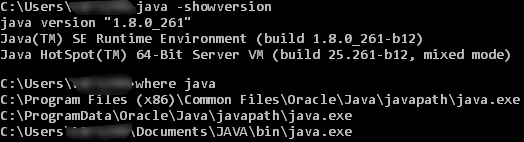
Having a hard time setting up the JRE Installation Path(JAVA_HOME). Please note that to the best of my knowledge, my java path is "C:\ProgramData\Oracle\Java\javapath" and this is a result from running the command "where java" in cmd (windows 10).
Splunk version 8.0.5 (local computer, pending trial for production)
DB Connect App version 3.3.1
JDK installed: 11.0.8
Error description: depends on how its written
- Entering exactly C:\ProgramData\Oracle\Java\javapath yields the error 'str' object has no attribute 'decode'
- Entering "C:\ProgramData\Oracle\Java\javapath" with quotation marks yields the error JAVA_HOME path not exist
Am I heading the right way? that folder does contain java.exe
- Mark as New
- Bookmark Message
- Subscribe to Message
- Mute Message
- Subscribe to RSS Feed
- Permalink
- Report Inappropriate Content


which package did you download from the link I have shared.
Did you download zip or exe?
I have download zip and extracted to
C:\Users\thambisetty\Downloads\java-11\jre
under above I got below directory
jre1.8.0_261
the above directory contains bin
so your path in db connect app should be like below:
C:\Users\thambisetty\Downloads\java-11\jre\jre1.8.0_261
Note: dont add bin end to above path and setting up java_home is also not required.
if you get error str object no attribute decode, thats fine restart splunk service. You will be okay.
If this helps, give a like below.
- Mark as New
- Bookmark Message
- Subscribe to Message
- Mute Message
- Subscribe to RSS Feed
- Permalink
- Report Inappropriate Content
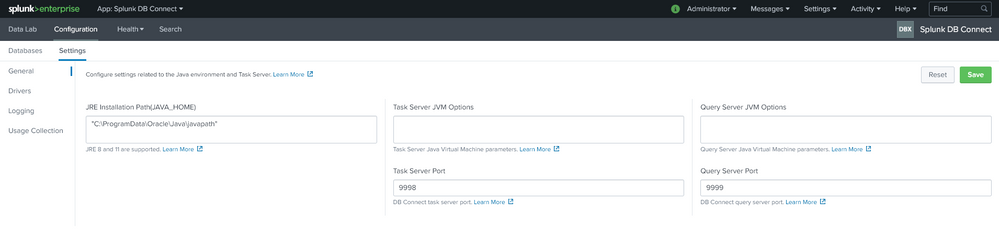
Can you take a screenshot of DB CONNNECTIONS SETTINGS and post it here.
If this helps, give a like below.
- Mark as New
- Bookmark Message
- Subscribe to Message
- Mute Message
- Subscribe to RSS Feed
- Permalink
- Report Inappropriate Content
Sure thing:
- Mark as New
- Bookmark Message
- Subscribe to Message
- Mute Message
- Subscribe to RSS Feed
- Permalink
- Report Inappropriate Content
you need jre some of JDKs don't have jre in it.
Download jre8 from here : https://www.oracle.com/java/technologies/javase-jre8-downloads.html
Note: you should have oracle account.
Path should be like below:
C:\Users\thambisetty\Downloads\java-11\jre\jre1.8.0_261
if you get an error saying str object no attribute to decode thats fine , just restart the splunk.
If this helps, give a like below.
- Mark as New
- Bookmark Message
- Subscribe to Message
- Mute Message
- Subscribe to RSS Feed
- Permalink
- Report Inappropriate Content
Upvote is appreciated if my solution works.
If this helps, give a like below.
- Mark as New
- Bookmark Message
- Subscribe to Message
- Mute Message
- Subscribe to RSS Feed
- Permalink
- Report Inappropriate Content
Didn't work.
- installed the JRE link you sent
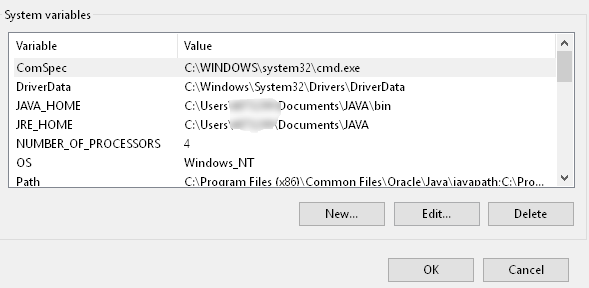
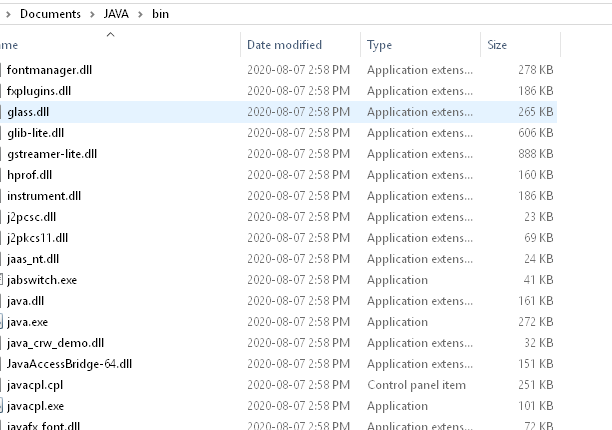
- entering C:\Users\thambisetty\Documents\JAVA\bin (replaced with actual user on machine) gives the usual 'str' object has no attribute 'decode' error. Entering "C:\Users\thambisetty\Documents\JAVA\bin" with quotations gives the usual JAVA_HOME path not exist error.
- I am far from being a java expert, but see below more info on it. I had to create the environment variable manually, but that did not fix the issue.
- Mark as New
- Bookmark Message
- Subscribe to Message
- Mute Message
- Subscribe to RSS Feed
- Permalink
- Report Inappropriate Content
which package did you download from the link I have shared.
Did you download zip or exe?
I have download zip and extracted to
C:\Users\thambisetty\Downloads\java-11\jre
under above I got below directory
jre1.8.0_261
the above directory contains bin
so your path in db connect app should be like below:
C:\Users\thambisetty\Downloads\java-11\jre\jre1.8.0_261
Note: dont add bin end to above path and setting up java_home is also not required.
if you get error str object no attribute decode, thats fine restart splunk service. You will be okay.
If this helps, give a like below.
- Mark as New
- Bookmark Message
- Subscribe to Message
- Mute Message
- Subscribe to RSS Feed
- Permalink
- Report Inappropriate Content
Solution: do not point to bin folder, but rather the folder before.
Thank you so much

Splunk Observability for AI
[Puzzles] Solve, Learn, Repeat: Dereferencing XML to Fixed-length events
Stay Connected: Your Guide to December Tech Talks, Office Hours, and Webinars!
