
Join the Conversation
- Find Answers
- :
- Apps & Add-ons
- :
- All Apps and Add-ons
- :
- All Apps and Add-ons
- :
- Re: No content is shown in Machine Learning Toolki...
- Subscribe to RSS Feed
- Mark Topic as New
- Mark Topic as Read
- Float this Topic for Current User
- Bookmark Topic
- Subscribe to Topic
- Mute Topic
- Printer Friendly Page
- Mark as New
- Bookmark Message
- Subscribe to Message
- Mute Message
- Subscribe to RSS Feed
- Permalink
- Report Inappropriate Content


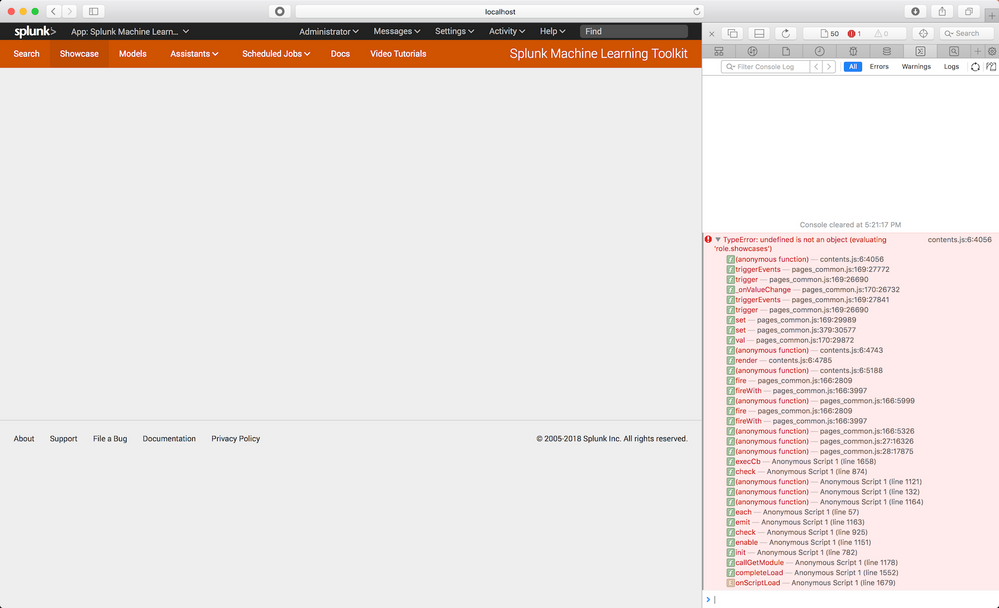
I have a issue that keeps the Machine Learning Toolkit Showcase overview page empty when I open the page in Safari. In Chrome the page is shown correctly. I get an error in Javascript that role.showcase variable is undefined. Screen attached. My system config: Splunk 7.0, MLTK 3.1, Safari Version 11.0.3 (12604.5.6.1.1) on macOS Sierra 10.12.6. Anyone else experienced (and solved?) this issue? Thanks, Philipp

- Mark as New
- Bookmark Message
- Subscribe to Message
- Mute Message
- Subscribe to RSS Feed
- Permalink
- Report Inappropriate Content

@pdrieger: can you try clearing your browser cache?
this is likely caused by the fact that the MLTK uses local storage to store the information from showcase example type dropdown.
To test, open a console on the showcase page (Developer tools) and type:
localStorage.getItem('mlts-role')
As of writing, the only legitimate options for this value are: default, it, business, security, iot. Likely, you've used an internal app where someone just blindly copied and pasted the showcase examples without changing any of the values, and have since added an item to that list that we don't support or know what to do with.
If you find that the mlts-role is a different value, and that clearing the cache doesn't work, you can try something like:
localStorage.setItem('mtls-role', 'default')
Then go track down the culprit app and developer and harass them for copying and pasting entire dashboards 😉
- Mark as New
- Bookmark Message
- Subscribe to Message
- Mute Message
- Subscribe to RSS Feed
- Permalink
- Report Inappropriate Content
@pdrieger: can you try clearing your browser cache?
this is likely caused by the fact that the MLTK uses local storage to store the information from showcase example type dropdown.
To test, open a console on the showcase page (Developer tools) and type:
localStorage.getItem('mlts-role')
As of writing, the only legitimate options for this value are: default, it, business, security, iot. Likely, you've used an internal app where someone just blindly copied and pasted the showcase examples without changing any of the values, and have since added an item to that list that we don't support or know what to do with.
If you find that the mlts-role is a different value, and that clearing the cache doesn't work, you can try something like:
localStorage.setItem('mtls-role', 'default')
Then go track down the culprit app and developer and harass them for copying and pasting entire dashboards 😉
- Mark as New
- Bookmark Message
- Subscribe to Message
- Mute Message
- Subscribe to RSS Feed
- Permalink
- Report Inappropriate Content
Thanks Xander - you're a hero - outpacing anyone else in answering fast 🙂 This helped to solve the issue immediately.

Join the Splunk Community Slack to learn, troubleshoot, and make connections with fellow Splunk practitioners in real time!
Join Splunk User Groups to connect and learn in-person by region or remotely by topic or industry.
Design, Compete, Win: Submit Your Best Splunk Dashboards for a .conf26 Pass
May 2026 Splunk Expert Sessions: Security & Observability
Network to App: Observability Unlocked [May & June Series]
