
Join the Conversation
- Find Answers
- :
- Apps & Add-ons
- :
- All Apps and Add-ons
- :
- All Apps and Add-ons
- :
- Re: Lookup Command doesn't support * symbol
- Subscribe to RSS Feed
- Mark Topic as New
- Mark Topic as Read
- Float this Topic for Current User
- Bookmark Topic
- Subscribe to Topic
- Mute Topic
- Printer Friendly Page
- Mark as New
- Bookmark Message
- Subscribe to Message
- Mute Message
- Subscribe to RSS Feed
- Permalink
- Report Inappropriate Content

Hello,
I'm facing a problem with my lookup command.
Here is the context :
I'v 1 csv :
| pattern | type |
| *ABC* | 1 |
| *DEF* | 2 |
| *xxx* | 3 |
And logs with "url".
Ex : "xxxxabcxxxxx.google.com"
I need to search if, in my url field of my log, all the possibilities of my lookup are present. If yes, how much matches with this field.
My expected result is :
| url | type | count(type) |
| xxxxabcxxxxx.google.com | 1 3 | 2 |
How can i do ?
-"| lookup" command don't take into account the "*" symbol. Only space or comma with "WIDLCARD" config.
-"| inputlookup" command works but can't display the field "type" because it only exists in my csv. So, i can't count either.
Thank's for your answers
- Mark as New
- Bookmark Message
- Subscribe to Message
- Mute Message
- Subscribe to RSS Feed
- Permalink
- Report Inappropriate Content

You could make a lookup definition for that lookup, and under the Advanced options, set the pattern field as wildcard. Like this:
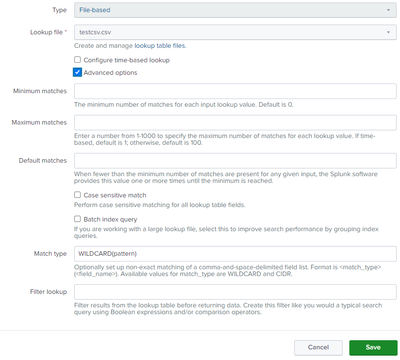
Match type must have "WILDCARD(pattern)"
Then you can run a lookup on this lookup definition using the url field, and return the "type" field values. Type will be a multi-value field, so you can eval mvcount on it to get the count of values.
| makeresults
| eval url = "xxxxabcxxxxx.google.com"
| lookup testcsv pattern as url output type as type
| eval count = mvcount(type)- Mark as New
- Bookmark Message
- Subscribe to Message
- Mute Message
- Subscribe to RSS Feed
- Permalink
- Report Inappropriate Content
You could make a lookup definition for that lookup, and under the Advanced options, set the pattern field as wildcard. Like this:
Match type must have "WILDCARD(pattern)"
Then you can run a lookup on this lookup definition using the url field, and return the "type" field values. Type will be a multi-value field, so you can eval mvcount on it to get the count of values.
| makeresults
| eval url = "xxxxabcxxxxx.google.com"
| lookup testcsv pattern as url output type as type
| eval count = mvcount(type)- Mark as New
- Bookmark Message
- Subscribe to Message
- Mute Message
- Subscribe to RSS Feed
- Permalink
- Report Inappropriate Content
Hello marnall,
First of all, thank you for your reply.
I thought the "wildcard" option was only used for fields containing spaces or commas. And that with the symbol * it didn't work.
I'll try this quickly and report back here.
Regards
- Mark as New
- Bookmark Message
- Subscribe to Message
- Mute Message
- Subscribe to RSS Feed
- Permalink
- Report Inappropriate Content
Hello,
Unfortunately, I've used your exact method and the result doesn't work.
I do have my line indicating my "url".
But nothing in "type" nor in its "count".
Maybe I made a mistake by indicating the wrong "destination app" when creating the "lookup definition"? What should I put?
Thanks
Regards
- Mark as New
- Bookmark Message
- Subscribe to Message
- Mute Message
- Subscribe to RSS Feed
- Permalink
- Report Inappropriate Content
I've found the solution. The problem was mine.
If I put : "testcsv.csv" -> it doesn't work.
But if I remove the ".csv", it works perfectly...
Thanks for your reply.


Join the Splunk Community Slack to learn, troubleshoot, and make connections with fellow Splunk practitioners in real time!
Join Splunk User Groups to connect and learn in-person by region or remotely by topic or industry.
Data Management Digest – September 2026
Federated Search for CloudWatch Unified Data Store Is Generally Available
Announcing Modern Navigation: A New Era of Splunk User Experience
