
Join the Conversation
- Find Answers
- :
- Apps & Add-ons
- :
- All Apps and Add-ons
- :
- All Apps and Add-ons
- :
- Java Invalid Parameter Error when using DBConnect ...
- Subscribe to RSS Feed
- Mark Topic as New
- Mark Topic as Read
- Float this Topic for Current User
- Bookmark Topic
- Subscribe to Topic
- Mute Topic
- Printer Friendly Page
- Mark as New
- Bookmark Message
- Subscribe to Message
- Mute Message
- Subscribe to RSS Feed
- Permalink
- Report Inappropriate Content
Java Invalid Parameter Error when using DBConnect Rising Column

Hi,
I am trying to setup a new input on Splunk DBConnect (V 3.1.4) to connect and retrieve data from MSSQL Server using MS-SQL Server Using jTDS Driver. Identity and Connection were setup successfully and a simple select * from <View Name> gets the data into the Preview Data pane. But as soon as I select any Rising Column and execute the query, following error is show.
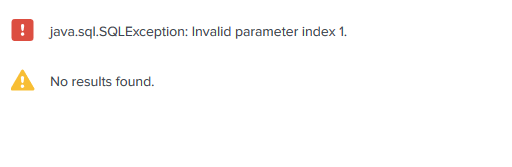
Tried different types for rising column(int, datetime etc) but they all end up with the error show above. In another thread it was mentioned that permissions on /opt/splunk/var/lib/splunk/modinputs/server/splunk_app_db_connect might be a reason but those seem fine to me, although the folder itself is empty. There is no checkpoint value stored.

What could be causing this issue? Anything wrong with the version I am using?
Thanks,
~ Abhi


- Mark as New
- Bookmark Message
- Subscribe to Message
- Mute Message
- Subscribe to RSS Feed
- Permalink
- Report Inappropriate Content
Hello @att35,
I dont think there is any issue with Splunk Version because i am using the same with no issues.
Please try the below steps:
1. First try to run the query directly, which i think you have already tried.
2. Then after that select checkpoint field and enter the value of checkpoint.
3. Then update the query to have checkpoint information: i.e. SELECT * FROM VIEW_NAME WHERE CHECKPOINT_VALUE > ? ORDER BY CHECKPOINT_VALUE
4. I think this will solve your issue.

Join the Splunk Community Slack to learn, troubleshoot, and make connections with fellow Splunk practitioners in real time!
Join Splunk User Groups to connect and learn in-person by region or remotely by topic or industry.
Make Your Machine Data AI-Ready in Splunk
Splunk Asynchronous Forwarding Explained
How to Monitor AI Agents with Splunk Agent Observability
