
Join the Conversation
- Find Answers
- :
- Apps & Add-ons
- :
- All Apps and Add-ons
- :
- All Apps and Add-ons
- :
- Re: Issue wtih Alert Manager Add-On for Splunk Clo...
- Subscribe to RSS Feed
- Mark Topic as New
- Mark Topic as Read
- Float this Topic for Current User
- Bookmark Topic
- Subscribe to Topic
- Mute Topic
- Printer Friendly Page
- Mark as New
- Bookmark Message
- Subscribe to Message
- Mute Message
- Subscribe to RSS Feed
- Permalink
- Report Inappropriate Content
Issue wtih Alert Manager Add-On for Splunk Cloud?

Hi,
I got an issue configuring alert manager app. The incident posture filter is not working.

It does not matter what info I change inside the red box. The alerts that are shown below does not change at all.
Any help will be grateful.
- Mark as New
- Bookmark Message
- Subscribe to Message
- Mute Message
- Subscribe to RSS Feed
- Permalink
- Report Inappropriate Content
Hi @gcusello ,
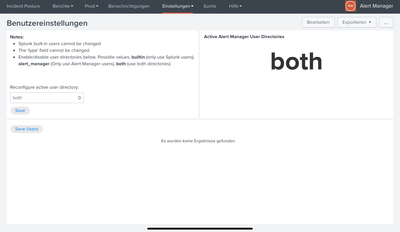
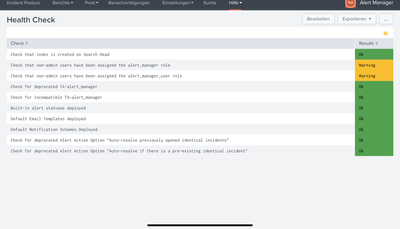
What could be the problem for me?
I can't define a user
- Mark as New
- Bookmark Message
- Subscribe to Message
- Mute Message
- Subscribe to RSS Feed
- Permalink
- Report Inappropriate Content


Hi @rohe,
sorry I didn't see this error.
Please could you share a screenshot in english, you can do this replacing the language in the link with "en-US".
Ciao.
Giuseppe
- Mark as New
- Bookmark Message
- Subscribe to Message
- Mute Message
- Subscribe to RSS Feed
- Permalink
- Report Inappropriate Content
Hi @rdiazalo,
to see alerts in Alert Manager, you have to configure all your alerts as Global, otherwise you don't see in this App.
If you found some error in JS execution, there's a message that you can find on the GitHub site.
Ciao.
Giuseppe
- Mark as New
- Bookmark Message
- Subscribe to Message
- Mute Message
- Subscribe to RSS Feed
- Permalink
- Report Inappropriate Content
Hi @gcusello,
Al the alerts are in global.
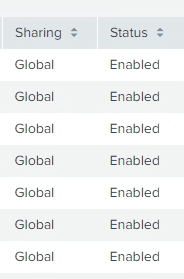
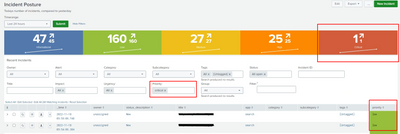
I can see al the alerts on the dashboard. What I cannot do is to filter them. If I choose to just see the ones with new status, it still show me all the alerts. In this example I select to just see critical alerts in the las 24 hours but it still shows me all alerts of the last 24 hours.
- Mark as New
- Bookmark Message
- Subscribe to Message
- Mute Message
- Subscribe to RSS Feed
- Permalink
- Report Inappropriate Content
Hi @rdiazalo,
it's strange I haven't your behaviour:
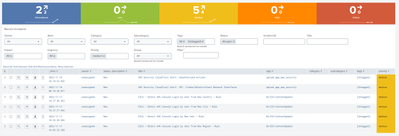
and the only customization I did was the Global sharing.
Which version are you using? I'm using 3.0.11.
Ciao.
Giuseppe
- Mark as New
- Bookmark Message
- Subscribe to Message
- Mute Message
- Subscribe to RSS Feed
- Permalink
- Report Inappropriate Content
This are the version of alert manager that I have:

I made a health test and find that TA- alert_manager got a warning.

What version of Alert Manager Add-on do you have?
- Mark as New
- Bookmark Message
- Subscribe to Message
- Mute Message
- Subscribe to RSS Feed
- Permalink
- Report Inappropriate Content
- Mark as New
- Bookmark Message
- Subscribe to Message
- Mute Message
- Subscribe to RSS Feed
- Permalink
- Report Inappropriate Content
Hi @gcusello ,
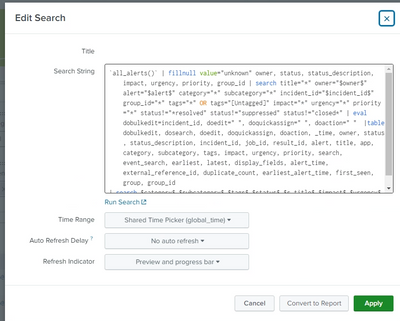
I have perform a restart today to delete Alert manager Add-On but the filter still don't work.
Did you change any query or something for it to work?
Regards
- Mark as New
- Bookmark Message
- Subscribe to Message
- Mute Message
- Subscribe to RSS Feed
- Permalink
- Report Inappropriate Content
Hi @rdiazalo,
No I didn't, the only customization was the Global sharing for all alerts.
Ciao.
Giuseppe
- Mark as New
- Bookmark Message
- Subscribe to Message
- Mute Message
- Subscribe to RSS Feed
- Permalink
- Report Inappropriate Content


Join the Splunk Community Slack to learn, troubleshoot, and make connections with fellow Splunk practitioners in real time!
Join Splunk User Groups to connect and learn in-person by region or remotely by topic or industry.
Where Innovation Takes Flight: The Splunk4Aviation Flight Sim Lands at .conf26
Turn Cisco Telemetry Into Action with Cisco Data Fabric, powered by the Splunk ...
Persistent Queue at TcpOut — One of Splunk's Most Practical Features
