
Join the Conversation
- Find Answers
- :
- Apps & Add-ons
- :
- All Apps and Add-ons
- :
- How to get workloads besides AzureActiveDirectory?
- Subscribe to RSS Feed
- Mark Topic as New
- Mark Topic as Read
- Float this Topic for Current User
- Bookmark Topic
- Subscribe to Topic
- Mute Topic
- Printer Friendly Page
- Mark as New
- Bookmark Message
- Subscribe to Message
- Mute Message
- Subscribe to RSS Feed
- Permalink
- Report Inappropriate Content


Hi
I configured this app with data coming in from
Splunk Add-on for Microsoft Office 365
app/4055/
and the Microsoft Office 365 Reporting Add-on
app/3720 for message trace.
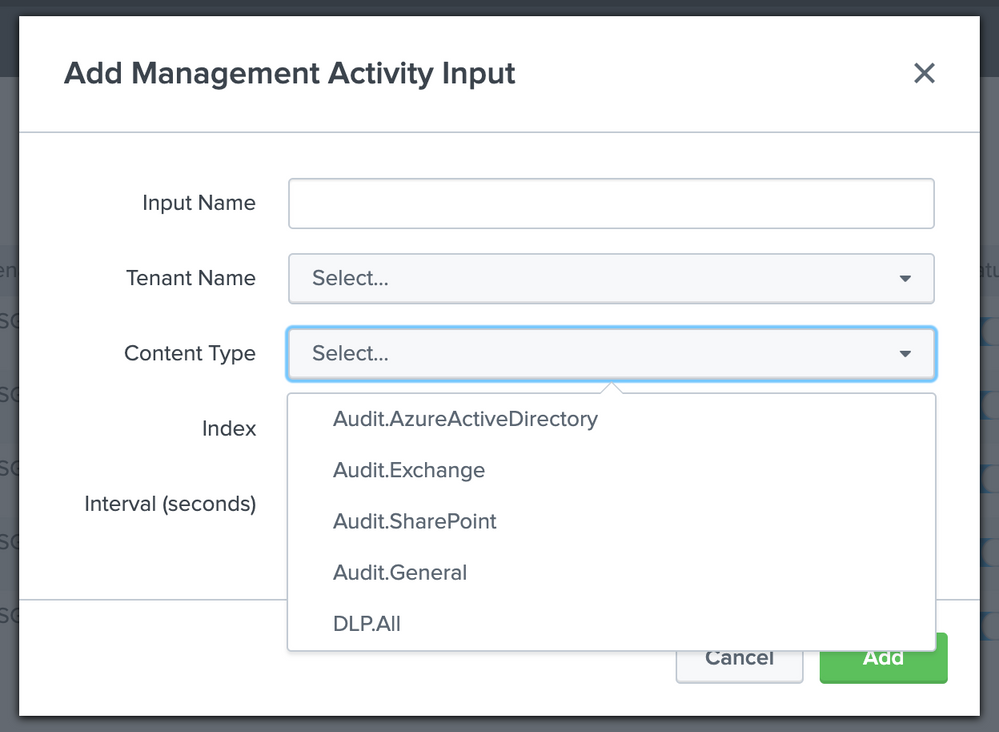
I get the Azure data in but the any query looking at Sharepoint and Exchange data doesn't light up the dashboard. Doing some investigation, I found the only workload I have coming in is AzureActiveDirectory. While the other panels are looking for Workload = Sharepoint and Workload = Exchange. We do use both Sharepoint and Exchange and I was wondering if there was anything specific on the Azure side that is missing to pull these additional workloads in?
- Mark as New
- Bookmark Message
- Subscribe to Message
- Mute Message
- Subscribe to RSS Feed
- Permalink
- Report Inappropriate Content

For the Office 365 add-on, you will need to configure one input per content type. It sounds like you only have an input for Audit.AzureActiveDirectory

- Mark as New
- Bookmark Message
- Subscribe to Message
- Mute Message
- Subscribe to RSS Feed
- Permalink
- Report Inappropriate Content
- Mark as New
- Bookmark Message
- Subscribe to Message
- Mute Message
- Subscribe to RSS Feed
- Permalink
- Report Inappropriate Content
Thanks Jason, We had actually saw that about 15 min after I posted

Accelerating Observability as Code with the Splunk AI Assistant
Integrating Splunk Search API and Quarto to Create Reproducible Investigation ...
Congratulations to the 2025-2026 SplunkTrust!
