
Join the Conversation
- Find Answers
- :
- Apps & Add-ons
- :
- All Apps and Add-ons
- :
- All Apps and Add-ons
- :
- Re: How to fix Splunk Add-on Builder error - Runti...
- Subscribe to RSS Feed
- Mark Topic as New
- Mark Topic as Read
- Float this Topic for Current User
- Bookmark Topic
- Subscribe to Topic
- Mute Topic
- Printer Friendly Page
- Mark as New
- Bookmark Message
- Subscribe to Message
- Mute Message
- Subscribe to RSS Feed
- Permalink
- Report Inappropriate Content
How to fix Splunk Add-on Builder error - RuntimeError: assist binary not found?

I am on a new install of Splunk 9.0.1 and add-on builder 4.1.1.
- creating a python script with check pointing as a Data Collection input.
- testing (with Test button) works as intended on the Edit Data Input
- after publishing I am not able to create a new input to start collecting events
- The script works as intended without the checkpoints
- Code of the check point below:
for service in r_json["response"]:
    state = helper.get_check_point(str(service["name"]) + str(service["appstack"]))
    if state is None:
        final_result.append(service)
        helper.save_check_point(str(service["name"]) + str(service["appstack"]), "Indexed")

    #helper.delete_check_point(str(service["name"]) + str(service["appstack"]))
- Index="_internal" error are below
ERROR ExecProcessor [1464594 ExecProcessor] - message from "/Applications/Splunk/bin/python3.7 /Applications/Splunk/etc/apps/splunk_assist/bin/uiassets_modular_input.py" RuntimeError: assist binary not found, path=/Applications/Splunk/etc/apps/splunk_assist/bin/darwin_x86_64/assistsup
ERROR ExecProcessor [1464594 ExecProcessor] - message from "/Applications/Splunk/bin/python3.7 /Applications/Splunk/etc/apps/splunk_assist/bin/uiassets_modular_input.py" raise RuntimeError(f'assist binary not found, path={full_path}')
ERROR ExecProcessor [1464594 ExecProcessor] - message from "/Applications/Splunk/bin/python3.7 /Applications/Splunk/etc/apps/splunk_assist/bin/uiassets_modular_input.py" File "/Applications/Splunk/etc/apps/splunk_assist/bin/assist/supervisor/context.py", line 41, in _test_supervisory_binary
ERROR ExecProcessor [1464594 ExecProcessor] - message from "/Applications/Splunk/bin/python3.7 /Applications/Splunk/etc/apps/splunk_assist/bin/uiassets_modular_input.py" _test_supervisory_binary(base_path)
- Mark as New
- Bookmark Message
- Subscribe to Message
- Mute Message
- Subscribe to RSS Feed
- Permalink
- Report Inappropriate Content
I made suggested change to disable the data input but I am still getting the same error.
I do not see permission to disable the whole app though. Can you please help as I am stuck !
- Mark as New
- Bookmark Message
- Subscribe to Message
- Mute Message
- Subscribe to RSS Feed
- Permalink
- Report Inappropriate Content
I just upgraded my dev environment to Splunk Enterprise 9.1.0.1 and add-on builder 4.1.3
And I cannot reproduce this error. What versions are You using?
- Mark as New
- Bookmark Message
- Subscribe to Message
- Mute Message
- Subscribe to RSS Feed
- Permalink
- Report Inappropriate Content
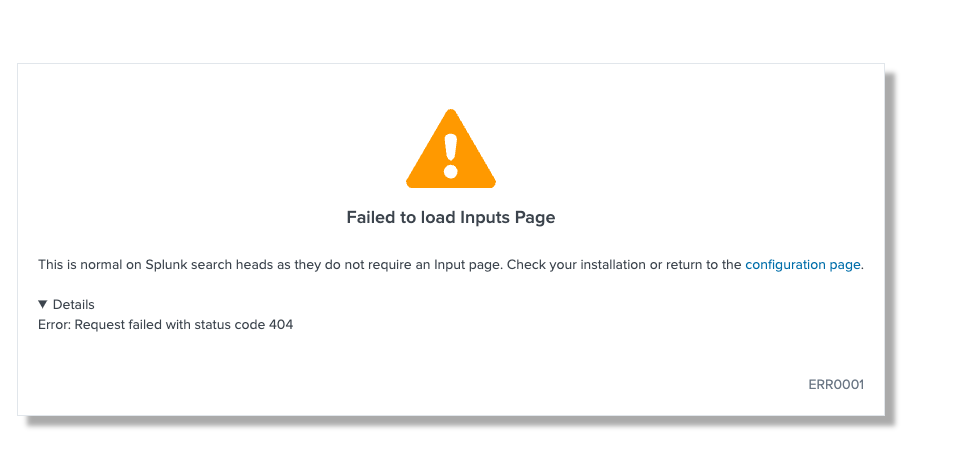
I'm experience the same issue after deleting a data input.
02-22-2023 17:16:27.779 +0200 ERROR ExecProcessor [6701716 ExecProcessor] - message from "/Applications/Splunk/bin/python3.7 /Applications/Splunk/etc/apps/splunk_assist/bin/uiassets_modular_input.py" RuntimeError: assist binary not found, path=/Applications/Splunk/etc/apps/splunk_assist/bin/darwin_x86_64/assistsup
- Mark as New
- Bookmark Message
- Subscribe to Message
- Mute Message
- Subscribe to RSS Feed
- Permalink
- Report Inappropriate Content
I had same problem. I just disabled "Splunk Assist Supervisor" Data Inputs
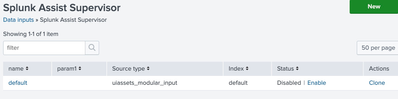
There are two data inputs with same name, I disabled both, but the one in image should be enough.
Actually , i finally disabled whole splunk_assist app.

Join the Splunk Community Slack to learn, troubleshoot, and make connections with fellow Splunk practitioners in real time!
Join Splunk User Groups to connect and learn in-person by region or remotely by topic or industry.
Announcing Modern Navigation: A New Era of Splunk User Experience
Modernize your Splunk Apps – Introducing Python 3.13 in Splunk
Step into “Hunt the Insider: An Splunk ES Premier Mystery” to catch a cybercriminal ...
