
Join the Conversation
- Find Answers
- :
- Apps & Add-ons
- :
- All Apps and Add-ons
- :
- All Apps and Add-ons
- :
- How to add more resource fields in Timeline plugin...
- Subscribe to RSS Feed
- Mark Topic as New
- Mark Topic as Read
- Float this Topic for Current User
- Bookmark Topic
- Subscribe to Topic
- Mute Topic
- Printer Friendly Page
- Mark as New
- Bookmark Message
- Subscribe to Message
- Mute Message
- Subscribe to RSS Feed
- Permalink
- Report Inappropriate Content
How to add more resource fields in Timeline plugin?

Hello Splunk community,
I'm testing Splunk Timeline - Custom Visualization plugin. I'd like to visualize distributed tracing in my microservices architecture, like app name, request URL, response codes, etc.
According to the documentation , I can specify only one resource field. How can use more fields?
I also found Splunk .conf19 presentation and the 19th slide looks promising:
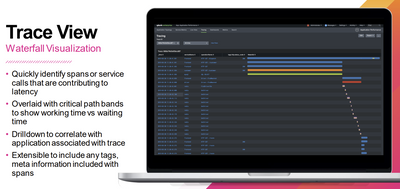
Unfortunately, mentioned presentation doesn't provide us with implementation details. Could you point me in the right direction to achieve the same, please? Any help would be much appreciated. Thanks!
- Mark as New
- Bookmark Message
- Subscribe to Message
- Mute Message
- Subscribe to RSS Feed
- Permalink
- Report Inappropriate Content


If a visualization says you can use only one field then you cannot use more than one field. You may, however, get it to work by concatenating multiple fields into a single field. The results may not make much sense, however, and the method doesn't work with numeric data.
Looking at the cited presentation, slide 19 uses the term "waterfall visualization". A search in splunkbase for that term returns the app at https://splunkbase.splunk.com/app/3669/. Perhaps that will do what you want.
If this reply helps you, Karma would be appreciated.
- Mark as New
- Bookmark Message
- Subscribe to Message
- Mute Message
- Subscribe to RSS Feed
- Permalink
- Report Inappropriate Content
Thanks. I've already tried concatenation but this plugin seems to be implemented poorly and longer strings get truncated on the tooltip. In addition, I didn't manage to break the line which makes it less readable.
In terms of "waterfall visualization", looks like it's compatible with Splunk Enterprise only and I couldn't find any documentation for that.

Join the Splunk Community Slack to learn, troubleshoot, and make connections with fellow Splunk practitioners in real time!
Join Splunk User Groups to connect and learn in-person by region or remotely by topic or industry.
Agent Mode Engaged! Enchaining Agentic Operations with Splunk AI Assistant 2.0
Announcing Modern Navigation: A New Era of Splunk User Experience
Modernize your Splunk Apps – Introducing Python 3.13 in Splunk
