
Join the Conversation
- Find Answers
- :
- Apps & Add-ons
- :
- All Apps and Add-ons
- :
- All Apps and Add-ons
- :
- Re: How to Interpret License Usage Page - Splunk E...
- Subscribe to RSS Feed
- Mark Topic as New
- Mark Topic as Read
- Float this Topic for Current User
- Bookmark Topic
- Subscribe to Topic
- Mute Topic
- Printer Friendly Page
- Mark as New
- Bookmark Message
- Subscribe to Message
- Mute Message
- Subscribe to RSS Feed
- Permalink
- Report Inappropriate Content
How to Interpret License Usage Page - Splunk Enterprise

Hello Team Splunk!
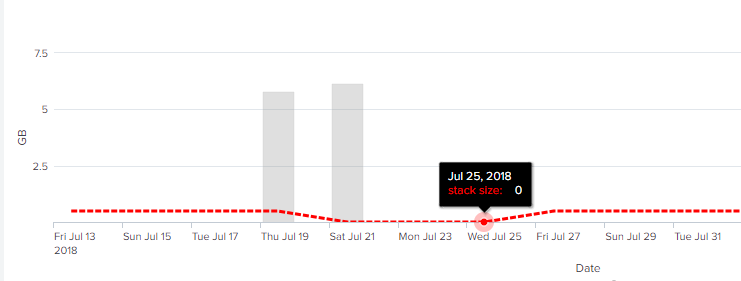
I am having some trouble interpreting the license usage page in Splunk Enterprise. Figures 1 and 2 below show the parts I am confused about. Figure 1 shows that there was some type of license violation on July 25, 2018 while Figure 2 shows this date without any skyrocketing bar indicating that index went over its allowance of data, 500MB per day.
Also, does anyone know what "stack size" means in Figure 2?
Also, in Figure 1, how can a warning be generated if the poolsize is equal to zero? Seems like a warning would be generated if the poolsize is over 524288000 Bytes. I looked this up and found that 500 MB = 524288000 Bytes (in binary). Of course 500MB is the limit on the amount of data that the indexer can consume with the free license.
Figure 1: July 25, Poolsize = 0 bytes
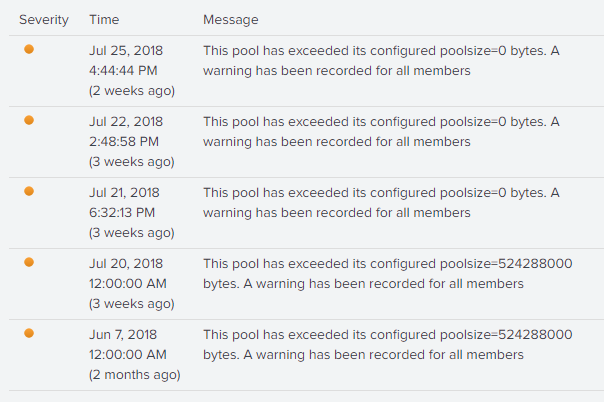
Figure 2: Daily License Usage


- Mark as New
- Bookmark Message
- Subscribe to Message
- Mute Message
- Subscribe to RSS Feed
- Permalink
- Report Inappropriate Content
Hi,
This error may occur if the configurations is not properly done, may be one of the indexer is configured without enough space then this error may trigger. Having more than three warnings in a 30-day window is a license violation for the free license and will stop search head.
Make sure your indexers all have sufficiently large license pools now to avoid new warnings on each new day. Then you'd have to wait for enough warnings to age out of the 30-day window.
Simple way would be to reinstall splunk if there is not much data in it.
- Mark as New
- Bookmark Message
- Subscribe to Message
- Mute Message
- Subscribe to RSS Feed
- Permalink
- Report Inappropriate Content
Interesting. Thank-you for the reply. I turned off all data coming into the Splunk server so as to not obtain any more license warnings. I think I have three more weeks before I can search again. I will research how to configure the indexer with enough space. If you look the first warnings say the pool size is 500MB. I wonder how the value changed from 500MB to 0MB?
How do I "Make sure your indexers all have sufficiently large license pools"?
Thank-you again for the helpful reply.

Join the Splunk Community Slack to learn, troubleshoot, and make connections with fellow Splunk practitioners in real time!
Join Splunk User Groups to connect and learn in-person by region or remotely by topic or industry.
Why Splunk Customers Should Attend Cisco Live 2026 Las Vegas
What Is the Name of the USB Key Inserted by Bob Smith? (BOTS Hint, Not the Answer)
Automating Threat Operations and Threat Hunting with Recorded Future
