
Join the Conversation
- Find Answers
- :
- Apps & Add-ons
- :
- All Apps and Add-ons
- :
- All Apps and Add-ons
- :
- Help with custom response handler for REST API Mod...
- Subscribe to RSS Feed
- Mark Topic as New
- Mark Topic as Read
- Float this Topic for Current User
- Bookmark Topic
- Subscribe to Topic
- Mute Topic
- Printer Friendly Page
- Mark as New
- Bookmark Message
- Subscribe to Message
- Mute Message
- Subscribe to RSS Feed
- Permalink
- Report Inappropriate Content

Hello,
I've been tasked with ingesting some audit events from a online application (Lever Hire). I'm looking at using the REST API Modular input and need help parsing the data. Originally I thought I had to create a new sourcetype to do the parsing, but now I believe the correct method is to create a custom Response Handler.
I've found some examples here: https://github.com/damiendallimore/SplunkModularInputsPythonFramework/blob/master/implementations/re...
However, I'm not familiar enough with python to write my own response handler. I'm hoping someone in the community can quickly help me with the code.
Here is what the raw data looks like. Any help is appreciated.
{
    "data": [{
        "id": "5b628f1e-2bcf-45f7-90fa-7b1264987d42",
        "user": {
            "role": "super admin",
            "id": "8810816c-03da-48db-b3c1-d47a8f5c024f",
            "name": "Joe Mama",
            "email": "joe@mama.org"
        },
        "type": "key:added",
        "createdAt": 1515609233213,
        "target": {
            "type": "key",
            "id": "8d0501a2-f613-4154-b2e7-fc4b416ad213",
            "label": "Splunk"
        },
        "meta": {
            "key": {
                "tokenLastFour": "w2jU",
                "id": "8d0501a2-f613-4154-b2e7-fc4b416ad213",
                "name": "Splunk",
                "partner": false,
                "service": "data-api"
            }
        }
    }, {
        "id": "85374119-2af3-48b2-838f-7821fb15ef7c",
        "user": {
            "role": "super admin",
            "id": "8810816c-03da-48db-b3c1-d47a8f5c024f",
            "name": "Joe Mama",
            "email": "joe@mama.org"
        },
        "type": "key:removed",
        "createdAt": 1515609175385,
        "target": {
            "type": "key",
            "id": "21b0fb88-006d-4a9a-a1e1-2164fcd8d243",
            "label": "Splunk"
        },
        "meta": {
            "key": {
                "tokenLastFour": "RhgT",
                "id": "21b0fb88-006d-4a9a-a1e1-2164fcd8d243",
                "name": "Splunk",
                "partner": false,
                "service": "data-api"
            }
        }
    }, {
        "id": "b368c76a-f7a5-4cc8-8201-ce4051847976",
        "user": {
            "role": "super admin",
            "id": "8810816c-03da-48db-b3c1-d47a8f5c024f",
            "name": "Joe Mama",
            "email": "joe@mama.org"
        },
        "type": "user.authentication:succeeded",
        "createdAt": 1515609122117,
        "target": {
            "type": "user",
            "id": "8810816c-03da-48db-b3c1-d47a8f5c024f",
            "label": "Joe Mama"
        },
        "meta": {
            "user": {
                "role": "super admin",
                "id": "8810816c-03da-48db-b3c1-d47a8f5c024f",
                "name": "Joe Mama",
                "email": "joe@mama.org"
            },
            "authentication": {
                "method": "direct"
            }
        }
    }, {
        "id": "5b88b646-f141-4be7-a970-e39c56ce13ad",
        "user": {
            "role": "super admin",
            "id": "lever-support",
            "name": "Lever Support",
            "email": "support@lever.co"
        },
        "type": "key:added",
        "createdAt": 1515520786845,
        "target": {
            "type": "key",
            "id": "82cedc33-87ff-4d68-bc44-7dcc7559da4c",
            "label": "click-boarding"
        },
        "meta": {
            "key": {
                "tokenLastFour": "RAof",
                "id": "82cedc33-87ff-4d68-bc44-7dcc7559da4c",
                "name": "click-boarding",
                "partner": false,
                "service": "data-api"
            }
        }
    }, {
        "id": "c4ef90e5-449d-4a2b-a724-8cde900f1a1f",
        "user": {
            "role": "super admin",
            "id": "cd6751d7-998a-451b-ab22-fb2e0fa96da5",
            "name": "superman",
            "email": "superman@mama.org"
        },
        "type": "user.authentication:succeeded",
        "createdAt": 1515456274871,
        "target": {
            "type": "user",
            "id": "cd6751d7-998a-451b-ab22-fb2e0fa96da5",
            "label": "superman"
        },
        "meta": {
            "user": {
                "role": "super admin",
                "id": "cd6751d7-998a-451b-ab22-fb2e0fa96da5",
                "name": "superman",
                "email": "superman@mama.org"
            },
            "authentication": {
                "method": "direct"
            }
        }

    }],
    "hasNext": false
}
- Mark as New
- Bookmark Message
- Subscribe to Message
- Mute Message
- Subscribe to RSS Feed
- Permalink
- Report Inappropriate Content

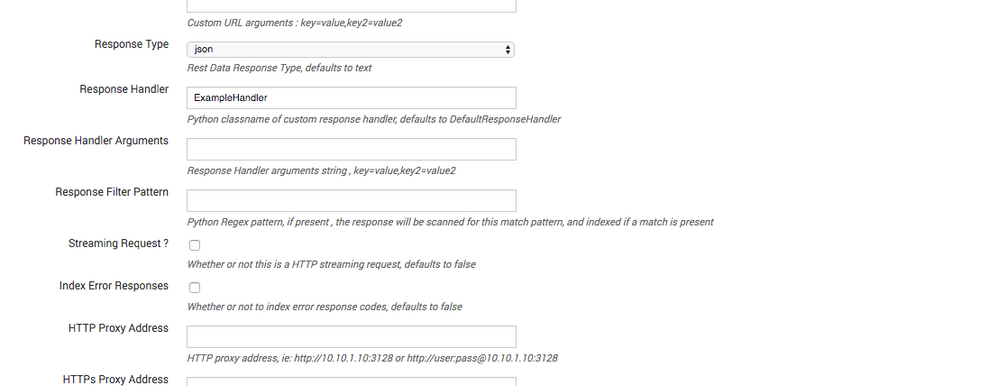
Handler example below.
Then use standard Splunk timestamp extraction in props.conf for your sourcetype to use the createdAt time as the prefix.
[yoursourcetype]
TIME_PREFIX = createdAt":
Handler
class ExampleHandler:

    def __init__(self,**args):
        pass

    def __call__(self, response_object,raw_response_output,response_type,req_args,endpoint):
        if response_type == "json":
            output = json.loads(raw_response_output)

            for item in output["data"]:
                print_xml_stream(json.dumps(item))
        else:
            print_xml_stream(raw_response_output)
- Mark as New
- Bookmark Message
- Subscribe to Message
- Mute Message
- Subscribe to RSS Feed
- Permalink
- Report Inappropriate Content
Handler example below.
Then use standard Splunk timestamp extraction in props.conf for your sourcetype to use the createdAt time as the prefix.
[yoursourcetype]
TIME_PREFIX = createdAt":
Handler
class ExampleHandler:

    def __init__(self,**args):
        pass

    def __call__(self, response_object,raw_response_output,response_type,req_args,endpoint):
        if response_type == "json":
            output = json.loads(raw_response_output)

            for item in output["data"]:
                print_xml_stream(json.dumps(item))
        else:
            print_xml_stream(raw_response_output)
- Mark as New
- Bookmark Message
- Subscribe to Message
- Mute Message
- Subscribe to RSS Feed
- Permalink
- Report Inappropriate Content
Thank you very much!
Had to escape the quotes, other than that perfect.
[yoursourcetype]

 TIME_PREFIX =\" createdAt\":
- Mark as New
- Bookmark Message
- Subscribe to Message
- Mute Message
- Subscribe to RSS Feed
- Permalink
- Report Inappropriate Content
Please describe what it is you want the custom response handler to do with the raw JSON ?
- Mark as New
- Bookmark Message
- Subscribe to Message
- Mute Message
- Subscribe to RSS Feed
- Permalink
- Report Inappropriate Content
Sorry I was not clear...
I would like the custom response handler to break out the raw json into individual events with proper timestamp (createdAt field). Each event starts with the {"id":

Join the Splunk Community Slack to learn, troubleshoot, and make connections with fellow Splunk practitioners in real time!
Join Splunk User Groups to connect and learn in-person by region or remotely by topic or industry.
Index This | What travels the world but is also stuck in place?
Discover New Use Cases: Unlock Greater Value from Your Existing Splunk Data
Continue Your Journey: Join Session 2 of the Data Management and Federation Bootcamp ...
