
Join the Conversation
- Find Answers
- :
- Apps & Add-ons
- :
- All Apps and Add-ons
- :
- All Apps and Add-ons
- :
- Help setting DB Connect input timestamp using yyyy...
- Subscribe to RSS Feed
- Mark Topic as New
- Mark Topic as Read
- Float this Topic for Current User
- Bookmark Topic
- Subscribe to Topic
- Mute Topic
- Printer Friendly Page
- Mark as New
- Bookmark Message
- Subscribe to Message
- Mute Message
- Subscribe to RSS Feed
- Permalink
- Report Inappropriate Content
Help setting DB Connect input timestamp using yyyy-MM-dd HH:mm:ss.SSS format

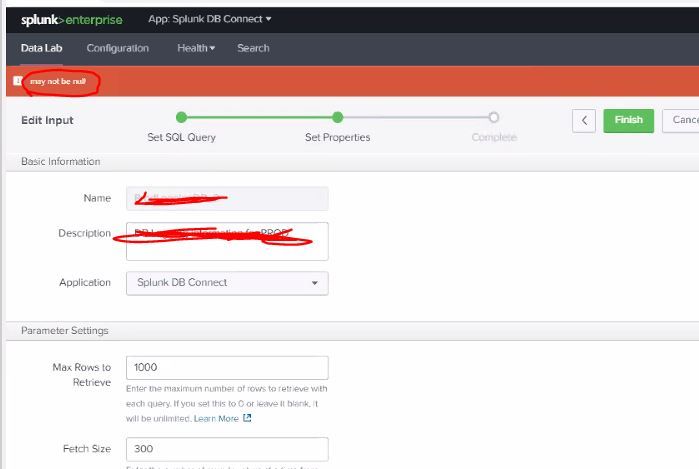
I'm trying to work with a data input using DB Connect version 3.0 and I cannot get the below input to save using the field alias 'time' that using this format :
2020-03-21 00:11:12.387
Based off this article I added these configurations to my stanza to help DB Connect identify the correct timestamp format :
input_timestamp_format = yyyy-MM-dd HH:mm:ss.SSS
output_timestamp_format = yyyy-MM-dd HH:mm:ss.SSS
*The LogEntryId is my rising column and returns as column #1
*The time column/Timestamp returns as column #2
I've also uses the below Answers suggestion to try to resolve the NULL values possible issue :
https://answers.splunk.com/answers/616150/how-to-force-dbconnect-to-send-fields-with-null-va.html
[TestDB_2]
connection = TestDB
description = Test Query
disabled = 0
index = main
interval = */5 * * * *
max_rows = 1000
mode = advanced
output_timestamp_format = yyyy-MM-dd HH:mm:ss.SSS
query = SELECT le.LogEntryId AS [LogEntryId]
, [Date] AS [time]
, l.[Name] AS [Level]
, at.Name AS [Application Source]
, le.Logger AS [Logger]
, le.[Message] AS [Message]
, COALESCE(le.FullMessage, 'NA') AS [FullMessage]
, COALESCE(le.Exception, 'NA') AS [Exception]
, COALESCE(le.FullException, 'NA') AS [Full Exception]
FROM "Logging"."dbo"."LogEntry" le
JOIN "Logging"."dbo"."LevelType" l
ON l.LevelTypeId = le.LevelTypeId
JOIN "Logging"."dbo"."ApplicationSourceType" at
ON at.ApplicationSourceTypeId = le.ApplicationSourceTypeId
WHERE le.LogEntryId > '?'
AND le.LevelTypeId IN (3,4,5) -- WARN, ERROR, FATAL
AND at.[Name] != 'developer.example.com'
ORDER BY le.LogEntryId DESC;
sourcetype = Test
tail_rising_column_number = 1
input_timestamp_column_number = 2
input_timestamp_format = yyyy-MM-dd HH:mm:ss.SSS
index_time_mode = dbColumn
- Mark as New
- Bookmark Message
- Subscribe to Message
- Mute Message
- Subscribe to RSS Feed
- Permalink
- Report Inappropriate Content


Join the Splunk Community Slack to learn, troubleshoot, and make connections with fellow Splunk practitioners in real time!
Join Splunk User Groups to connect and learn in-person by region or remotely by topic or industry.
Design, Compete, Win: Submit Your Best Splunk Dashboards for a .conf26 Pass
May 2026 Splunk Expert Sessions: Security & Observability
Network to App: Observability Unlocked [May & June Series]
