
Join the Conversation
- Find Answers
- :
- Apps & Add-ons
- :
- All Apps and Add-ons
- :
- All Apps and Add-ons
- :
- Re: Google Apps for Splunk: Why is the authorizati...
- Subscribe to RSS Feed
- Mark Topic as New
- Mark Topic as Read
- Float this Topic for Current User
- Bookmark Topic
- Subscribe to Topic
- Mute Topic
- Printer Friendly Page
- Mark as New
- Bookmark Message
- Subscribe to Message
- Mute Message
- Subscribe to RSS Feed
- Permalink
- Report Inappropriate Content

Hi,
New to Splunk and managed to get it up and running today after a brief introduction in Splunk Sales Training.
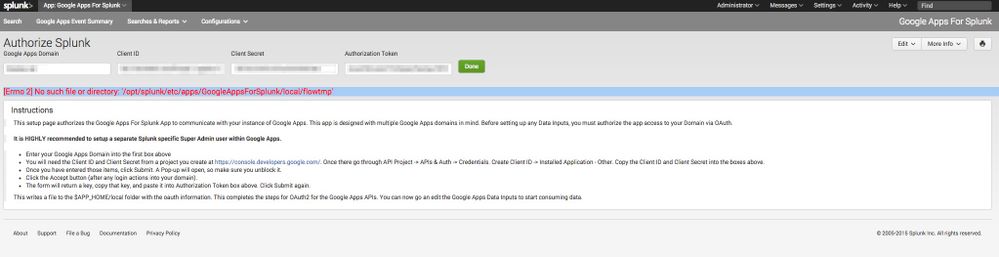
I want to add Google Apps as a source and installed the Google Apps For Splunk App. All goes well until I try to Authorize the App.
Following the process, I get to the point I need to complete the authorization step where I get redirected to Google and accept the access to Google Apps for Work from Splunk. This part works with the output:
Credentials Written to "/opt/splunk/etc/apps/GoogleAppsForSplunk/local/GoogleApps.blueteq.net.cred"
Then I get the token and paste it in and when I click "Done" the following error shows up:
[Errno 2] No such file or directory: '/opt/splunk/etc/apps/GoogleAppsForSplunk/local/flowtmp'
I removed App and installed it again.
Splunk installed on Ubuntu 14.04 64bit.
2GB Ram and 2 Cores KVM

- Mark as New
- Bookmark Message
- Subscribe to Message
- Mute Message
- Subscribe to RSS Feed
- Permalink
- Report Inappropriate Content


Being that you have successfully written a Credential file out, then most likely you are good to go. The Authorization process is a two step process. First, enter the domain, Client ID, and Client Secret. Click the Green Button 1 (one) time. This will open a new window where you Grant access to the App to consume the data. You will see the authorization token, copy that, paste it back into the credential page (without refreshing the credential page), and click the button again.
I believe you have done this. I believe it has worked. You may have hit a bug. Contact me via email or IRC (#splunk on efnet.org).
Try adding an input (Settings > Data Inputs > Google Apps For Splunk). If you see data, then it worked.
Edit
So a few things happened here. You authorized correctly, well done! The problems was the inputs. I ship the default configs to make it easy, but you have to change the domain names to have it work for your domain.
The other problem was API enablement. The Admin Reports API must be enabled in https://console.developers.google.com for the input to work.
Also - If you aren't seeing data you expect, or only starting from when you got the inputs configured correctly, try this command on CLI :
rm /opt/splunk/var/lib/splunk/modinputs/ga/*
This will remove the checkpoint files for the inputs and cause Splunk to consume the last years worth of data from Google.
- Mark as New
- Bookmark Message
- Subscribe to Message
- Mute Message
- Subscribe to RSS Feed
- Permalink
- Report Inappropriate Content
Being that you have successfully written a Credential file out, then most likely you are good to go. The Authorization process is a two step process. First, enter the domain, Client ID, and Client Secret. Click the Green Button 1 (one) time. This will open a new window where you Grant access to the App to consume the data. You will see the authorization token, copy that, paste it back into the credential page (without refreshing the credential page), and click the button again.
I believe you have done this. I believe it has worked. You may have hit a bug. Contact me via email or IRC (#splunk on efnet.org).
Try adding an input (Settings > Data Inputs > Google Apps For Splunk). If you see data, then it worked.
Edit
So a few things happened here. You authorized correctly, well done! The problems was the inputs. I ship the default configs to make it easy, but you have to change the domain names to have it work for your domain.
The other problem was API enablement. The Admin Reports API must be enabled in https://console.developers.google.com for the input to work.
Also - If you aren't seeing data you expect, or only starting from when you got the inputs configured correctly, try this command on CLI :
rm /opt/splunk/var/lib/splunk/modinputs/ga/*
This will remove the checkpoint files for the inputs and cause Splunk to consume the last years worth of data from Google.
- Mark as New
- Bookmark Message
- Subscribe to Message
- Mute Message
- Subscribe to RSS Feed
- Permalink
- Report Inappropriate Content
Thank you, fantastic support!
Works really well.

Join the Splunk Community Slack to learn, troubleshoot, and make connections with fellow Splunk practitioners in real time!
Join Splunk User Groups to connect and learn in-person by region or remotely by topic or industry.
May 2026 Splunk Expert Sessions: Security & Observability
Network to App: Observability Unlocked [May & June Series]
SPL2 Deep Dives, AppDynamics Integrations, SAML Made Simple and Much More on Splunk ...
