
Join the Conversation
- Find Answers
- :
- Apps & Add-ons
- :
- All Apps and Add-ons
- :
- All Apps and Add-ons
- :
- Re: Global Account Settings
- Subscribe to RSS Feed
- Mark Topic as New
- Mark Topic as Read
- Float this Topic for Current User
- Bookmark Topic
- Subscribe to Topic
- Mute Topic
- Printer Friendly Page
- Mark as New
- Bookmark Message
- Subscribe to Message
- Mute Message
- Subscribe to RSS Feed
- Permalink
- Report Inappropriate Content
Global Account Settings

How can I add new fields and/or rename existing fields to Global Account Settings which currently by default just have username/password inputs ? Something like client id, client secret etc.
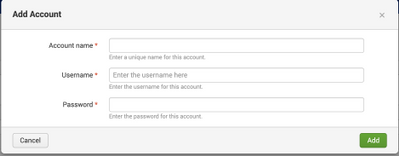
I cannot add password/client secret as data input parameter as they get stored in plain text when add via system user interface(settings->data input)
I cannot make them global parameter either as we need to support multiple environment with each having different set of data.
Any help would be appreciated.
- Mark as New
- Bookmark Message
- Subscribe to Message
- Mute Message
- Subscribe to RSS Feed
- Permalink
- Report Inappropriate Content


Hi @SailPoint_IDPlu,
probably I didn't correctly understand your question, but, you can define fields or aliases or calculated fields giving them access to all the roles (so at all the users).
You can share them as Global and give the Read grant to all.
In this way all the users can use those fields.
Ciao.
Giuseppe
- Mark as New
- Bookmark Message
- Subscribe to Message
- Mute Message
- Subscribe to RSS Feed
- Permalink
- Report Inappropriate Content
Hello @gcusello
Currently my app_account.conf file have following:
[DEV_ENV]
password = ********
username =admin
I'd like to add more fields to global account settings like client id and client secret so it should be like:
[DEV_ENV]
password = ********
username =admin
client_id=
client_secret =
Is this possible?
I am using Splunk add-on builder to build the app.
- Mark as New
- Bookmark Message
- Subscribe to Message
- Mute Message
- Subscribe to RSS Feed
- Permalink
- Report Inappropriate Content
sorry, probaby I misunderstood your question: you want to add some additional fields to Splunk user profile, is it correct?
in this case, I think that it isn't possible.
A workaround could be to craete an automatic lookup with all the fields you need having username as kay.
Ciao.
Giuseppe

Join the Splunk Community Slack to learn, troubleshoot, and make connections with fellow Splunk practitioners in real time!
Join Splunk User Groups to connect and learn in-person by region or remotely by topic or industry.
Announcing Modern Navigation: A New Era of Splunk User Experience
Modernize your Splunk Apps – Introducing Python 3.13 in Splunk
Step into “Hunt the Insider: An Splunk ES Premier Mystery” to catch a cybercriminal ...
