
Join the Conversation
- Find Answers
- :
- Apps & Add-ons
- :
- All Apps and Add-ons
- :
- All Apps and Add-ons
- :
- DLTK Setup (Windows w/ Docker Desktop)
- Subscribe to RSS Feed
- Mark Topic as New
- Mark Topic as Read
- Float this Topic for Current User
- Bookmark Topic
- Subscribe to Topic
- Mute Topic
- Printer Friendly Page
- Mark as New
- Bookmark Message
- Subscribe to Message
- Mute Message
- Subscribe to RSS Feed
- Permalink
- Report Inappropriate Content
DLTK Setup (Windows w/ Docker Desktop)

Hello,
Today I watched a session at .conf20 that piqued my interest about the Deep Learning Toolkit. So of course I hopped over to Splunkbase and added it to my local dev environment. Then quickly found out that version 4 is only available via GitHub (for now). I was able to successfully clone the repo and copy the contents to the etc/apps/dltk directory.
The following documentation worked exactly as expected:
- Install
- I skipped the steps to apply role. I have confirmed the roles were added to the environment.
However, I cannot complete the second half of the following document (validation).
If I click on the Algorithms menu item, I have nothing but a create button. I have tried to create one with no luck either:
- Name: MyAlgo
- Runtime: Base
- Environment: <one created after installation>
The system will say "Saving..... Please be patient" for about 3 mins then yields this (only after upgrading to S/E 8.1):
{"messages":[{"type":"WARN","text":"Could not parse xml reply (no reply from script). See splunkd.log for more info."}]}
splunkd.log:
10-21-2020 15:24:33.780 -0600 WARN  HttpListener - Socket error from 127.0.0.1:64908 while accessing /services/dltk/deployments: Winsock error 10053
10-21-2020 15:24:39.825 -0600 WARN  DispatchSearchMetadata - could not read metadata file: C:\Splunk\var\run\splunk\dispatch\admin__admin__dltk__search10_1603315479.70\metadata.csv
10-21-2020 15:24:39.825 -0600 WARN  DispatchSearchMetadata - could not read metadata file: C:\Splunk\var\run\splunk\dispatch\admin__admin__dltk__search10_1603315479.70\metadata.csv
10-21-2020 15:24:39.825 -0600 WARN  DispatchSearchMetadata - could not read metadata file: C:\Splunk\var\run\splunk\dispatch\admin__admin__dltk__search10_1603315479.70\metadata.csv
10-21-2020 15:24:39.825 -0600 WARN  DispatchSearchMetadata - could not read metadata file: C:\Splunk\var\run\splunk\dispatch\admin__admin__dltk__search10_1603315479.70\metadata.csv
10-21-2020 15:24:39.826 -0600 WARN  DispatchSearchMetadata - could not read metadata file: C:\Splunk\var\run\splunk\dispatch\admin__admin__dltk__search10_1603315479.70\metadata.csv
10-21-2020 15:24:39.826 -0600 WARN  DispatchSearchMetadata - could not read metadata file: C:\Splunk\var\run\splunk\dispatch\admin__admin__dltk__search10_1603315479.70\metadata.csv
10-21-2020 15:24:39.826 -0600 WARN  DispatchSearchMetadata - could not read metadata file: C:\Splunk\var\run\splunk\dispatch\admin__admin__dltk__search10_1603315479.70\metadata.csv
10-21-2020 15:24:39.826 -0600 WARN  DispatchSearchMetadata - could not read metadata file: C:\Splunk\var\run\splunk\dispatch\admin__admin__dltk__search10_1603315479.70\metadata.csv
10-21-2020 15:26:06.247 -0600 WARN  HttpListener - Socket error from 127.0.0.1:65292 while accessing /services/dltk/deployments: Winsock error 10053
10-21-2020 15:29:34.956 -0600 INFO  MetricSchemaProcessor - log messages will be throttled. POST to /services/admin/metric-schema-reload/_reload will force reset of the throttle counters
10-21-2020 15:29:35.286 -0600 INFO  IndexWriter - Creating hot bucket=hot_v1_61, idx=_telemetry, event timestamp=1603315775, reason="suitable bucket not found, number of hot buckets=0, max=3"
10-21-2020 15:29:35.297 -0600 INFO  DatabaseDirectoryManager - idx=_telemetry writing a bucket manifest in hotWarmPath='C:\Splunk\var\lib\splunk\_telemetry\db' pendingBucketUpdates=1 innerLockTime=0.016. Reason='New hot bucket bid=_telemetry~61~5CCEBD6A-D90D-4E2E-9256-E10D2DC91EE3 bucket_action=add'
10-21-2020 15:29:35.306 -0600 INFO  DatabaseDirectoryManager - Finished writing bucket manifest in hotWarmPath=C:\Splunk\var\lib\splunk\_telemetry\db duration=0.016
10-21-2020 15:40:49.523 -0600 WARN  HttpListener - Socket error from 127.0.0.1:52171 while accessing /services/dltk/algorithms: Winsock error 10053
10-21-2020 15:44:54.837 -0600 WARN  HttpListener - Socket error from 127.0.0.1:52907 while accessing /services/dltk/algorithms: Winsock error 10053
10-21-2020 15:47:37.303 -0600 WARN  HttpListener - Socket error from 127.0.0.1:53519 while accessing /services/dltk/algorithms: Winsock error 10053
10-21-2020 15:50:19.236 -0600 WARN  HttpListener - Socket error from 127.0.0.1:54415 while accessing /services/dltk/algorithms: Winsock error 10053
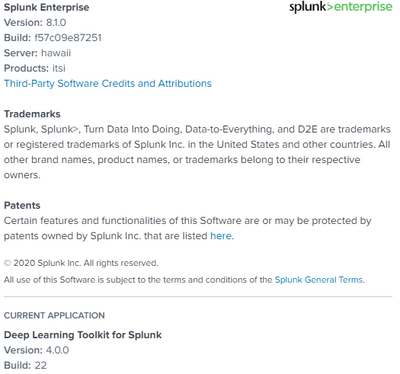
Here's my config:
- Mark as New
- Bookmark Message
- Subscribe to Message
- Mute Message
- Subscribe to RSS Feed
- Permalink
- Report Inappropriate Content


Hi @force1024 - thanks for sharing - this is likely related to a bug that happens on windows when reading conf files with different encoding. See https://github.com/splunk/deep-learning-toolkit/issues/66 with a proposed fix which is to be implemented.


Join the Splunk Community Slack to learn, troubleshoot, and make connections with fellow Splunk practitioners in real time!
Join Splunk User Groups to connect and learn in-person by region or remotely by topic or industry.
Data Management Digest – September 2026
Federated Search for CloudWatch Unified Data Store Is Generally Available
Announcing Modern Navigation: A New Era of Splunk User Experience
