
Turn on suggestions
Auto-suggest helps you quickly narrow down your search results by suggesting possible matches as you type.
All Apps and Add-ons
×
Join the Conversation
Without signing in, you're just watching from the sidelines. Sign in or Register to connect, share, and be part of the Splunk Community.
- Find Answers
- :
- Apps & Add-ons
- :
- All Apps and Add-ons
- :
- All Apps and Add-ons
- :
- DB Connect version 3.0 incorrect process Russian
Options
- Subscribe to RSS Feed
- Mark Topic as New
- Mark Topic as Read
- Float this Topic for Current User
- Bookmark Topic
- Subscribe to Topic
- Mute Topic
- Printer Friendly Page
- Mark as New
- Bookmark Message
- Subscribe to Message
- Mute Message
- Subscribe to RSS Feed
- Permalink
- Report Inappropriate Content
DB Connect version 3.0 incorrect process Russian

mkalyakin
Explorer
03-02-2017
05:35 AM
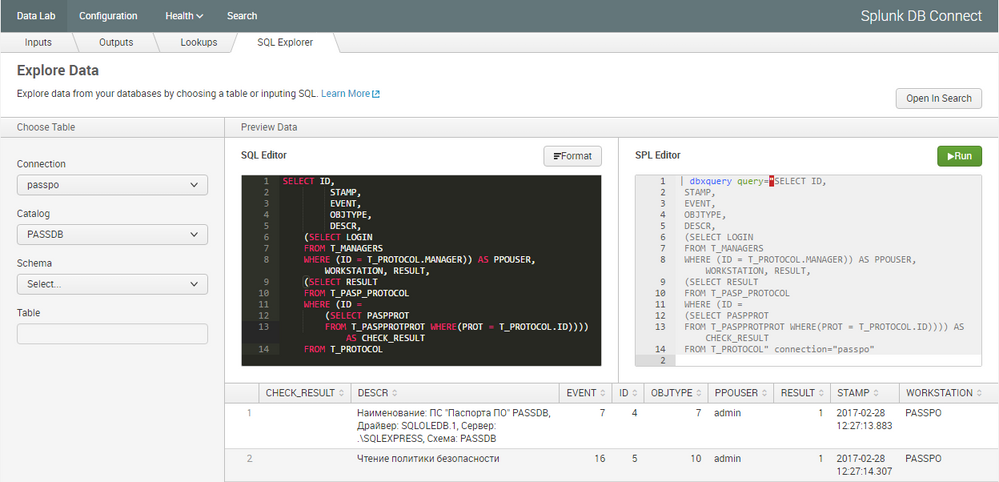
After updating Splunk DB Connect from 2.4 to 3.0 events with Russian language display incorrect.
In preview of creating input everything looks fine, but in search there are only "??????".
- Mark as New
- Bookmark Message
- Subscribe to Message
- Mute Message
- Subscribe to RSS Feed
- Permalink
- Report Inappropriate Content
mkalyakin
Explorer
08-10-2018
02:01 AM
- Mark as New
- Bookmark Message
- Subscribe to Message
- Mute Message
- Subscribe to RSS Feed
- Permalink
- Report Inappropriate Content

Penkov
Loves-to-Learn Lots
01-17-2020
01:23 AM
Hello,
I have the same problem like you, but i try to read from teradata. And this workaround didn't work for Bulgarian. Can you have more hints like this.
- Mark as New
- Bookmark Message
- Subscribe to Message
- Mute Message
- Subscribe to RSS Feed
- Permalink
- Report Inappropriate Content
mkalyakin
Explorer
01-23-2020
12:11 AM
I have no idea what can help you. In my case Splunk support helped me.
You can try to open case to Splunk Support.
- Mark as New
- Bookmark Message
- Subscribe to Message
- Mute Message
- Subscribe to RSS Feed
- Permalink
- Report Inappropriate Content

evelenke
Contributor
08-09-2018
10:22 AM
Hi,
did you find any solution?
- Mark as New
- Bookmark Message
- Subscribe to Message
- Mute Message
- Subscribe to RSS Feed
- Permalink
- Report Inappropriate Content
mkalyakin
Explorer
08-10-2018
02:01 AM
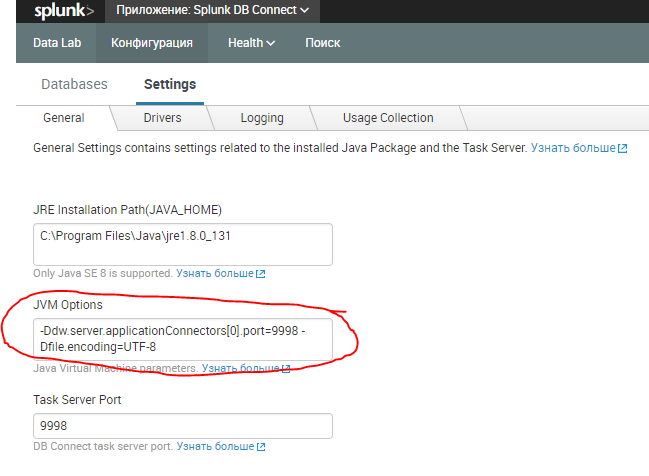
Yes, I've posted the answer here.




Got questions? Get answers!
Join the Splunk Community Slack to learn, troubleshoot, and make connections with fellow Splunk practitioners in real time!
Meet up IRL or virtually!
Join Splunk User Groups to connect and learn in-person by region or remotely by topic or industry.
Get Updates on the Splunk Community!
Agentic Operations Start with Context: Build the Right Data Foundation
Agentic Operations Start with Context: Build the Right Data Foundation
By Courtney Wright, Product Marketing ...
Assisted, Augmented or Agentic? Choose Your Splunk Starting Point
Assisted, Augmented or Agentic? Choose Your Splunk Starting Point
By Courtney Wright, Product Marketing ...
Session 2 | Beyond the Thread: Operationalizing AI with Confidence
Session 2
Beyond the Thread: Operationalizing AI with Confidence
The true power of the Cisco Data Fabric ...
