
Join the Conversation
- Find Answers
- :
- Apps & Add-ons
- :
- All Apps and Add-ons
- :
- All Apps and Add-ons
- :
- Re: Configuring EdgeRouter Syslog for HomeMonitor ...
- Subscribe to RSS Feed
- Mark Topic as New
- Mark Topic as Read
- Float this Topic for Current User
- Bookmark Topic
- Subscribe to Topic
- Mute Topic
- Printer Friendly Page
- Mark as New
- Bookmark Message
- Subscribe to Message
- Mute Message
- Subscribe to RSS Feed
- Permalink
- Report Inappropriate Content
Configuring EdgeRouter Syslog for HomeMonitor - unable to parse data cleanly

My goal - my ISP has warned me I've got a security issue. I'm trying to monitor my outgoing data to see which device is possibly speaking to the enemy.
HomeMonitor looks pretty well suited to this task. I've got it all installed, but am struggling to get the sourcetype configured for the Edge Router syslog format.
My router is a Ubiquiti EdgeRouter X. My Splunk Server is a Win 10 PC, hardwired into EdgeRouter.
I configured the edgerouter to turn on syslogging, & enabled logging for the NAT masquarade. This gives me logs of all outgoing traffic only. I am able to pull the UDS traffic using Kiwi Syslog, it spits it out in this format:
2020-12-23 18:21:54 Kernel.Warning 192.168.2.1 Dec 23 18:21:55 ubnt kernel: [NAT-5010-MASQ] IN= OUT=eth0 src=XX.XX.XXX.XXX DST=XX.XX.XXX.X LEN=73 TOS=0x00 PREC=0x00 TTL=64 ID=14664 DF PROTO=UDP SPT=21167 DPT=53 LEN=53
Per Ubiquiti's website,
NOTE:EdgeOS uses the BSD Syslog format, the rsyslogd service and UDP port 514 (not customizable) for Syslog by default.
I tried installing this TA, but it appears to me misconfigured for my purposes.
https://splunkbase.splunk.com/app/3483/
I read elsewhere that using asus sourcetype gets it close. I cloned asus sourcetype & made a few changes to it, dst & dpt weren't capatilized (I'm assuming it's case sensitive), I updated time format.
This gets me SOME data, in Network Overview Outbound Traffic, but it only shows Source IPs. I really want to look at destination IPs & see if they're on a blacklist etc...
I think the blocked traffic & map of connections panels are more suited to this task, but I'm not getting any data populating in there.
Does anyone have any guidance? I assume I'm missing some critical data alias' or something.
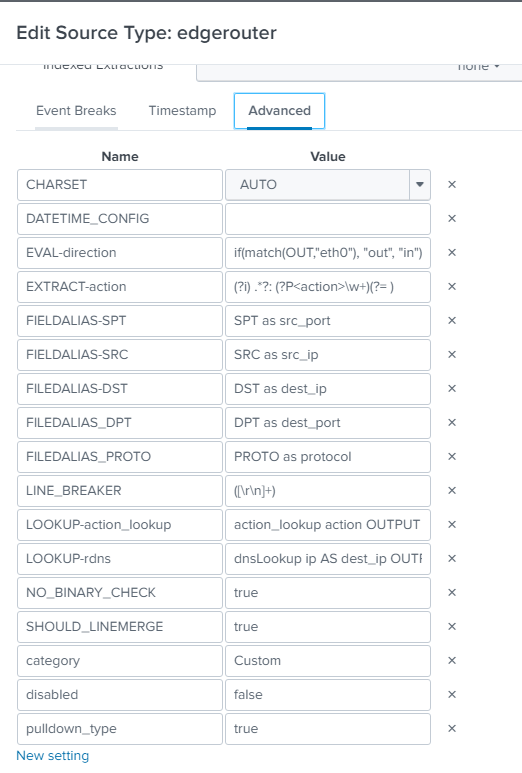
All help is appreciated, here's a pic of the sourcetype config.
- Mark as New
- Bookmark Message
- Subscribe to Message
- Mute Message
- Subscribe to RSS Feed
- Permalink
- Report Inappropriate Content


Hi @LargeCanineUnit,
I don't know your dashboard search but I would try to add dest field as an alias.
FIELDALIAS-dest = DST as dest
İf this reply helps you an upvote is appreciated.
- Mark as New
- Bookmark Message
- Subscribe to Message
- Mute Message
- Subscribe to RSS Feed
- Permalink
- Report Inappropriate Content
My main issue ended up being a mess of typos, I had several underscores instead of hyphens, and FILEDALIAS instead of FIELDALIAS. Fixing those typos has, for the most part, corrected the issue.
I was able to build up a dashboard of what I needed with this search term:
index=homemonitor sourcetype=$sourcetype$ direction=out | iplocation dest_ip | stats sparkline count by dest_ip, src_ip, Country, City | sort -count
This lets me see which internal IP on my network is talking to suspicious locations.
Certainly not efficient, but it should give me something to go on.
Thanks for the reply.


Join the Splunk Community Slack to learn, troubleshoot, and make connections with fellow Splunk practitioners in real time!
Join Splunk User Groups to connect and learn in-person by region or remotely by topic or industry.
Supercharging Windows Security Detection Performance: Introducing Hybrid Field ...
Enriching Signals with the OTel Lookup Processor
Meet the .conf26 AI Agent Buildathon Winners
