
Join the Conversation
- Find Answers
- :
- Apps & Add-ons
- :
- All Apps and Add-ons
- :
- All Apps and Add-ons
- :
- Can't symbolicate iOS crash reports
- Subscribe to RSS Feed
- Mark Topic as New
- Mark Topic as Read
- Float this Topic for Current User
- Bookmark Topic
- Subscribe to Topic
- Mute Topic
- Printer Friendly Page
- Mark as New
- Bookmark Message
- Subscribe to Message
- Mute Message
- Subscribe to RSS Feed
- Permalink
- Report Inappropriate Content
Can't symbolicate iOS crash reports

We're using Splunk Mint for reporting app crashes. We always upload the zipped dSYMs for our new releases, so we can symbolicate and understand the crash reports.
Recently i'm seeing weird behaviour, where our code's symbols get translated into correct names, but the iOS libraries are not.
Here's a screenshot to illustrate this (although this screenshot doesn't contain our app's functions in the stack, you can see that none of the OS libraries and frameworks are resolved):
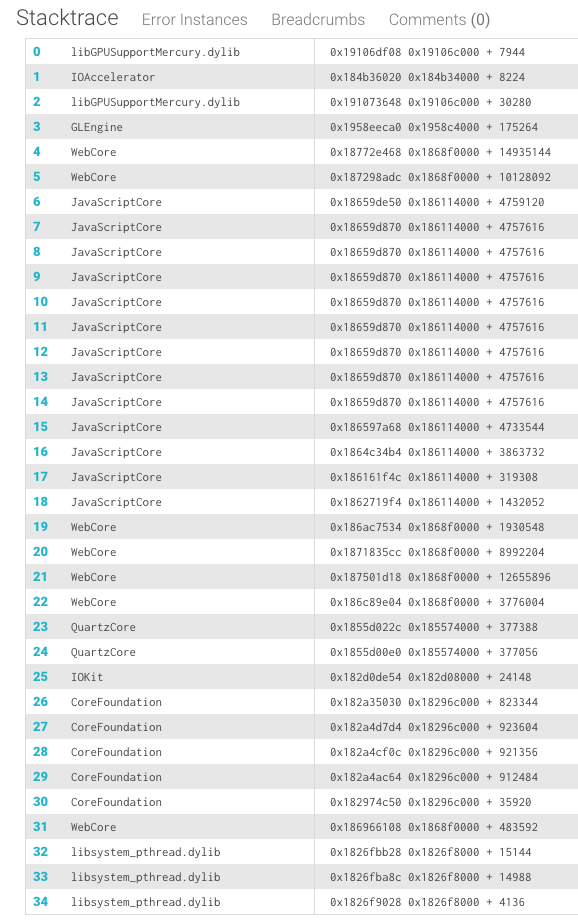
The same happens to all iOS versions i've tried to look at. Is this a bug? how can we symbolicate our crashes like we could in the past ?

- Mark as New
- Bookmark Message
- Subscribe to Message
- Mute Message
- Subscribe to RSS Feed
- Permalink
- Report Inappropriate Content


Are you using Swift? If you use Swift, crash reports will not be fully symbolicated. Only your code is symbolicated, but Apple system libraries are not symbolicated, so crash reports will include some hexadecimal code.
https://docs.splunk.com/Documentation/MintIOSSDK/5.2.x/DevGuide/Configureyourprojectforsymbolication
- Mark as New
- Bookmark Message
- Subscribe to Message
- Mute Message
- Subscribe to RSS Feed
- Permalink
- Report Inappropriate Content
we are not using swift.is there any way to get official support ? in the past i was able to get the stack traces. i was logging in the other day and realized that i cannot see that anymore.
- Mark as New
- Bookmark Message
- Subscribe to Message
- Mute Message
- Subscribe to RSS Feed
- Permalink
- Report Inappropriate Content
What SDK version are you integrated with?
- Mark as New
- Bookmark Message
- Subscribe to Message
- Mute Message
- Subscribe to RSS Feed
- Permalink
- Report Inappropriate Content
I believe we're using some 5.1.x version. not sure how to tell by the actual SDK files (is there any version written in there ?)
- Mark as New
- Bookmark Message
- Subscribe to Message
- Mute Message
- Subscribe to RSS Feed
- Permalink
- Report Inappropriate Content
Will you send an email with one of your project keys where you are seeing this issue to mobilesupport@splunk.com with subject: Can't symbolicate iOS crash reports?

Join the Splunk Community Slack to learn, troubleshoot, and make connections with fellow Splunk practitioners in real time!
Join Splunk User Groups to connect and learn in-person by region or remotely by topic or industry.
May 2026 Splunk Expert Sessions: Security & Observability
Network to App: Observability Unlocked [May & June Series]
SPL2 Deep Dives, AppDynamics Integrations, SAML Made Simple and Much More on Splunk ...
