
Join the Conversation
- Find Answers
- :
- Using Splunk
- :
- Other Using Splunk
- :
- Alerting
- :
- Stop creating alerts for users that have had alert...
- Subscribe to RSS Feed
- Mark Topic as New
- Mark Topic as Read
- Float this Topic for Current User
- Bookmark Topic
- Subscribe to Topic
- Mute Topic
- Printer Friendly Page
- Mark as New
- Bookmark Message
- Subscribe to Message
- Mute Message
- Subscribe to RSS Feed
- Permalink
- Report Inappropriate Content

Hi all!
Hoping you can help me out. We are setting up an alert in splunk that will feed into servicenow, that when triggered will allow us to reach out to our users whenever they lock themselves out instead of them calling through to IT desk. We don't want a snow alert to trigger every time they show up in the splunk seach however, instead if they have had an alert created in the last 4 hours for example they are not included and it only checks for new people in that time frame. After the time period has elapsed they can then be included in the alert again.
I have the search to a point where it is finding the users with issues and creating a transaction so we are getting them at the point they would be calling us, just stuck on that last bit.
index=prd_example sourcetype=LogSource "host=Host*
| transaction UserID EventDescription maxspan=4h
| table UserID EventDescription LockoutTime FirstName LastName EventCode eventcount
| where eventcount >= 3
| sort -_time
Any help would be greatly appreciated. I'm not even sure if this can be done at the splunk level or needs to be done at the SNow end
- Mark as New
- Bookmark Message
- Subscribe to Message
- Mute Message
- Subscribe to RSS Feed
- Permalink
- Report Inappropriate Content

Hey @Southy567,
To achieve the use case, you can have alert throttling enabled. You can find the throttle checkbox in the below screenshot.
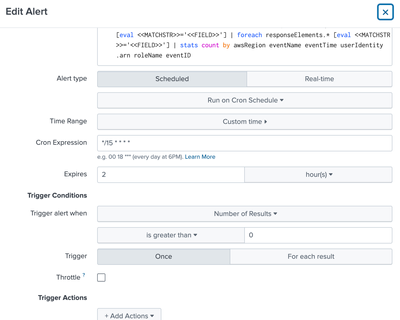
Once you check the throttle checkbox, you can suppress the alerting for 4 hours as mentioned in the below screenshot

So if the alert is suppressed for 4 hours, the SNOW ticket will not be created for the users that already have s SNOW ticket raised. After 4 hours, the alerting should resume as normal for the same set of users.
Thanks,
Tejas.
---
If the above solution helps, an upvote is appreciated.
- Mark as New
- Bookmark Message
- Subscribe to Message
- Mute Message
- Subscribe to RSS Feed
- Permalink
- Report Inappropriate Content
Hey @Southy567,
To achieve the use case, you can have alert throttling enabled. You can find the throttle checkbox in the below screenshot.
Once you check the throttle checkbox, you can suppress the alerting for 4 hours as mentioned in the below screenshot
So if the alert is suppressed for 4 hours, the SNOW ticket will not be created for the users that already have s SNOW ticket raised. After 4 hours, the alerting should resume as normal for the same set of users.
Thanks,
Tejas.
---
If the above solution helps, an upvote is appreciated.

Your Guide to Splunk Digital Experience Monitoring
Data Management Digest – November 2025
Upcoming Webinar: Unmasking Insider Threats with Slunk Enterprise Security’s UEBA
