
Join the Conversation
- Find Answers
- :
- Using Splunk
- :
- Other Using Splunk
- :
- Alerting
- :
- Splunk alerts have disappeared
- Subscribe to RSS Feed
- Mark Topic as New
- Mark Topic as Read
- Float this Topic for Current User
- Bookmark Topic
- Subscribe to Topic
- Mute Topic
- Printer Friendly Page
- Mark as New
- Bookmark Message
- Subscribe to Message
- Mute Message
- Subscribe to RSS Feed
- Permalink
- Report Inappropriate Content
Splunk alerts have disappeared

Our system has a few Splunk alerts set up and about a week ago, they all disappeared. They are not shown in the list of alerts inside Splunk and they are not carrying out their assigned actions.
If I try to create a new alert, it does not show up. I'll fill out the fields, save it, not see any error but then when I look at the list of alerts, it's not there:
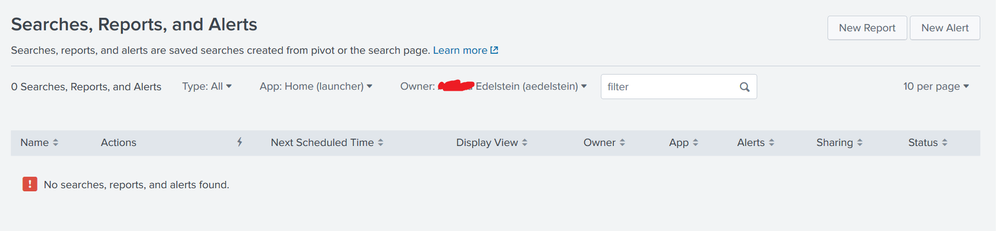
However, it I try to create another alert with the same title as the alert I've just created, I receive an error, "Unable to create saved search with name [name]. A saved search with that name already exists."
Where are my alerts and how can I re-enable them? I'm using Splunk Enterprise v7.1.2.

- Mark as New
- Bookmark Message
- Subscribe to Message
- Mute Message
- Subscribe to RSS Feed
- Permalink
- Report Inappropriate Content

In the filters, for "App:" select all apps and try. Right now it's trying to look for alerts created in app "Home".

Join the Splunk Community Slack to learn, troubleshoot, and make connections with fellow Splunk practitioners in real time!
Join Splunk User Groups to connect and learn in-person by region or remotely by topic or industry.
Meet the .conf26 AI Agent Buildathon Winners
Trusted Autonomy in the SOC: A Maturity Journey
Supercharging Windows Security Detection Performance: Introducing Hybrid Field ...
