
Join the Conversation
- Find Answers
- :
- Using Splunk
- :
- Other Using Splunk
- :
- Alerting
- :
- Re: Real time Alert
- Subscribe to RSS Feed
- Mark Topic as New
- Mark Topic as Read
- Float this Topic for Current User
- Bookmark Topic
- Subscribe to Topic
- Mute Topic
- Printer Friendly Page
- Mark as New
- Bookmark Message
- Subscribe to Message
- Mute Message
- Subscribe to RSS Feed
- Permalink
- Report Inappropriate Content
Real time Alert
Hello,
I'm trying to generate an alert if the result is greater than 2, but i don't have the field Real-Time as shown in the picture:
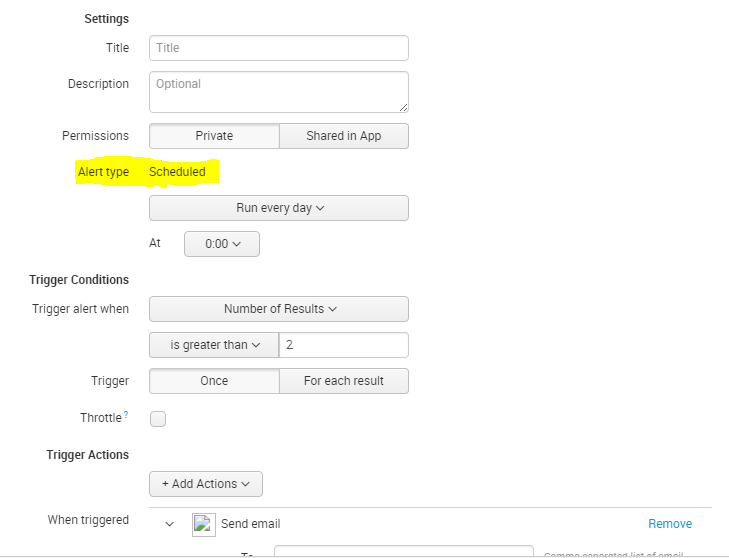
Is there any other way to generate this alert ?
Thank you
- Mark as New
- Bookmark Message
- Subscribe to Message
- Mute Message
- Subscribe to RSS Feed
- Permalink
- Report Inappropriate Content

There are very, Very, VERY good reasons that your admin has wisely taken away Real-Time, including:
1: Any real-time anything locks 1 core on EVERY Indexer and Your Search-Head. This does not scale.
2: You don't need it. If you cannot react to the alert in ~1s, a short-window regular search is just as effective.
3: There is pipeline latency in getting events into Splunk and a real-time search may search for your event before it has even arrived on the indexer and make for many false-negatives.
Despite what all of the marketing and training says, SPLUNK IS *NOT* A REAL-TIME PRODUCT!
- Mark as New
- Bookmark Message
- Subscribe to Message
- Mute Message
- Subscribe to RSS Feed
- Permalink
- Report Inappropriate Content

Hi @omarka,
You need schedule_rtsearch permission to schedule a real time search.
Real-time alerts can be costly in terms of computing resources, so consider using a scheduled alert when possible. You could use schedule search to run every 1 minute which should be enough in most of the uses Define scheduled alerts. Also have a look at the Best Practices.
What goes around comes around. If it helps, hit it with Karma 🙂



Join the Splunk Community Slack to learn, troubleshoot, and make connections with fellow Splunk practitioners in real time!
Join Splunk User Groups to connect and learn in-person by region or remotely by topic or industry.
Vibe-coding, AI, and Splunkcraft: Highlights from the .conf26 Builder Bar
Thanks for the Memories: .conf26 Took Learning to New Heights
Best Practices: Splunk auto adjust pipeline queue
