
Join the Conversation
- Find Answers
- :
- Using Splunk
- :
- Other Using Splunk
- :
- Alerting
- :
- Re: Mail Alert with multiple informations
- Subscribe to RSS Feed
- Mark Topic as New
- Mark Topic as Read
- Float this Topic for Current User
- Bookmark Topic
- Subscribe to Topic
- Mute Topic
- Printer Friendly Page
- Mark as New
- Bookmark Message
- Subscribe to Message
- Mute Message
- Subscribe to RSS Feed
- Permalink
- Report Inappropriate Content

Hello everyone,
There is my search :
my_severity=error my_app="name" earliest=-48h latest=-24h
| stats count as nb_yesterday by my_method limit=0
| appendcols[search my_severity=error my_app="name" earliest=-24h latest=now | stats count as nb_today by my_method]
| eval increase=round(nb_today*100/nb_yesterday)
| eval status=if(increase>100 OR nb_today>10, "CRITICAL", "GOOD")
| table my_method, nb_yesterday, increase, status, nb_today
| sort nb_today desc
my_severity, my_app and my_method are fields that i created myself
with my search, i get multiple results (and multiple lines) and i want to send one mail with the list of CRITICAL status like :
"Hello, we notice some errors :
[name of the method(1)] [status] [increase] [nb_today]
[name of the method(2)] [status] [increase] [nb_today]
[name of the method(3)] [status] [increase] [nb_today]
... "
How can i send a mail with all the "CRITICAL" status for exemple ?
When i configure the mail alert with this body message :
"The method "$result.my_method$" was $result.status$ with $result.nb_today$ errors in the last 24hours. (That's a $result.increase$% increase) "
I only send a mail with the informations of the first line.
Thanks.
- Mark as New
- Bookmark Message
- Subscribe to Message
- Mute Message
- Subscribe to RSS Feed
- Permalink
- Report Inappropriate Content

hi @CesarCrt ,
You can use strcat to create the message for each row and use mvcombine to combine all the message field values into a single value.
| strcat "The method ",my_method," was ",status," with ",nb_today," errors in the last 24hours. (That's a ",increase,"% increase)" message
| fields message
| mvcombine message delim="; "
| nomv message
Sample query:
| makeresults
| eval _raw="my_method status increase nb_today
method(1) status1 10 nb_today1
method(2) status2 20 nb_today2
method(3) status3 30 nb_today3"
| multikv forceheader=1
| strcat "The method ",my_method," was ",status," with ",nb_today," errors in the last 24hours. (That's a ",increase,"% increase)" message
| fields message
| mvcombine message delim="; "
| nomv message
----
If this reply helps you, a like would be appreciated.
- Mark as New
- Bookmark Message
- Subscribe to Message
- Mute Message
- Subscribe to RSS Feed
- Permalink
- Report Inappropriate Content
Hello @manjunathmeti ,
Thanks for your answer.
I tried it and i received one mail for every different error. (50 different mails)
I want to put ALL different errors in ONE mail.
(sorry for my bad english)
- Mark as New
- Bookmark Message
- Subscribe to Message
- Mute Message
- Subscribe to RSS Feed
- Permalink
- Report Inappropriate Content
It is not a good idea to put all alert results in email body. You can enable attach CSV/PDF file to the email. This will send all the results in a CSV/PDF file attached to the email.
- Mark as New
- Bookmark Message
- Subscribe to Message
- Mute Message
- Subscribe to RSS Feed
- Permalink
- Report Inappropriate Content
That was my second option. I was thinking about an external python script who deals with all the results on a CSV file.
If you have the command to put all the alert in one mail, i would like to make some tests.
Thanks for your swiftness @manjunathmeti
- Mark as New
- Bookmark Message
- Subscribe to Message
- Mute Message
- Subscribe to RSS Feed
- Permalink
- Report Inappropriate Content
There is an option to enable attach CSV file email option in the email alert action edit page.
- Mark as New
- Bookmark Message
- Subscribe to Message
- Mute Message
- Subscribe to RSS Feed
- Permalink
- Report Inappropriate Content
I may have expressed myself badly.
I know about the CSV attachment but i was asking about the command to see literally all the alert in the body mail and not in a side file.
- Mark as New
- Bookmark Message
- Subscribe to Message
- Mute Message
- Subscribe to RSS Feed
- Permalink
- Report Inappropriate Content
hi @CesarCrt ,
You can use strcat to create the message for each row and use mvcombine to combine all the message field values into a single value.
| strcat "The method ",my_method," was ",status," with ",nb_today," errors in the last 24hours. (That's a ",increase,"% increase)" message
| fields message
| mvcombine message delim="; "
| nomv message
Sample query:
| makeresults
| eval _raw="my_method status increase nb_today
method(1) status1 10 nb_today1
method(2) status2 20 nb_today2
method(3) status3 30 nb_today3"
| multikv forceheader=1
| strcat "The method ",my_method," was ",status," with ",nb_today," errors in the last 24hours. (That's a ",increase,"% increase)" message
| fields message
| mvcombine message delim="; "
| nomv message
----
If this reply helps you, a like would be appreciated.
- Mark as New
- Bookmark Message
- Subscribe to Message
- Mute Message
- Subscribe to RSS Feed
- Permalink
- Report Inappropriate Content
hi @CesarCrt ,
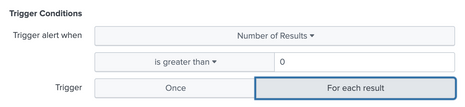
You need to set Trigger to For each result. This will trigger alert action for each row.
If this reply helps you, an upvote/like would be appreciated.

Join the Splunk Community Slack to learn, troubleshoot, and make connections with fellow Splunk practitioners in real time!
Join Splunk User Groups to connect and learn in-person by region or remotely by topic or industry.
Meet the .conf26 AI Agent Buildathon Winners
Trusted Autonomy in the SOC: A Maturity Journey
Supercharging Windows Security Detection Performance: Introducing Hybrid Field ...
