
Join the Conversation
- Find Answers
- :
- Using Splunk
- :
- Other Using Splunk
- :
- Alerting
- :
- How to find out the SMTP Splunk server?
- Subscribe to RSS Feed
- Mark Topic as New
- Mark Topic as Read
- Float this Topic for Current User
- Bookmark Topic
- Subscribe to Topic
- Mute Topic
- Printer Friendly Page
- Mark as New
- Bookmark Message
- Subscribe to Message
- Mute Message
- Subscribe to RSS Feed
- Permalink
- Report Inappropriate Content
How to find out the SMTP Splunk server?

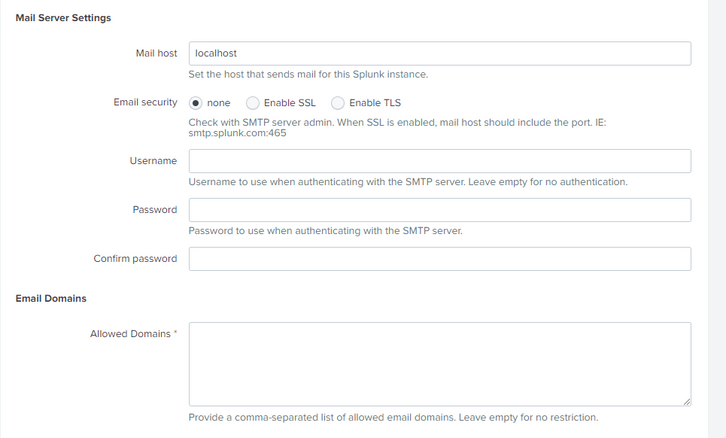
Hello Community.
Can you please advise me. Where in the configuration can I find out which SMTP mail server my Splunk uses to send notifications to employees? My configuration uses Search Head Cluster.
I'm trying to find the configuration file where my company's SMTP is listed through which it can send alerts within our domain.
I went to one of the Search Head and wanted to see the configuration at Settings/Server settings/Email settings. But there are no settings listed there. But this Search Head is sending alerts. Thank you for your feedback
- Mark as New
- Bookmark Message
- Subscribe to Message
- Mute Message
- Subscribe to RSS Feed
- Permalink
- Report Inappropriate Content


Hi @igor04653,
It seems Splunk is using your Linux server sendmail to send an email. It may work if you are sending only internal company mail addresses.
- Mark as New
- Bookmark Message
- Subscribe to Message
- Mute Message
- Subscribe to RSS Feed
- Permalink
- Report Inappropriate Content

I'm not sure how the web interface behaves with search-head clustering in this case but the email settings are configured in alert_actions.conf in [email] stanza.
Of course since you have clustered search-head environment, the settings are most probably deployed via an app deployed from the deployer. You should probably look there.
You can also just log on onto one of your search-heads and run
/opt/splunk/bin/splunk btool alert_actions list email
To see effective config. You can also add --debug switch to see which file the setting comes from.
You're interested in the "mailserver" key


Join the Splunk Community Slack to learn, troubleshoot, and make connections with fellow Splunk practitioners in real time!
Join Splunk User Groups to connect and learn in-person by region or remotely by topic or industry.
Developer Spotlight with Denis Gladkikh
Governing Enterprise AI, Bringing Cisco Telemetry Home, and More from Splunk Lantern
Agentic SOC Triage: Investigating Splunk ES Notables with MCP Server and a Local LLM
