
Join the Conversation
- Find Answers
- :
- Using Splunk
- :
- Other Using Splunk
- :
- Alerting
- :
- Re: Splunk Alert for spike in log events
- Subscribe to RSS Feed
- Mark Topic as New
- Mark Topic as Read
- Float this Topic for Current User
- Bookmark Topic
- Subscribe to Topic
- Mute Topic
- Printer Friendly Page
- Mark as New
- Bookmark Message
- Subscribe to Message
- Mute Message
- Subscribe to RSS Feed
- Permalink
- Report Inappropriate Content
How to create a Splunk Alert for spike in log events?

Trying to implement an alert on detecting spikes in logged events in our Splunk deployment and not sure how to go about it...
For example: Have 15 hosts with varying levels of sources within each... one of my sources in a host averages about 5-6k events per day over the past 30 days; then out of the blue, we're hit with 1.3 million events on one of the days.
Assuming the alert would need to be tailored to each host (or source, not sure) and would need an average number of events over a "normal" week to compare to when there's a spike?
Any help would be greatly appreciated.
- Mark as New
- Bookmark Message
- Subscribe to Message
- Mute Message
- Subscribe to RSS Feed
- Permalink
- Report Inappropriate Content


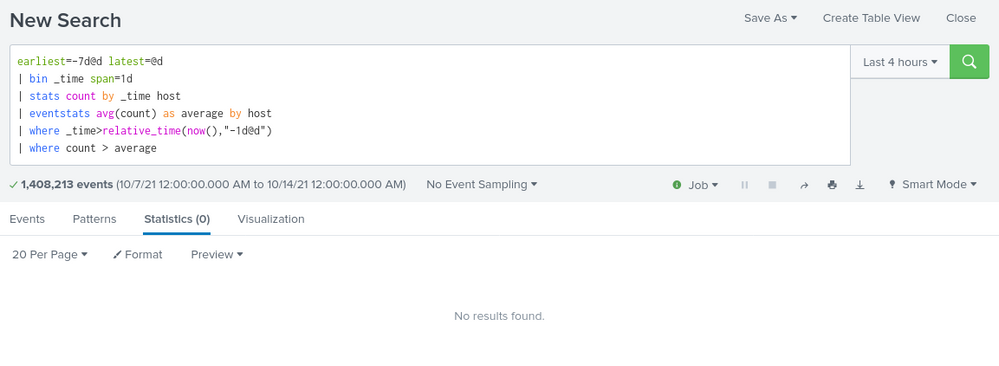
Something like this:
your search earliest=-7d@d latest=@d
| bin _time span=1d
| stats count by _time host
| eventstats avg(count) as average by host
| where _time>relative_time(now(),"-1d@d")
| where count > average- Mark as New
- Bookmark Message
- Subscribe to Message
- Mute Message
- Subscribe to RSS Feed
- Permalink
- Report Inappropriate Content
Thank you for sharing your inputs and code logic.
I tried the below way: -
In the time range picker: "earliest: -7d@d" "latest:now".
index=xxx sourcetype IN ("A","B")
| bin _time span=1d
| stats count by _time sourcetype
| eventstats avg(count) as average by sourcetype
| eval rise_percent=((count-average)*100)/count
|where rise_percent>=25
And I get results for each sourcetype when the count for a sourcetype on a given date is greater than average count by 25%.
I need your assistance to build SPL which takes average of past 15 days and compare it with today's results, but it should exclude today's date in the average. For example: - today is 11 May 2022, the past 15 days should be from 26 April 2022 to10 May 2022
- Mark as New
- Bookmark Message
- Subscribe to Message
- Mute Message
- Subscribe to RSS Feed
- Permalink
- Report Inappropriate Content
You could do something like this (with timepicker at -15d@d)
index=xxx sourcetype IN ("A","B")
| bin _time span=1d
| stats count by _time sourcetype
| eval previous=if(_time<relative_time(now(),"@d"),count,null())
| eventstats avg(previous) as average by sourcetype
| eval rise_percent=((count-average)*100)/count
|where rise_percent>=25- Mark as New
- Bookmark Message
- Subscribe to Message
- Mute Message
- Subscribe to RSS Feed
- Permalink
- Report Inappropriate Content
Thank you for your prompt inputs.
I tried with following: -
index=xxx sourcetype IN ("A")
| bin _time span=1d
| stats count by _time sourcetype
| eval previous=if(_time<relative_time(now(),"@d"),count,null())
Due to large volume of data, for testing purpose I only kept once sourcetype in the SPL and time range as Last 7 days.
In output, I get table with following columns: -
_time
sourcetype
count
previous
I get results for each date in past 7 days, however the values under column count and previous are same.
Sample output: -
| _time | sourcetype | count | previous |
| 2022-05-04 | A | 1004558705 | 1004558705 |
| 2022-05-05 | A | 2450936208 | 2450936208 |
| 2022-05-06 | A | 3074060943 | 3074060943 |
Thus, can you please help me to correct where I am going wrong.
- Mark as New
- Bookmark Message
- Subscribe to Message
- Mute Message
- Subscribe to RSS Feed
- Permalink
- Report Inappropriate Content
- Mark as New
- Bookmark Message
- Subscribe to Message
- Mute Message
- Subscribe to RSS Feed
- Permalink
- Report Inappropriate Content
Well it was just an example - you probably want to add an index or more to restrict your search depending on your actual data - similarly, it looks like you don't have host extracted so change this for something you do have that you want to group your data by - only you will know what this is as you didn't provide that information in your original post.

Join the Splunk Community Slack to learn, troubleshoot, and make connections with fellow Splunk practitioners in real time!
Join Splunk User Groups to connect and learn in-person by region or remotely by topic or industry.
[Puzzles] Solve, Learn, Repeat: Matching cron expressions
Design, Compete, Win: Submit Your Best Splunk Dashboards for a .conf26 Pass
May 2026 Splunk Expert Sessions: Security & Observability
