
Join the Conversation
- Find Answers
- :
- Using Splunk
- :
- Other Using Splunk
- :
- Alerting
- :
- Re: How to configure multiple tomcat servers under...
- Subscribe to RSS Feed
- Mark Topic as New
- Mark Topic as Read
- Float this Topic for Current User
- Bookmark Topic
- Subscribe to Topic
- Mute Topic
- Printer Friendly Page
- Mark as New
- Bookmark Message
- Subscribe to Message
- Mute Message
- Subscribe to RSS Feed
- Permalink
- Report Inappropriate Content
How to configure multiple tomcat servers under splunk add-on for Tomcat

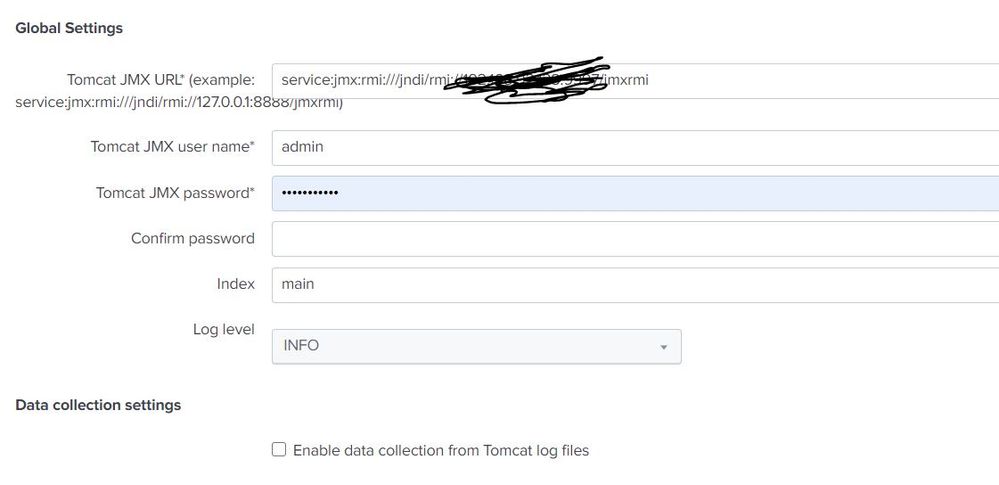
I have installed splunk add-on for tomcat on search head and indexer and by using Universal Forwarder I am sending my Tomcat logs to SH and indexer. I have configure my Tomcat URL under the setup page of add-on and I am able to parse the logs and extract the fields. It is good till here, now I am having multiple Tomcat servers to send the logs. How do I configure the multiple server URL's under the this setup page.? Is it meant for accepting the single URL?
- Mark as New
- Bookmark Message
- Subscribe to Message
- Mute Message
- Subscribe to RSS Feed
- Permalink
- Report Inappropriate Content

Hi @sandeepduppalli,
Seems like it might be limited to a single input. You can try one of two things :
1- Replicate the stanza for the input in the configuration and see how it behaves.
2- Replicate the entire application making one app per tomcat server.
Let me know if that helps.
Cheers,
David
- Mark as New
- Bookmark Message
- Subscribe to Message
- Mute Message
- Subscribe to RSS Feed
- Permalink
- Report Inappropriate Content
Can you please elaborate to get a clear picture? I tried changing under tomcat_server.conf under SPLUNK_HOME/etc/apps/Splunk_TA_tomcat/local/ but the password is encrypted. I don't think I can change here also.

Join the Splunk Community Slack to learn, troubleshoot, and make connections with fellow Splunk practitioners in real time!
Join Splunk User Groups to connect and learn in-person by region or remotely by topic or industry.
Observability Simplified: Combining User Experience, Application Performance & ...
Event Series May & June: From Network Visibility to Service Intelligence
Global Splunk User Group Events: May + June 2026
