
Join the Conversation
- Find Answers
- :
- Using Splunk
- :
- Other Using Splunk
- :
- Alerting
- :
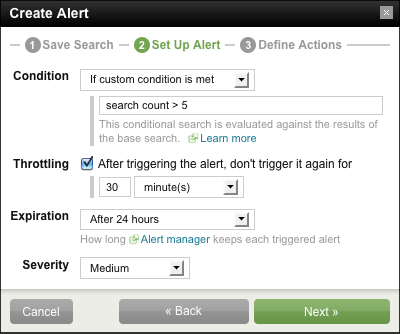
- Getting to the create alert dialog box.
- Subscribe to RSS Feed
- Mark Topic as New
- Mark Topic as Read
- Float this Topic for Current User
- Bookmark Topic
- Subscribe to Topic
- Mute Topic
- Printer Friendly Page
- Mark as New
- Bookmark Message
- Subscribe to Message
- Mute Message
- Subscribe to RSS Feed
- Permalink
- Report Inappropriate Content

I would like to know where do i get to this create alert dialog box shown below. I got click the create button on search app then click alert.., i do not see the tabs save search, set up alert and define actions.
- Mark as New
- Bookmark Message
- Subscribe to Message
- Mute Message
- Subscribe to RSS Feed
- Permalink
- Report Inappropriate Content
misteryuku,
What version of Splunk are you running? - If it is the free version you will not have access to alerting, as per the Splunk comparison table available here...
http://www.splunk.com/view/how-to-get-splunk/SP-CAAADFV
If you are unsure, you can navigate to the "Manager" and then the "Licensing" section (this will appear in the top-right panel within the manager view). Here it will say something like, "Free license group", in large green font, at the top of the page. If you have a paid for license (i.e. Enterprise), it will say something like, "Enterprise license group".
Hope this helps
Regards,
MHibbin
- Mark as New
- Bookmark Message
- Subscribe to Message
- Mute Message
- Subscribe to RSS Feed
- Permalink
- Report Inappropriate Content
OK, no worries.. there was no rush, as I say it helps others (those looking for questions to answer, and those looking for answers to questions) 🙂
- Mark as New
- Bookmark Message
- Subscribe to Message
- Mute Message
- Subscribe to RSS Feed
- Permalink
- Report Inappropriate Content
I wasn't present when you replied to my question. so now that i'm online i can mark your answer. I'm quite sorry to have kept you waiting.
- Mark as New
- Bookmark Message
- Subscribe to Message
- Mute Message
- Subscribe to RSS Feed
- Permalink
- Report Inappropriate Content
has the answer below answered your question? - if so can you mark the answer as accepted to help the community (so they know if the answer is valid/still needs a correct answer)
- Mark as New
- Bookmark Message
- Subscribe to Message
- Mute Message
- Subscribe to RSS Feed
- Permalink
- Report Inappropriate Content
misteryuku,
What version of Splunk are you running? - If it is the free version you will not have access to alerting, as per the Splunk comparison table available here...
http://www.splunk.com/view/how-to-get-splunk/SP-CAAADFV
If you are unsure, you can navigate to the "Manager" and then the "Licensing" section (this will appear in the top-right panel within the manager view). Here it will say something like, "Free license group", in large green font, at the top of the page. If you have a paid for license (i.e. Enterprise), it will say something like, "Enterprise license group".
Hope this helps
Regards,
MHibbin
- Mark as New
- Bookmark Message
- Subscribe to Message
- Mute Message
- Subscribe to RSS Feed
- Permalink
- Report Inappropriate Content
I'm using the free version.


Join the Splunk Community Slack to learn, troubleshoot, and make connections with fellow Splunk practitioners in real time!
Join Splunk User Groups to connect and learn in-person by region or remotely by topic or industry.
SOC4Kafka - New Kafka Connector Powered by OpenTelemetry
Event Series: Level up your SOC: Advancing with Splunk Enterprise Security
Announcing Modern Navigation: A New Era of Splunk User Experience
