
Join the Conversation
- Find Answers
- :
- Using Splunk
- :
- Other Using Splunk
- :
- Alerting
- :
- Re: Hiding search dialog when viewing alert result...
- Subscribe to RSS Feed
- Mark Topic as New
- Mark Topic as Read
- Float this Topic for Current User
- Bookmark Topic
- Subscribe to Topic
- Mute Topic
- Printer Friendly Page
- Mark as New
- Bookmark Message
- Subscribe to Message
- Mute Message
- Subscribe to RSS Feed
- Permalink
- Report Inappropriate Content
Escaping tokens in alert emails

I'm using some email alert actions without attachments included. My users aren't technical, so when they click on "view results" in an email the resulting search timeline view within Splunk is overwhelming for them. They're dashboard users, not search users. I'm not aware of a good and simple way to basically just not show the search dialog along with the results on the timeline view (e.g. via some savedsearches.conf "view"/"ui" related config option), though I'd love to hear about one.
Instead, I thought to send a custom email in the alert such as:
Your Splunk report '$name$' is ready.

Results can be retrieved at the following link:

https://splunk:8000/en-US/app/app/alert_test?search_name=$name$&search_id=$job.sid$
Where the dashboard is basically just this:
  <row>
    <panel>
      <title>Search Name: $search_name$</title>
      <table>
        <search>
          <query>| loadjob $search_id$</query>

        </search>
        <option name="count">100</option>
        <option name="dataOverlayMode">none</option>
        <option name="drilldown">none</option>
        <option name="percentagesRow">false</option>
        <option name="rowNumbers">true</option>
        <option name="totalsRow">false</option>
        <option name="wrap">true</option>
      </table>
    </panel>
  </row>
That works, but the problem is that the standard token encoding methods such as $name|u$ don't appear to actually work in alert emails, so spaces and special characters break the link. And, html support for links seems super broken, so I appear to have to send as a text email and allow magic linking to happen, but that doesn't handle the spaces / unencoded name value.
I'm hoping for a simple way to deal with this. The only thing I can think of probably involves just dealing with not passing the search name to the dashboard, or getting into cloning the sendemail command to try to make it encode things, and then losing the normal alert configuration UI, etc. This seems like it should be easier to handle all the way around. Why am I forced to push users into a web page that starts with a hideous 40 line search?
- Mark as New
- Bookmark Message
- Subscribe to Message
- Mute Message
- Subscribe to RSS Feed
- Permalink
- Report Inappropriate Content
can you provide a screenshot of what you actually mean?
- Mark as New
- Bookmark Message
- Subscribe to Message
- Mute Message
- Subscribe to RSS Feed
- Permalink
- Report Inappropriate Content
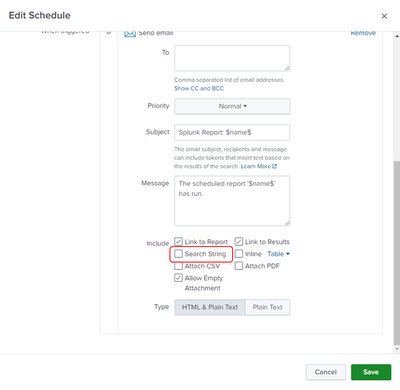
Hello,
please check first if you checked something by mistake:
- Mark as New
- Bookmark Message
- Subscribe to Message
- Mute Message
- Subscribe to RSS Feed
- Permalink
- Report Inappropriate Content
Sorry for the confusion, but I'm referring to the search timeline view when you click on "view results" from an alert, not the actual email content.

Join the Splunk Community Slack to learn, troubleshoot, and make connections with fellow Splunk practitioners in real time!
Join Splunk User Groups to connect and learn in-person by region or remotely by topic or industry.
Why Splunk Customers Should Attend Cisco Live 2026 Las Vegas
What Is the Name of the USB Key Inserted by Bob Smith? (BOTS Hint, Not the Answer)
Automating Threat Operations and Threat Hunting with Recorded Future
