
Turn on suggestions
Auto-suggest helps you quickly narrow down your search results by suggesting possible matches as you type.
Alerting
×
Join the Conversation
Without signing in, you're just watching from the sidelines. Sign in or Register to connect, share, and be part of the Splunk Community.
Turn on suggestions
Auto-suggest helps you quickly narrow down your search results by suggesting possible matches as you type.
- Find Answers
- :
- Using Splunk
- :
- Other Using Splunk
- :
- Alerting
- :
- Re: Cron schedule alert from 2:30 Am to 4 AM in sp...
Options
- Subscribe to RSS Feed
- Mark Topic as New
- Mark Topic as Read
- Float this Topic for Current User
- Bookmark Topic
- Subscribe to Topic
- Mute Topic
- Printer Friendly Page
- Mark as New
- Bookmark Message
- Subscribe to Message
- Mute Message
- Subscribe to RSS Feed
- Permalink
- Report Inappropriate Content

Supriya
Path Finder
08-07-2020
04:30 AM
This expression( 30/5 2-4 * * * ) I found to schedule alert from 2:30 Am to 4 AM which runs in every 5 minute
https://crontab.guru/#30/5_2-4_*_*_*
But this is not working in the Splunk cloud and getting below error
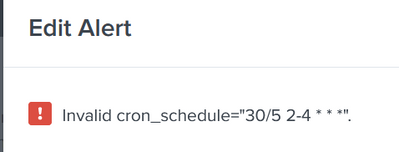
Could someone please suggest the alternate expression which will work in splunk cloud
1 Solution
- Mark as New
- Bookmark Message
- Subscribe to Message
- Mute Message
- Subscribe to RSS Feed
- Permalink
- Report Inappropriate Content

thambisetty

SplunkTrust
08-07-2020
04:56 AM
I have already provided the solution in different question.
you are looking to schedule for 5 minutes in one complete hour and only 30 minutes in the second hour.
so I gave you two cron jobs.
————————————
If this helps, give a like below.
If this helps, give a like below.
- Mark as New
- Bookmark Message
- Subscribe to Message
- Mute Message
- Subscribe to RSS Feed
- Permalink
- Report Inappropriate Content
thambisetty
SplunkTrust
08-07-2020
04:33 AM

check the warning message under cron. It will not work.
————————————
If this helps, give a like below.
If this helps, give a like below.
- Mark as New
- Bookmark Message
- Subscribe to Message
- Mute Message
- Subscribe to RSS Feed
- Permalink
- Report Inappropriate Content
Supriya
Path Finder
08-07-2020
04:54 AM
- Mark as New
- Bookmark Message
- Subscribe to Message
- Mute Message
- Subscribe to RSS Feed
- Permalink
- Report Inappropriate Content
thambisetty
SplunkTrust
08-07-2020
04:56 AM
I have already provided the solution in different question.
you are looking to schedule for 5 minutes in one complete hour and only 30 minutes in the second hour.
so I gave you two cron jobs.
————————————
If this helps, give a like below.
If this helps, give a like below.

Get Updates on the Splunk Community!
Splunk Search APIを使えば調査過程が残せます
このゲストブログは、JCOM株式会社の情報セキュリティ本部・専任部長である渡辺慎太郎氏によって執筆されました。
Note: This article is published in both Japanese ...
Integrating Splunk Search API and Quarto to Create Reproducible Investigation ...
Splunk is More Than Just the Web Console
For Digital Forensics and Incident Response (DFIR) practitioners, ...
Congratulations to the 2025-2026 SplunkTrust!
Hello, Splunk Community! We are beyond thrilled to announce our newest group of SplunkTrust members!
The ...
