
Join the Conversation
- Find Answers
- :
- Using Splunk
- :
- Other Using Splunk
- :
- Alerting
- :
- Re: Connection Timed out and An existing connectio...
- Subscribe to RSS Feed
- Mark Topic as New
- Mark Topic as Read
- Float this Topic for Current User
- Bookmark Topic
- Subscribe to Topic
- Mute Topic
- Printer Friendly Page
- Mark as New
- Bookmark Message
- Subscribe to Message
- Mute Message
- Subscribe to RSS Feed
- Permalink
- Report Inappropriate Content

Hi Guys,
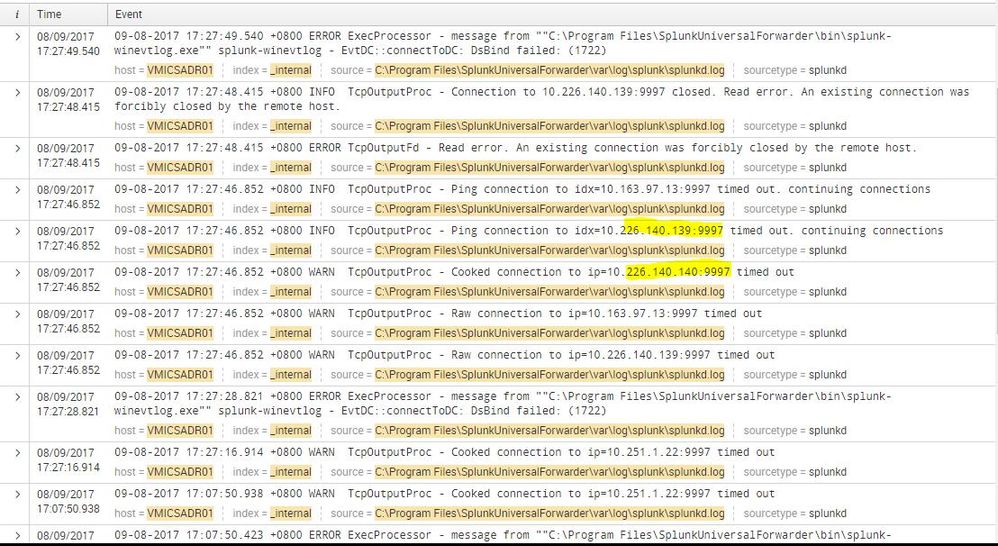
I am just a newbie in Splunk and this will be my first time to perform troubleshooting. I'm having a connection timed out with 6 of our servers and I think this is reason why there is no logs being forwarded to our Indexers. Also there is an error saying that "An existing connection was forcibly closed by the remote host". Hope anyone can help me on how to resolve this issue. Please see the screenshot below for reference.



- Mark as New
- Bookmark Message
- Subscribe to Message
- Mute Message
- Subscribe to RSS Feed
- Permalink
- Report Inappropriate Content


Hi vino06,
no there is another problem because Splunk Forwarders continuously send internal logs to Indexerds so the channel is used.
The problem is another: at first, are you sure about the available network bandwidth?
In addition: what storage do you used, in other words, disks are quick or not?
One usual problem of timeout is that Indexer is overloaded so cannot reach to index logs and put in wait transmission.
In these cases Forwarder caches its logs and send it as soon as connection is available, so you don't loose data.
Check performances and hardware requirements of your Indexer.
Bye.
Giuseppe
- Mark as New
- Bookmark Message
- Subscribe to Message
- Mute Message
- Subscribe to RSS Feed
- Permalink
- Report Inappropriate Content


Hey @vino06, If cusello solved your problem, please don't forget to accept an answer! You can upvote posts as well. (Karma points will be awarded for either action.) Happy Splunking!
- Mark as New
- Bookmark Message
- Subscribe to Message
- Mute Message
- Subscribe to RSS Feed
- Permalink
- Report Inappropriate Content
Hi vino06,
no there is another problem because Splunk Forwarders continuously send internal logs to Indexerds so the channel is used.
The problem is another: at first, are you sure about the available network bandwidth?
In addition: what storage do you used, in other words, disks are quick or not?
One usual problem of timeout is that Indexer is overloaded so cannot reach to index logs and put in wait transmission.
In these cases Forwarder caches its logs and send it as soon as connection is available, so you don't loose data.
Check performances and hardware requirements of your Indexer.
Bye.
Giuseppe
- Mark as New
- Bookmark Message
- Subscribe to Message
- Mute Message
- Subscribe to RSS Feed
- Permalink
- Report Inappropriate Content
I already seek assistance with our FW team to check the connection of the servers going to our Indexers. Also i think your right saying that our Indexer is overload since we usually encounter this which results to "No Result found" on some of our server as well. But how can I fix the Connection Timed our or the Existing Connection has forcibly closed by remote host?
- Mark as New
- Bookmark Message
- Subscribe to Message
- Mute Message
- Subscribe to RSS Feed
- Permalink
- Report Inappropriate Content
Hi vino06,
Using Forwarders you don't loose events because it locally caches them and then sends them to Indexers as soon it's available.
Check if this is true in your situation, in other words see if you have in your indexer all the events of your files.
Anyway you can use Distributed Monitoring Console to check the Indexers health and its indexing load.
Bye.
Giuseppe

Join the Splunk Community Slack to learn, troubleshoot, and make connections with fellow Splunk practitioners in real time!
Join Splunk User Groups to connect and learn in-person by region or remotely by topic or industry.
Index This | What travels the world but is also stuck in place?
Discover New Use Cases: Unlock Greater Value from Your Existing Splunk Data
Continue Your Journey: Join Session 2 of the Data Management and Federation Bootcamp ...
