
Join the Conversation
- Find Answers
- :
- Using Splunk
- :
- Other Using Splunk
- :
- Alerting
- :
- Re: Configure triggered alert expiration
- Subscribe to RSS Feed
- Mark Topic as New
- Mark Topic as Read
- Float this Topic for Current User
- Bookmark Topic
- Subscribe to Topic
- Mute Topic
- Printer Friendly Page
- Mark as New
- Bookmark Message
- Subscribe to Message
- Mute Message
- Subscribe to RSS Feed
- Permalink
- Report Inappropriate Content
Configure triggered alert expiration

Hi,
Its probably somewhere but I can't see it (find it)
http://docs.splunk.com/Documentation/Splunk/6.6.3/Alert/Updatealerts
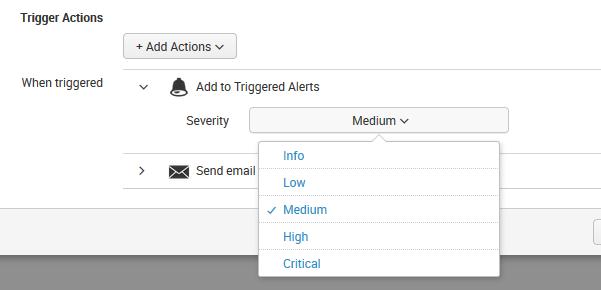
There is only the: Trigger Actions / Add Actions / e.g. Add to Triggered Alerts
But if default is 24h and I want to set it to e.g. 7 days, how do I do that?
--
Thanks in advance
/Edwin
- Mark as New
- Bookmark Message
- Subscribe to Message
- Mute Message
- Subscribe to RSS Feed
- Permalink
- Report Inappropriate Content
- Mark as New
- Bookmark Message
- Subscribe to Message
- Mute Message
- Subscribe to RSS Feed
- Permalink
- Report Inappropriate Content

In 7.3, there is now an "Expires" field which can be set in the simple Edit Alert interface. The "Expires" value is only used to determine the TTL when using the "Add to Triggered Alerts" Action Type.
- Mark as New
- Bookmark Message
- Subscribe to Message
- Mute Message
- Subscribe to RSS Feed
- Permalink
- Report Inappropriate Content
I believe this setting is controlled by the value set for ttl in alert_actions.conf. Here's an excerpt:
ttl     = <integer>[p]
* Optional argument specifying the minimum time to live (in seconds)
  of the search artifacts, if this action is triggered.
* If p follows integer, then integer is the number of scheduled periods.
* If no actions are triggered, the artifacts will have their ttl determined
  by the "dispatch.ttl" attribute in savedsearches.conf.
* Defaults to 10p
* Defaults to 86400 (24 hours)   for: email, rss
* Defaults to   600 (10 minutes) for: script
* Defaults to   120 (2 minutes)  for: summary_index, populate_lookup
- Mark as New
- Bookmark Message
- Subscribe to Message
- Mute Message
- Subscribe to RSS Feed
- Permalink
- Report Inappropriate Content
to build on this if you don't want to configure these in the .conf file they can be configured by select "Advanced Edit" when you edit the alert from the "Searches, Reports, and Alerts" page. You can then filter by ".ttl"
- Mark as New
- Bookmark Message
- Subscribe to Message
- Mute Message
- Subscribe to RSS Feed
- Permalink
- Report Inappropriate Content
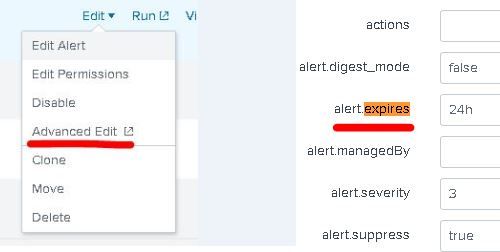
I remember that in the 'past' this could be defined by editing the Alert. I believe that I found the related setting through Advanced Edit (Alert):
alert.expires




Join the Splunk Community Slack to learn, troubleshoot, and make connections with fellow Splunk practitioners in real time!
Join Splunk User Groups to connect and learn in-person by region or remotely by topic or industry.
Painting a Clearer Picture: Unifying Your Investigations with Cisco AI Canvas
Hello POJO, meet nocode
Announcing Modern Navigation: A New Era of Splunk User Experience
