
Join the Conversation
- Find Answers
- :
- Using Splunk
- :
- Other Using Splunk
- :
- Alerting
- :
- Re: Alert with email
- Subscribe to RSS Feed
- Mark Topic as New
- Mark Topic as Read
- Float this Topic for Current User
- Bookmark Topic
- Subscribe to Topic
- Mute Topic
- Printer Friendly Page
- Mark as New
- Bookmark Message
- Subscribe to Message
- Mute Message
- Subscribe to RSS Feed
- Permalink
- Report Inappropriate Content

Hi,
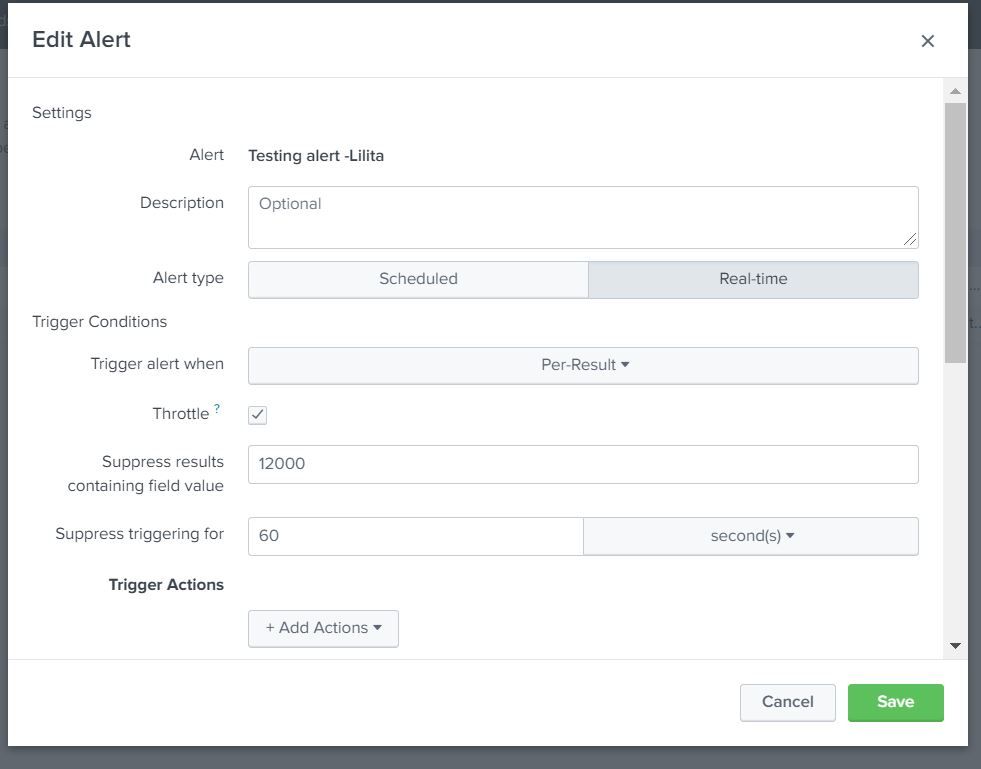
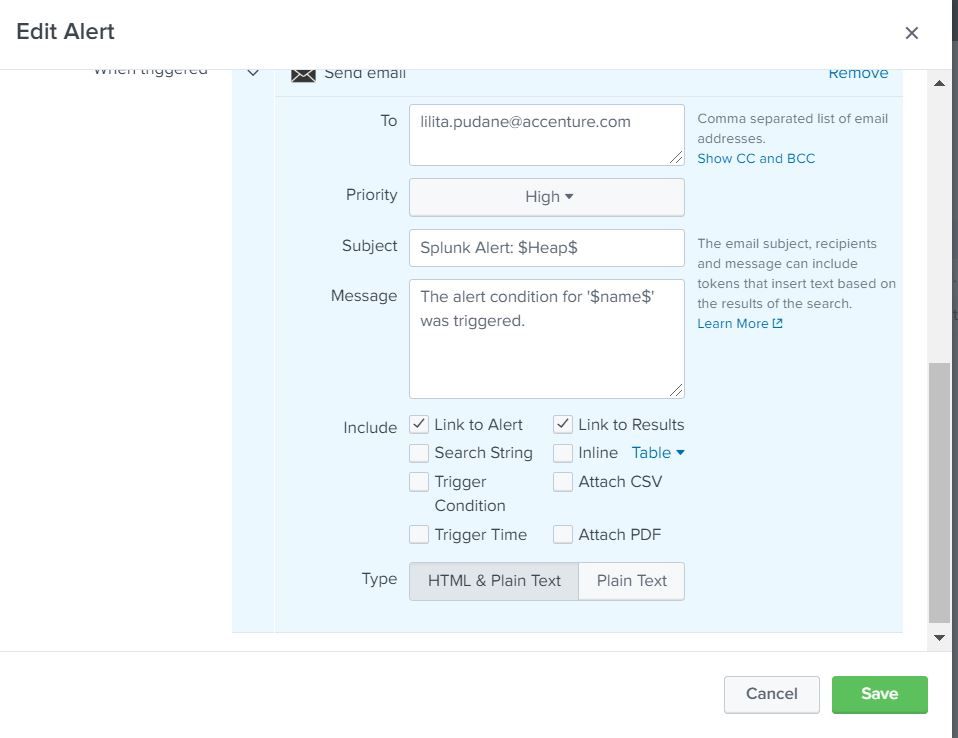
I'm struggling to create email alert.
My search query:
| rex "Heap:\s(?<HeapNum>[\d\.]+)(?<unit>\w+)" | search HeapNum!=" " | eval HeapNum = case(unit="K",HeapNum/1000,unit="M", HeapNum,unit="G", HeapNum*1000) | eval critical=15000 | table _time HeapNum critical
I want, that when it reaches critical value, it sends email to me.
I created alert, but it doesn't work, can you please help with configuration?


- Mark as New
- Bookmark Message
- Subscribe to Message
- Mute Message
- Subscribe to RSS Feed
- Permalink
- Report Inappropriate Content


Hi pudanelilita,
try something like this
| rex "Heap:\s(?<HeapNum>[\d\.]+)(?<unit>\w+)"
| search NOT HeapNum=" "
| eval HeapNum = case(unit="K",HeapNum/1000,unit="M", HeapNum,unit="G", HeapNum*1000)
| search HeapNum>15000
| table _time HeapNum critical
Then in the alert's condition put activation when there are results (results>0)
Bye.
Giuseppe
- Mark as New
- Bookmark Message
- Subscribe to Message
- Mute Message
- Subscribe to RSS Feed
- Permalink
- Report Inappropriate Content
Hi pudanelilita,
try something like this
| rex "Heap:\s(?<HeapNum>[\d\.]+)(?<unit>\w+)"
| search NOT HeapNum=" "
| eval HeapNum = case(unit="K",HeapNum/1000,unit="M", HeapNum,unit="G", HeapNum*1000)
| search HeapNum>15000
| table _time HeapNum critical
Then in the alert's condition put activation when there are results (results>0)
Bye.
Giuseppe
- Mark as New
- Bookmark Message
- Subscribe to Message
- Mute Message
- Subscribe to RSS Feed
- Permalink
- Report Inappropriate Content
it shows me: No results found.
- Mark as New
- Bookmark Message
- Subscribe to Message
- Mute Message
- Subscribe to RSS Feed
- Permalink
- Report Inappropriate Content
At first (my error!) replace
| search HeapNum>15000
with
| where HeapNum>15000
if you still have no results, delete the second search and then see what are the values you have for HeapNum to check if the condition is correct.
Bye.
Giuseppe

Join the Splunk Community Slack to learn, troubleshoot, and make connections with fellow Splunk practitioners in real time!
Join Splunk User Groups to connect and learn in-person by region or remotely by topic or industry.
Tuning Edge Processor in Hybrid Mode: What Limits Each Data Path
Best Practices: Splunk auto adjust pipeline queue
Request for Professional Development: Attending .conf26
