
Join the Conversation
- Find Answers
- :
- Using Splunk
- :
- Other Using Splunk
- :
- Alerting
- :
- Alert doesn't run each minute
- Subscribe to RSS Feed
- Mark Topic as New
- Mark Topic as Read
- Float this Topic for Current User
- Bookmark Topic
- Subscribe to Topic
- Mute Topic
- Printer Friendly Page
- Mark as New
- Bookmark Message
- Subscribe to Message
- Mute Message
- Subscribe to RSS Feed
- Permalink
- Report Inappropriate Content
Alert doesn't run each minute

Hello,
I created a small alert compiling data per minute for the last 24 hours:
(index=my*filter) (myConstraint) | bin span=1m _time
| eval fieldX=formule
| stats count(eval(field="OK")) AS OK, count as Total by index, field1, ..., fieldN, _time
| append [| inputlookup MyLookup.csv | addinfo | where _time > relative_time(info_max_time, "-24h")]
| stats max(OK) as OK, max(Total) as Total by index, field1, ..., fieldN, _time
| outputlookup append=f MyLookup.csv
I configure the alert with earliest=-5m and latest=now
Schedule window : 0
I try with and without acceleration without success.
I schedule my search : * * * * *
Expiration : I keep 1 h of alerts
The alert runs correctly but, it runs each 5 to 10 minutes.
I see in tasks the execution time is less than 15s (between 6 and 15 sec) :
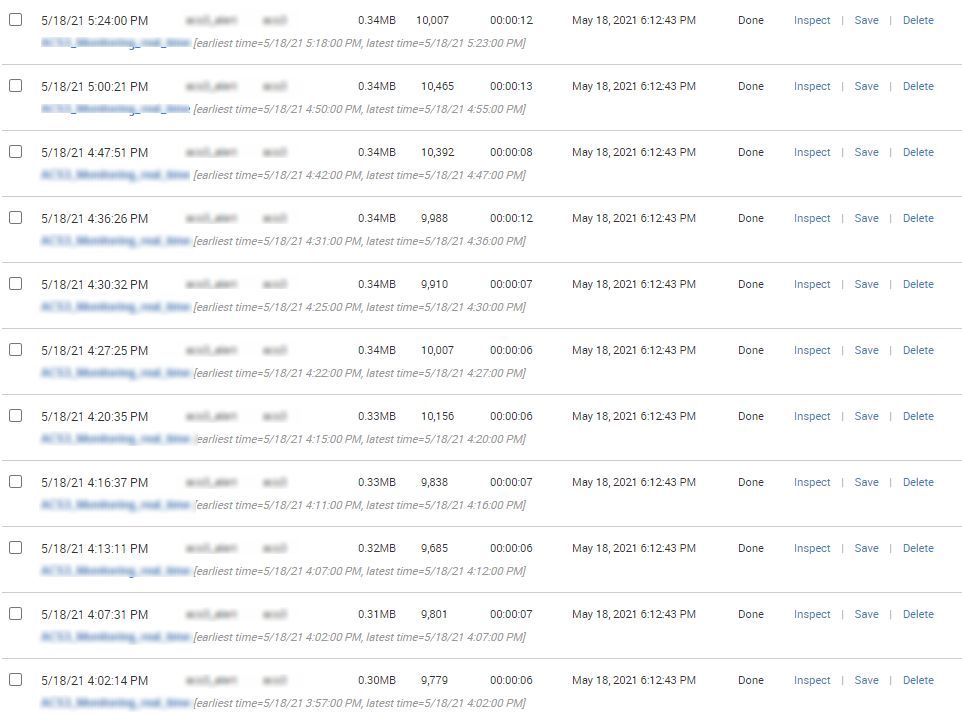
The goal : another alert must run each 5 min and must look last 2h to generate alerts. Directly on the real time the alert duration is 3 min. I hope the inspect the "lookup" is quicker.
- Mark as New
- Bookmark Message
- Subscribe to Message
- Mute Message
- Subscribe to RSS Feed
- Permalink
- Report Inappropriate Content

Have you checked the audittrail rather than relying on the UI?
index=_audit sourcetype=audittrail action="search" info="completed" savedsearch_name=[your alert]
- Mark as New
- Bookmark Message
- Subscribe to Message
- Mute Message
- Subscribe to RSS Feed
- Permalink
- Report Inappropriate Content
Hello,
Sorry, I'm using splunk 6.4.2
I find this command :
index=_internal "INFO StreamedSearch - Streamed search connection terminated" savedsearch_name="My_Alert" | table _time, search_id, server, active_searches, elapsedTime, search, savedsearch_name
And the frequency is the same. I schedule a mail for each alert, and it's the same in my outlook than on splunk.

Join the Splunk Community Slack to learn, troubleshoot, and make connections with fellow Splunk practitioners in real time!
Join Splunk User Groups to connect and learn in-person by region or remotely by topic or industry.
Meet the .conf26 AI Agent Buildathon Winners
Trusted Autonomy in the SOC: A Maturity Journey
Supercharging Windows Security Detection Performance: Introducing Hybrid Field ...
