
Join the Conversation
- Find Answers
- :
- Using Splunk
- :
- Splunk Search
- :
- How to search for values in a lookup table with wi...
- Subscribe to RSS Feed
- Mark Topic as New
- Mark Topic as Read
- Float this Topic for Current User
- Bookmark Topic
- Subscribe to Topic
- Mute Topic
- Printer Friendly Page
- Mark as New
- Bookmark Message
- Subscribe to Message
- Mute Message
- Subscribe to RSS Feed
- Permalink
- Report Inappropriate Content

My lookup table is a simple list of malicious domains. How can I do a search such that I can search for the malicious domain* instead of just an exact match for the malicious domain in my firewall logs?
Lookup table
badsite.com
malware.com
I want it to match against
theother.badsite.com/
microsoft.malware.com/download.exe
Current Query
index=web [|inputlookup badboylist.csv | fields uri] | stats count by uri
- Mark as New
- Bookmark Message
- Subscribe to Message
- Mute Message
- Subscribe to RSS Feed
- Permalink
- Report Inappropriate Content

Hi @DEAD_BEEF,
Please follow below steps.
1.) Create lookup with wildcard, for example
       Domain
    *badsite.com*
    *malware.com*
2.) Upload lookup file into splunk for example lookup filename is test.csv
3.) Create lookup definition , for example I have given definition name as test_lookup for test.csv file
4.) Create transforms.conf with below configuration
       [test_lookup]
    filename = test.csv
    match_type=WILDCARD(Domain)
5.) Reload splunk using https://<SH:8000>/debug/refresh or restart splunk.
6.) I have tried with below sample query and it works fine, in below first 5 lines are used to generate dummy data.
       | makeresults
    | eval Domain="badsite.com"
    | append [ | makeresults | eval Domain="theother.badsite.com/"]
    | append [ | makeresults | eval Domain="xyz.com"]
    | append [ | makeresults | eval Domain="microsoft.malware.com/download.exe"]
    | lookup test_lookup Domain AS Domain OUTPUT Domain AS Domain_lookup
Please find below screenshot with output for above query.
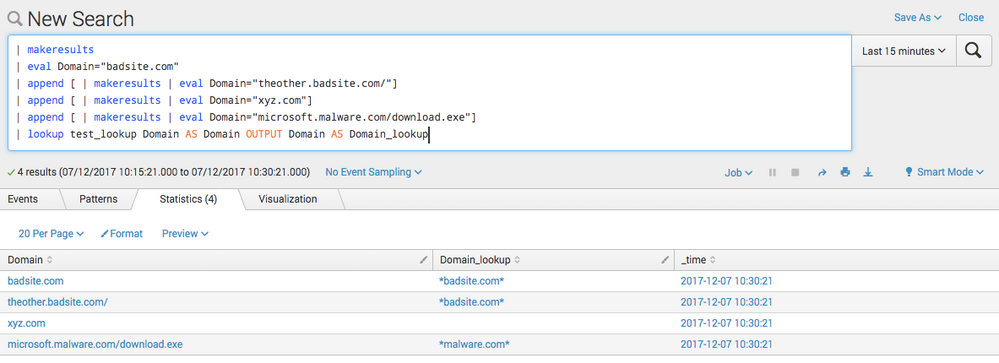
7.) Query which is provided in point 6 gives you matching and non-matching Domain but if you want to filter out only matching domain name then sample query will be
       | makeresults
    | eval Domain="badsite.com"
    | append [ | makeresults | eval Domain="theother.badsite.com/"]
    | append [ | makeresults | eval Domain="xyz.com"]
    | append [ | makeresults | eval Domain="microsoft.malware.com/download.exe"]
    | lookup test_lookup Domain AS Domain OUTPUT Domain AS Domain_lookup
    | where isnotnull(Domain_lookup)
I hope this helps.
Thanks,
Harshil

- Mark as New
- Bookmark Message
- Subscribe to Message
- Mute Message
- Subscribe to RSS Feed
- Permalink
- Report Inappropriate Content

@DEAD_BEEF, this question has been asked several times in past. Look at the post below:
https://answers.splunk.com/answers/52580/can-we-use-wildcard-characters-in-a-lookup-table.html
| makeresults | eval message= "Happy Splunking!!!"
- Mark as New
- Bookmark Message
- Subscribe to Message
- Mute Message
- Subscribe to RSS Feed
- Permalink
- Report Inappropriate Content
Hi @DEAD_BEEF,
Please follow below steps.
1.) Create lookup with wildcard, for example
       Domain
    *badsite.com*
    *malware.com*
2.) Upload lookup file into splunk for example lookup filename is test.csv
3.) Create lookup definition , for example I have given definition name as test_lookup for test.csv file
4.) Create transforms.conf with below configuration
       [test_lookup]
    filename = test.csv
    match_type=WILDCARD(Domain)
5.) Reload splunk using https://<SH:8000>/debug/refresh or restart splunk.
6.) I have tried with below sample query and it works fine, in below first 5 lines are used to generate dummy data.
       | makeresults
    | eval Domain="badsite.com"
    | append [ | makeresults | eval Domain="theother.badsite.com/"]
    | append [ | makeresults | eval Domain="xyz.com"]
    | append [ | makeresults | eval Domain="microsoft.malware.com/download.exe"]
    | lookup test_lookup Domain AS Domain OUTPUT Domain AS Domain_lookup
Please find below screenshot with output for above query.
7.) Query which is provided in point 6 gives you matching and non-matching Domain but if you want to filter out only matching domain name then sample query will be
       | makeresults
    | eval Domain="badsite.com"
    | append [ | makeresults | eval Domain="theother.badsite.com/"]
    | append [ | makeresults | eval Domain="xyz.com"]
    | append [ | makeresults | eval Domain="microsoft.malware.com/download.exe"]
    | lookup test_lookup Domain AS Domain OUTPUT Domain AS Domain_lookup
    | where isnotnull(Domain_lookup)
I hope this helps.
Thanks,
Harshil
- Mark as New
- Bookmark Message
- Subscribe to Message
- Mute Message
- Subscribe to RSS Feed
- Permalink
- Report Inappropriate Content
This is awesome! Interesting that it requires editing in transforms.conf but nothing in props.conf. Let me test this out with my data just to confirm before accepting.
- Mark as New
- Bookmark Message
- Subscribe to Message
- Mute Message
- Subscribe to RSS Feed
- Permalink
- Report Inappropriate Content
You might see that when you complete point 3, transforms.conf stanza will be created but you need to add one line match_type=WILDCARD(Domain)
- Mark as New
- Bookmark Message
- Subscribe to Message
- Mute Message
- Subscribe to RSS Feed
- Permalink
- Report Inappropriate Content
Hi @DEAD_BEEF,
Answer provided by me worked for you? If yes then please accept and upvote it.
Thanks,
Harshil

Join the Splunk Community Slack to learn, troubleshoot, and make connections with fellow Splunk practitioners in real time!
Join Splunk User Groups to connect and learn in-person by region or remotely by topic or industry.
Make Your Machine Data AI-Ready in Splunk
How to Break a Kubernetes Pod on Purpose and Let the AI Troubleshooting Agent Find ...
Splunk Add-on for Microsoft Windows 11.0.3: Parse Once, Search Faster
