
Join the Conversation
- Find Answers
- :
- Using Splunk
- :
- Splunk Search
- :
- Re: tonumber() not working on scientific notation
- Subscribe to RSS Feed
- Mark Topic as New
- Mark Topic as Read
- Float this Topic for Current User
- Bookmark Topic
- Subscribe to Topic
- Mute Topic
- Printer Friendly Page
- Mark as New
- Bookmark Message
- Subscribe to Message
- Mute Message
- Subscribe to RSS Feed
- Permalink
- Report Inappropriate Content
tonumber() not working on scientific notation

Hi All,
I am indexing a file with JSON and epoch values on the JSON are written in scientific notation
An example of a field I that is parsed by Splunk:
incStart: "1.4848974e+12"
Which is seen as a string. In the event view window however it is show as an integer (or long):
I've seen using eval incStartInt = tonumber(incStart) should work, but its not creating a new field with the value as an integer.

Am I doing something wrong? I'm using Splunk 6.5.2
- Mark as New
- Bookmark Message
- Subscribe to Message
- Mute Message
- Subscribe to RSS Feed
- Permalink
- Report Inappropriate Content

You wrote:
I am indexing a file with JSON
...
incStart: "1.4848974e+12"
I'm curious. I doubt that this is a verbatim example of the JSON in the input file, because it's not JSON: in JSON—as opposed to a JavaScript object literal—you must enclose property names, such as incStart, in quotes.
And then, you enclose the numeric value in quotes, as if it were a string value. Are you really enclosing that value in quotes in the JSON (JSON Lines?) input file?
If so—and if you have any control over the format of that input file—then do this instead:
"incStart": 1.4848974e+12
Splunk (I'm currently using 7.3) correctly ingests such numbers in scientific notation in JSON.
- Mark as New
- Bookmark Message
- Subscribe to Message
- Mute Message
- Subscribe to RSS Feed
- Permalink
- Report Inappropriate Content
HI 999chris
you can try this
 | makeresults |eval incStart= "1.4848974e+12"
 |fieldformat incStartint =tonumber(incStart)
but you can't use fieldformat to do this
 | makeresults |eval incStart= "1.4848974e+12" | eval inStart1="1.23457e+10"
 |foreach inStart[fieldformat <<FIELD>>=tonumber(<<FIELD>>)]
If you have more column to number ,you can try this search
 | makeresults |eval incStart= "1.4848974e+12" | eval inStart1="1.23457e+10"
 |foreach inStart[fieldformat <<FIELD>>=tonumber(<<FIELD>>)]
- Mark as New
- Bookmark Message
- Subscribe to Message
- Mute Message
- Subscribe to RSS Feed
- Permalink
- Report Inappropriate Content

This works for me:
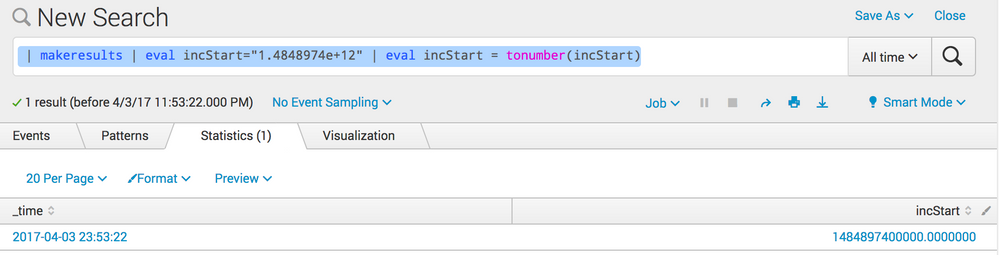
Are you sure the field as it is extracted from JSON is in fact a string (i.e. is shown in the list of interesting fields with a 'a' prefix)?
If it is extracted as a number (which would make sense, given the value), the event viewer value is simply wrong (assuming it is from the same event than your example string representation.




Join the Splunk Community Slack to learn, troubleshoot, and make connections with fellow Splunk practitioners in real time!
Join Splunk User Groups to connect and learn in-person by region or remotely by topic or industry.
A Four-Part Event Series: Full Stack Observability For the AI Era
SOC4Kafka - New Kafka Connector Powered by OpenTelemetry
Event Series: Level up your SOC: Advancing with Splunk Enterprise Security
