
Join the Conversation
- Find Answers
- :
- Using Splunk
- :
- Splunk Search
- :
- inputs.conf whitelist regex issue on message field
- Subscribe to RSS Feed
- Mark Topic as New
- Mark Topic as Read
- Float this Topic for Current User
- Bookmark Topic
- Subscribe to Topic
- Mute Topic
- Printer Friendly Page
- Mark as New
- Bookmark Message
- Subscribe to Message
- Mute Message
- Subscribe to RSS Feed
- Permalink
- Report Inappropriate Content

I am unable to whitelist input, I do not understand why, my Splunk is ingesting data from a c-icap server logfile and I only want to keep these logs (the ones with Anti-Virus Hit's), here is my inputs.conf file:
[monitor:///var/log/c-icap/server.log]
disabled = false
sourcetype = c-icap

whitelist= Message = ".*DEBUG.*Clamd.*FOUND.*"
This is the type of log I want to allow into Splunk, my regex works fine, I have tested it, it is unclear what key/field name I should be using, I also tried "Event" instead of "Message" without success:
Wed Jun 3 17:04:06 2020, 24488/1744570112, squidclamav.c(861) squidclamav_end_of_data_handler: Wed Jun 3 17:04:06 2020, 24488/1744570112, DEBUG received from Clamd: stream: Win.Trojan.Powershell-7007230-0 FOUND
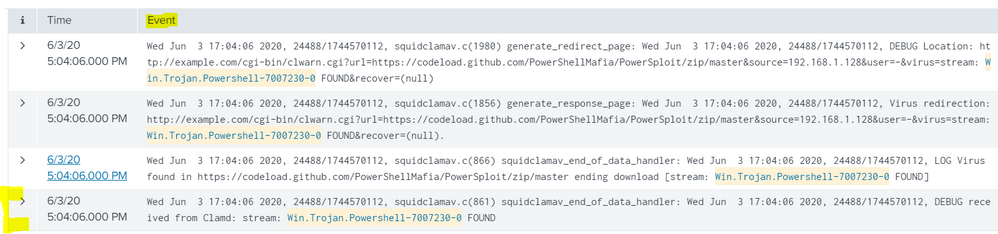
PS: I am using the free version of Splunk.

- Mark as New
- Bookmark Message
- Subscribe to Message
- Mute Message
- Subscribe to RSS Feed
- Permalink
- Report Inappropriate Content


Hi @williamhardykimber,
as you can read at https://docs.splunk.com/Documentation/Splunk/latest/Admin/Inputsconf , the whitelist option permits to filter the filenames to input not to filter the events and anyway it takes only regexes not strings like your.
In Splunk it's possible to filter events on Indexers or (when present) on Heavy Forwarders, not on Universal Forwarders, with the only exception of Windows EventLogs.
So if you want to filter events you have to follow instructions at https://docs.splunk.com/Documentation/SplunkCloud/8.0.2004/Forwarding/Routeandfilterdatad#Filter_eve... .
Ciao.
Giuseppe
- Mark as New
- Bookmark Message
- Subscribe to Message
- Mute Message
- Subscribe to RSS Feed
- Permalink
- Report Inappropriate Content
I changed the regex and followed gcusello's advice, this worked like a charm (use the same regex for field extrations) :
:: props.conf ::
[c-icap]
DATETIME_CONFIG =
NO_BINARY_CHECK = true
category = Custom
description = squiclamav
disabled = false
pulldown_type = true
TRANSFORMS-set= setnull,setparsing
:: Transforms.conf ::
[setparsing]
REGEX=(.*Location.*http:\/\/example\.com\/cgi-bin\/clwarn\.cgi\?url=(?P<url>.*)\?X-Amz-Algorithm.*source=(?P<src_ip>[0-9\.]*).*stream:\s(?P<threat_name>[a-zA-Z0-9\-._]+).*)
DEST_KEY=queue
FORMAT=indexQueue
- Mark as New
- Bookmark Message
- Subscribe to Message
- Mute Message
- Subscribe to RSS Feed
- Permalink
- Report Inappropriate Content
Hi @williamhardykimber,
as you can read at https://docs.splunk.com/Documentation/Splunk/latest/Admin/Inputsconf , the whitelist option permits to filter the filenames to input not to filter the events and anyway it takes only regexes not strings like your.
In Splunk it's possible to filter events on Indexers or (when present) on Heavy Forwarders, not on Universal Forwarders, with the only exception of Windows EventLogs.
So if you want to filter events you have to follow instructions at https://docs.splunk.com/Documentation/SplunkCloud/8.0.2004/Forwarding/Routeandfilterdatad#Filter_eve... .
Ciao.
Giuseppe
- Mark as New
- Bookmark Message
- Subscribe to Message
- Mute Message
- Subscribe to RSS Feed
- Permalink
- Report Inappropriate Content
Interesting, something like this ?
Edit props.conf and add the following:
[c-icap]
TRANSFORMS-icap=icapnull

Edit transforms.conf and add the following:
[icapnull]
REGEX=(.*DEBUG.*Clamd.*FOUND.*)
DEST_KEY=queue
FORMAT=nullQueue
- Mark as New
- Bookmark Message
- Subscribe to Message
- Mute Message
- Subscribe to RSS Feed
- Permalink
- Report Inappropriate Content
Hi @williamhardykimber,
yes, you can check the regex also in Splunk using the regex command
your search
| regex ".*DEBUG.*Clamd.*FOUND.*"
Ciao.
Giuseppe

Index This | What is broken 80% of the time by February?
Unlock Faster Time-to-Value on Edge and Ingest Processor with New SPL2 Pipeline ...
Splunk MCP & Agentic AI: Machine Data Without Limits
