
Join the Conversation
- Find Answers
- :
- Using Splunk
- :
- Splunk Search
- :
- declaring a variable in splunk dasboard and make a...
- Subscribe to RSS Feed
- Mark Topic as New
- Mark Topic as Read
- Float this Topic for Current User
- Bookmark Topic
- Subscribe to Topic
- Mute Topic
- Printer Friendly Page
- Mark as New
- Bookmark Message
- Subscribe to Message
- Mute Message
- Subscribe to RSS Feed
- Permalink
- Report Inappropriate Content

I have a splunk dashboard with multiple panels/searches. My sample dashboard below.
I want to be able to declare a variable at the top that is available to every search below, on the dashboard.
Can this be done in advanced XML. Appreciate any advise.
My sample dashboard. For example, I am using VaribleX = 500 as the variable to be shared across the dashboard.
<form>
    ...

VaribleX = 500
  <row>
    <panel>
      <title>device=BRT01KPR component="GigabitEthernet1_0_1.200" Mbps</title>
      <table>
        <search>
          <query>
          search 1 ... | timechart span=d sum(VariableX)
          </query>
          <earliest>-1d@d</earliest>
          <latest>@d</latest>
          <sampleRatio>1</sampleRatio>
        </search>
        <option name="count">100</option>
        ...
      </table>
    </panel>
    <panel>
      <title>device=BRT01KPR component="GigabitEthernet1_0_1.200" Mbps</title>
      <table>
        <search>
          <query>
          search 1 ... | timechart span=d sum(VariableX)
          </query>
          <earliest>-1d@d</earliest>
          <latest>@d</latest>
          <sampleRatio>1</sampleRatio>
        </search>
        <option name="count">100</option>
        ...
      </table>
    </panel>
</row>

...

  <row>
    <panel>
      <title>device=BRT01KPR component="GigabitEthernet1_0_1.200" Mbps</title>
      <table>
        <search>
          <query>
          search 1 ... | timechart span=d sum(VariableX)
          </query>
          <earliest>-1d@d</earliest>
          <latest>@d</latest>
          <sampleRatio>1</sampleRatio>
        </search>
        <option name="count">100</option>
        ...
      </table>
    </panel>
    <panel>
      <title>device=BRT01KPR component="GigabitEthernet1_0_1.200" Mbps</title>
      <table>
        <search>
          <query>
          search 1 ... | timechart span=d sum(VariableX)
          </query>
          <earliest>-1d@d</earliest>
          <latest>@d</latest>
          <sampleRatio>1</sampleRatio>
        </search>
        <option name="count">100</option>
        ...
      </table>
    </panel>
</row>

</form>
- Mark as New
- Bookmark Message
- Subscribe to Message
- Mute Message
- Subscribe to RSS Feed
- Permalink
- Report Inappropriate Content
I believe you want to pass value dynamically..!
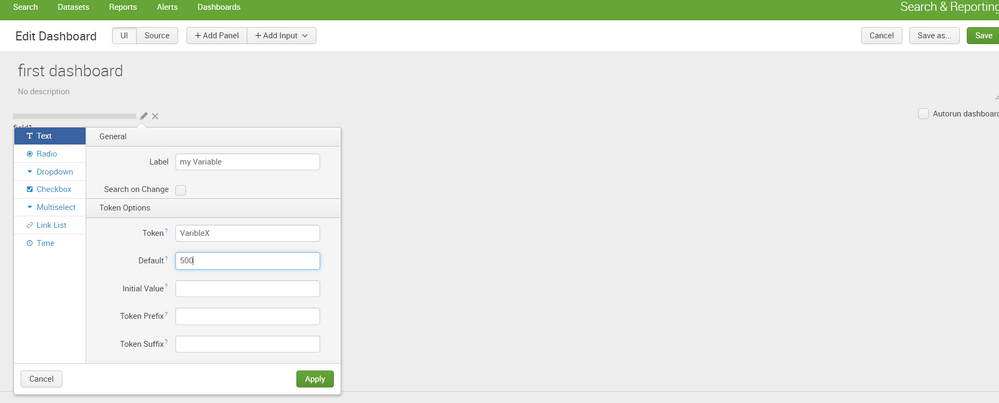
You can do this using simple XML and you have started correctly by selecting form. Now you should be able to select input type text from "Add Input" and give label for your variable(My Variable), variable name (VariableX), and default value(500) as optional. Then use your variable in dashboard code as $VariableX$ to replace user input.
your input should look something like shown in screenshot and your search like below.
<query>
           search 1 ... Field=$VariableX$ | ....
</query>

- Mark as New
- Bookmark Message
- Subscribe to Message
- Mute Message
- Subscribe to RSS Feed
- Permalink
- Report Inappropriate Content

If you don't want users selecting that value via an input, you can just use the init tag to set it on dashboard load. Here's a simple example:
<dashboard>
  <label>Init Token</label>
  <init>
    <set token="variableX">splunkd</set>
  </init>
  <row>
    <panel>
      <table>
        <search>
          <query>|  tstats count where index=_internal sourcetype=$variableX$</query>
          <earliest>-24h@h</earliest>
          <latest>now</latest>
        </search>
        <option name="drilldown">none</option>
      </table>
    </panel>
  </row>
</dashboard>
- Mark as New
- Bookmark Message
- Subscribe to Message
- Mute Message
- Subscribe to RSS Feed
- Permalink
- Report Inappropriate Content
tks both answers are good
- Mark as New
- Bookmark Message
- Subscribe to Message
- Mute Message
- Subscribe to RSS Feed
- Permalink
- Report Inappropriate Content
I believe you want to pass value dynamically..!
You can do this using simple XML and you have started correctly by selecting form. Now you should be able to select input type text from "Add Input" and give label for your variable(My Variable), variable name (VariableX), and default value(500) as optional. Then use your variable in dashboard code as $VariableX$ to replace user input.
your input should look something like shown in screenshot and your search like below.
<query>
           search 1 ... Field=$VariableX$ | ....
</query>
- Mark as New
- Bookmark Message
- Subscribe to Message
- Mute Message
- Subscribe to RSS Feed
- Permalink
- Report Inappropriate Content
tks both answers are good
- Mark as New
- Bookmark Message
- Subscribe to Message
- Mute Message
- Subscribe to RSS Feed
- Permalink
- Report Inappropriate Content
<form hideFilters="true"> to hide the filters

Upcoming Webinar: Unmasking Insider Threats with Slunk Enterprise Security’s UEBA
.conf25 technical session recap of Observability for Gen AI: Monitoring LLM ...
A Season of Skills: New Splunk Courses to Light Up Your Learning Journey
