
Join the Conversation
- Find Answers
- :
- Using Splunk
- :
- Splunk Search
- :
- What is the difference between report range and su...
- Subscribe to RSS Feed
- Mark Topic as New
- Mark Topic as Read
- Float this Topic for Current User
- Bookmark Topic
- Subscribe to Topic
- Mute Topic
- Printer Friendly Page
- Mark as New
- Bookmark Message
- Subscribe to Message
- Mute Message
- Subscribe to RSS Feed
- Permalink
- Report Inappropriate Content

Hi
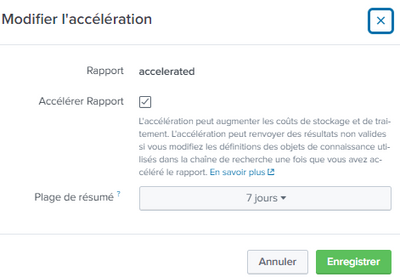
I dont understand the goal of the summary range in accelerated search
what is the difference with the report range
For example if i run my report on the last 30 days and I put 7 days in the summary range what it means exactly?
Rgds
- Mark as New
- Bookmark Message
- Subscribe to Message
- Mute Message
- Subscribe to RSS Feed
- Permalink
- Report Inappropriate Content


Hi @jip31,
as you can read at https://docs.splunk.com/Documentation/Splunk/9.0.1/Report/Acceleratereports ,
When you accelerate a report, you must choose a Summary Range value such as 7 Days, 3 Months, or All Time. This range represents the approximate span of time that is always covered by the summary at any given moment, once it is built. When the summary is built and you run this report again, to get full acceleration benefits the report must have a time range that fits within this summary range. For more information, see the subtopic "How Summary Range works," below.in other words, the Summary Range is the accelerated time period.
If you want to search a larger time, you'll use the Summary Ragen for its period and the normal Splunk search for the remaining.
Ciao.
Giuseppe
- Mark as New
- Bookmark Message
- Subscribe to Message
- Mute Message
- Subscribe to RSS Feed
- Permalink
- Report Inappropriate Content
Hi @jip31,
as you can read at https://docs.splunk.com/Documentation/Splunk/9.0.1/Report/Acceleratereports ,
When you accelerate a report, you must choose a Summary Range value such as 7 Days, 3 Months, or All Time. This range represents the approximate span of time that is always covered by the summary at any given moment, once it is built. When the summary is built and you run this report again, to get full acceleration benefits the report must have a time range that fits within this summary range. For more information, see the subtopic "How Summary Range works," below.in other words, the Summary Range is the accelerated time period.
If you want to search a larger time, you'll use the Summary Ragen for its period and the normal Splunk search for the remaining.
Ciao.
Giuseppe
- Mark as New
- Bookmark Message
- Subscribe to Message
- Mute Message
- Subscribe to RSS Feed
- Permalink
- Report Inappropriate Content
- Mark as New
- Bookmark Message
- Subscribe to Message
- Mute Message
- Subscribe to RSS Feed
- Permalink
- Report Inappropriate Content
Hi @jip31,
good for you, see next time!
Ciao and happy splunking
Giuseppe
P.S.: Karma Points are appreciated 😉


Join the Splunk Community Slack to learn, troubleshoot, and make connections with fellow Splunk practitioners in real time!
Join Splunk User Groups to connect and learn in-person by region or remotely by topic or industry.
A Four-Part Event Series: Full Stack Observability For the AI Era
SOC4Kafka - New Kafka Connector Powered by OpenTelemetry
Event Series: Level up your SOC: Advancing with Splunk Enterprise Security
