
Join the Conversation
- Find Answers
- :
- Using Splunk
- :
- Splunk Search
- :
- Trending sum count
- Subscribe to RSS Feed
- Mark Topic as New
- Mark Topic as Read
- Float this Topic for Current User
- Bookmark Topic
- Subscribe to Topic
- Mute Topic
- Printer Friendly Page
- Mark as New
- Bookmark Message
- Subscribe to Message
- Mute Message
- Subscribe to RSS Feed
- Permalink
- Report Inappropriate Content
Trending sum count

Hi,
I am trying to create a trending single value however having trouble setting it up. Essentially the stats below sums up VALUE_NUM and works as expected however i would like to compare this to 7d period or with the same previous_value of the time-picker
index=main VALUE_NUM>0 | dedup UUID | stats sum(VALUE_NUM)I have tried
index=main VALUE_NUM>0 | dedup UUID | timechart count as sum(VALUE_NUM) span=7dhowever this isn't returning the correct value
TIA
- Mark as New
- Bookmark Message
- Subscribe to Message
- Mute Message
- Subscribe to RSS Feed
- Permalink
- Report Inappropriate Content


With a single value visualisation, you can add a trend sparkline showing the comparison against earlier, but you need to use timechart
index=main VALUE_NUM>0
| dedup UUID
| timechart span=1d sum(VALUE_NUM)
and then in the format section of the single value viz, set these
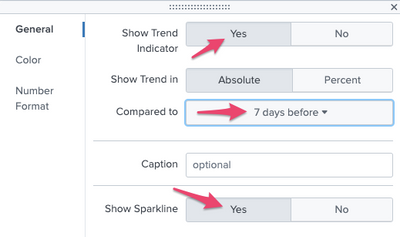
Hope this helps
Another command you can use is timewrap, which can then show corresponding time periods mapped onto the same chart period
- Mark as New
- Bookmark Message
- Subscribe to Message
- Mute Message
- Subscribe to RSS Feed
- Permalink
- Report Inappropriate Content
Thank you. Close however the numbers aren't adding up.
So for instance: if run stats sum - the total count comes to over 2000. This is the sum of the values in VALUE_NUM. There are multiple events that has VALUE_NUM with the value greater than 0.
whereas with Timechart - it comes to about 300 (missing 1700)
These events are usually populated during the weekends and some (small amount of events) come during the day. So the sum of VALUE_NUM over 7 days = 2000; and comparing it to the past 7 days of the sum would be ideal.
ex:
Sum of Week1=2500
Sum of Week2=1800
Sum of Week3=2000
So trendline for Week3 would show an uptick of 200 and the count as 2000


Join the Splunk Community Slack to learn, troubleshoot, and make connections with fellow Splunk practitioners in real time!
Join Splunk User Groups to connect and learn in-person by region or remotely by topic or industry.
A Four-Part Event Series: Full Stack Observability For the AI Era
SOC4Kafka - New Kafka Connector Powered by OpenTelemetry
Event Series: Level up your SOC: Advancing with Splunk Enterprise Security
