
Join the Conversation
- Find Answers
- :
- Using Splunk
- :
- Splunk Search
- :
- Re: Query to Display change in values of fields
- Subscribe to RSS Feed
- Mark Topic as New
- Mark Topic as Read
- Float this Topic for Current User
- Bookmark Topic
- Subscribe to Topic
- Mute Topic
- Printer Friendly Page
- Mark as New
- Bookmark Message
- Subscribe to Message
- Mute Message
- Subscribe to RSS Feed
- Permalink
- Report Inappropriate Content

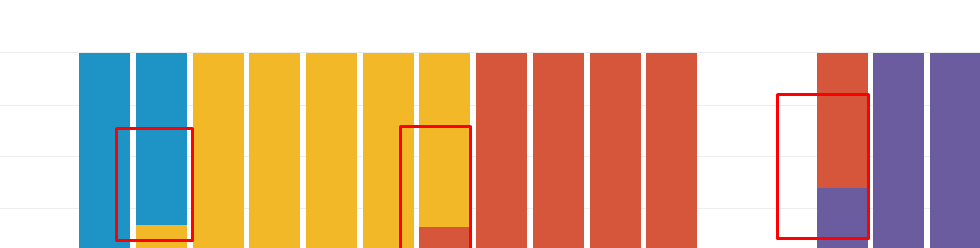
I trying to write a query to check the changes in versions of a software. When using timechart (stacked) I can see multiple columns (when there was change in the version of software) and I am trying to display only those days which had occurrence of multiple columns in the graph. Any suggestions ?

- Mark as New
- Bookmark Message
- Subscribe to Message
- Mute Message
- Subscribe to RSS Feed
- Permalink
- Report Inappropriate Content
The streamstats command helped. Borrowed the concept from one of the Splunk blog entries (on tracking DHCP lease for a particular MAC id).
| streamstats current=false last(Version) as new_Version last(_time) AS time_of_change BY src_ip | where Version!=new_Version | convert ctime(time_of_change) AS time_of_change | rename Version as old_Version | stats count by date_wday
- Mark as New
- Bookmark Message
- Subscribe to Message
- Mute Message
- Subscribe to RSS Feed
- Permalink
- Report Inappropriate Content
The streamstats command helped. Borrowed the concept from one of the Splunk blog entries (on tracking DHCP lease for a particular MAC id).
| streamstats current=false last(Version) as new_Version last(_time) AS time_of_change BY src_ip | where Version!=new_Version | convert ctime(time_of_change) AS time_of_change | rename Version as old_Version | stats count by date_wday
- Mark as New
- Bookmark Message
- Subscribe to Message
- Mute Message
- Subscribe to RSS Feed
- Permalink
- Report Inappropriate Content

@muralianup, please accept your Answer to mark the question as answered.
| makeresults | eval message= "Happy Splunking!!!"
- Mark as New
- Bookmark Message
- Subscribe to Message
- Mute Message
- Subscribe to RSS Feed
- Permalink
- Report Inappropriate Content

Can you share your query? Without knowing that, my suggestion would be to add following to your existing search.
your current search producing above output
| eval versions=0
| foreach * [eval versions=if('<<FIELD>>' > 0,versions+1,versions)]
| where versions>1 | fields -versions
- Mark as New
- Bookmark Message
- Subscribe to Message
- Mute Message
- Subscribe to RSS Feed
- Permalink
- Report Inappropriate Content
Base query is index=web_prxy domain=abc useragent= | rex filed=useragent "(?P[\d]*)" | timechart count by Version limit=5
Does stereamstats helps ?
- Mark as New
- Bookmark Message
- Subscribe to Message
- Mute Message
- Subscribe to RSS Feed
- Permalink
- Report Inappropriate Content
Just extending @somesoni2 's Answer to your scenario.
<YourBaseSearch>
| rename * as Count*
| rename Count_time as _time
| rename Count_span as _span
| eval versions=0
| foreach Count* [eval versions=if(<<FIELD>> > 0,versions+1,versions)]
| search versions>1
| fields - versions
| rename Count* as *
| makeresults | eval message= "Happy Splunking!!!"

Join the Splunk Community Slack to learn, troubleshoot, and make connections with fellow Splunk practitioners in real time!
Join Splunk User Groups to connect and learn in-person by region or remotely by topic or industry.
[Puzzles] Solve, Learn, Repeat: Matching cron expressions
Design, Compete, Win: Submit Your Best Splunk Dashboards for a .conf26 Pass
May 2026 Splunk Expert Sessions: Security & Observability
