
Join the Conversation
- Find Answers
- :
- Using Splunk
- :
- Splunk Search
- :
- How to use eval if there is no result from the bas...
- Subscribe to RSS Feed
- Mark Topic as New
- Mark Topic as Read
- Float this Topic for Current User
- Bookmark Topic
- Subscribe to Topic
- Mute Topic
- Printer Friendly Page
- Mark as New
- Bookmark Message
- Subscribe to Message
- Mute Message
- Subscribe to RSS Feed
- Permalink
- Report Inappropriate Content


Hello everybody,
there were two questions lately, related to using eval when there were no events from the base search:
http://answers.splunk.com/answers/171101/stats-count-eval-error-using-or.html
http://answers.splunk.com/answers/174458/error-when-using-eval-in-a-range.html
So, how to use eval if there is no result from the base search and (as you already might have figured out) without the use of any subsearch ?
cheers, MuS
- Mark as New
- Bookmark Message
- Subscribe to Message
- Mute Message
- Subscribe to RSS Feed
- Permalink
- Report Inappropriate Content
I will show an example using this run everywhere command and explain it line by line:
First is the base search:
index=_internal sourcetype=splunkd splunk_server=local earliest=-1h@h latest=-0h@h
Next we do some eval to get some fake isFailure field:
| eval isFailure=if(searchmatch("source"),1,0)
Now comes the trick, do a simple stats count AS .. and provide any further needed values as well:
| stats count as myCount sum(isFailure) AS isFailure
Next, check if there were no search results, if so set the value of isFailure to "0" .If there were search results, set isFailureto the sum of the isFailure field:
| eval isFailure=if(myCount=="0",0,isFailure)
Now set the failuresCategory to different levels:
| eval failuresCategory = case(isFailure=0,"low",isFailure<1000,"elevated",isFailure>=1000,"severe")
and finally display it using table
| table myCount, failuresCategory, isFailure
Now, let do the no results search and see if this works:
index=_internal sourcetype=splunkd splunk_server=local earliest=-1h@h latest=-0h@h this will bring back no results from the base search
| eval isFailure=if(searchmatch("source"),1,0)
| stats count as myCount sum(isFailure) AS isFailure
| eval isFailure=if(myCount=="0",0,isFailure)
| eval failuresCategory = case(isFailure=0,"low",isFailure<1000,"elevated",isFailure>=1000,"severe")
| table myCount, failuresCategory, isFailure
and the result looks like this:
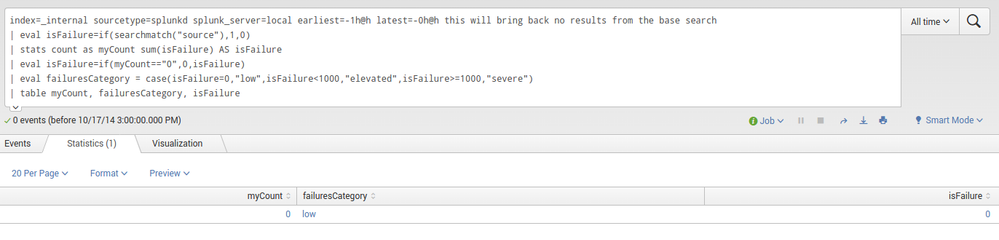
Instead of table you can use any command like chart or rangemap as well.
hope this helps ...
cheers, MuS

- Mark as New
- Bookmark Message
- Subscribe to Message
- Mute Message
- Subscribe to RSS Feed
- Permalink
- Report Inappropriate Content
I will show an example using this run everywhere command and explain it line by line:
First is the base search:
index=_internal sourcetype=splunkd splunk_server=local earliest=-1h@h latest=-0h@h
Next we do some eval to get some fake isFailure field:
| eval isFailure=if(searchmatch("source"),1,0)
Now comes the trick, do a simple stats count AS .. and provide any further needed values as well:
| stats count as myCount sum(isFailure) AS isFailure
Next, check if there were no search results, if so set the value of isFailure to "0" .If there were search results, set isFailureto the sum of the isFailure field:
| eval isFailure=if(myCount=="0",0,isFailure)
Now set the failuresCategory to different levels:
| eval failuresCategory = case(isFailure=0,"low",isFailure<1000,"elevated",isFailure>=1000,"severe")
and finally display it using table
| table myCount, failuresCategory, isFailure
Now, let do the no results search and see if this works:
index=_internal sourcetype=splunkd splunk_server=local earliest=-1h@h latest=-0h@h this will bring back no results from the base search
| eval isFailure=if(searchmatch("source"),1,0)
| stats count as myCount sum(isFailure) AS isFailure
| eval isFailure=if(myCount=="0",0,isFailure)
| eval failuresCategory = case(isFailure=0,"low",isFailure<1000,"elevated",isFailure>=1000,"severe")
| table myCount, failuresCategory, isFailure
and the result looks like this:
Instead of table you can use any command like chart or rangemap as well.
hope this helps ...
cheers, MuS
- Mark as New
- Bookmark Message
- Subscribe to Message
- Mute Message
- Subscribe to RSS Feed
- Permalink
- Report Inappropriate Content

Very nice! Sooo, how would I do this with a "stats" command using "by _time". Ths solution is working perfectly on my implementations, but now I have one grouped by time. Maybe I need to run it through a timechart instead...hmmm
Thank you!

Stronger Security with Federated Search for S3, GCP SQL & Australian Threat ...
Accelerating Observability as Code with the Splunk AI Assistant
Integrating Splunk Search API and Quarto to Create Reproducible Investigation ...
