
Join the Conversation
- Find Answers
- :
- Using Splunk
- :
- Splunk Search
- :
- How to split count by product by another value?
- Subscribe to RSS Feed
- Mark Topic as New
- Mark Topic as Read
- Float this Topic for Current User
- Bookmark Topic
- Subscribe to Topic
- Mute Topic
- Printer Friendly Page
- Mark as New
- Bookmark Message
- Subscribe to Message
- Mute Message
- Subscribe to RSS Feed
- Permalink
- Report Inappropriate Content
How to split count by product by another value?

Hi, I have the following query:
| bin _time span=1d | stats count as ProductCount by applysourcetype, product, _time

| where _time=relative_time(now(), "-d@d") or _time=relative_time(now(), "-8d@d")

| eval when = if(_time=relative_time(now(), "-d@d"), "(Yesterday)", "(7 Days Ago)")

| eval "Products Ordered {when}" = ProductCount

| fields - _time ProductCount  when

| stats  values(*) as * by product , applysourcetype
and I'm getting following output:
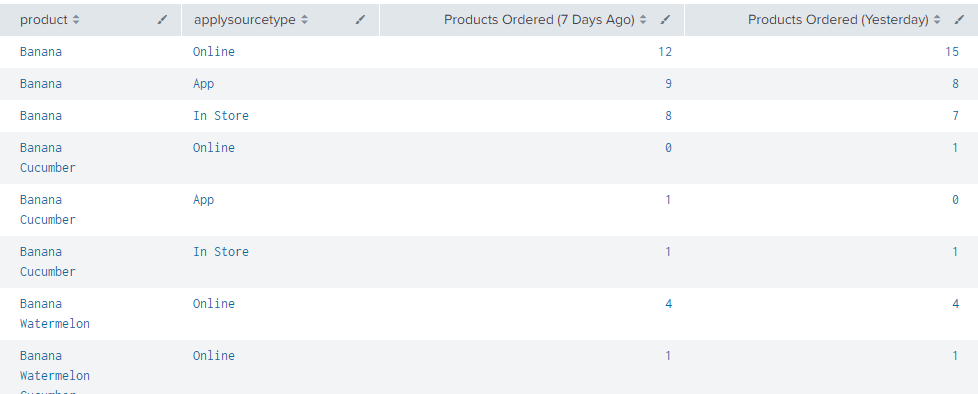
How can make product filed one row for unique product?
- Mark as New
- Bookmark Message
- Subscribe to Message
- Mute Message
- Subscribe to RSS Feed
- Permalink
- Report Inappropriate Content

| mvexpand productat the end of your search should do the trick. mvexpand docs here.
- Mark as New
- Bookmark Message
- Subscribe to Message
- Mute Message
- Subscribe to RSS Feed
- Permalink
- Report Inappropriate Content
- Mark as New
- Bookmark Message
- Subscribe to Message
- Mute Message
- Subscribe to RSS Feed
- Permalink
- Report Inappropriate Content


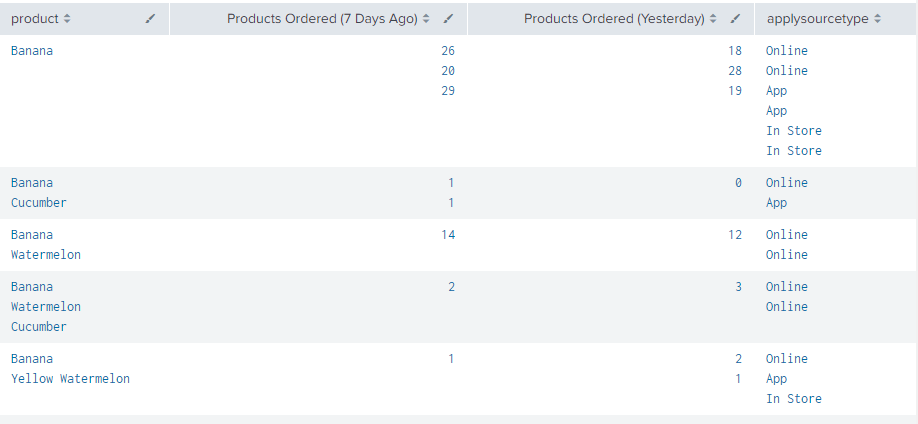
| stats list(*) as * by product- Mark as New
- Bookmark Message
- Subscribe to Message
- Mute Message
- Subscribe to RSS Feed
- Permalink
- Report Inappropriate Content
got this
- Mark as New
- Bookmark Message
- Subscribe to Message
- Mute Message
- Subscribe to RSS Feed
- Permalink
- Report Inappropriate Content
One unique product per row - which is what you said. If this is not what you wanted, perhaps you can give an example of what you were expecting?
- Mark as New
- Bookmark Message
- Subscribe to Message
- Mute Message
- Subscribe to RSS Feed
- Permalink
- Report Inappropriate Content
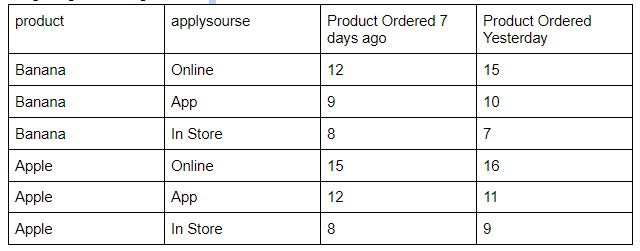
From original query I’m getting something like this :
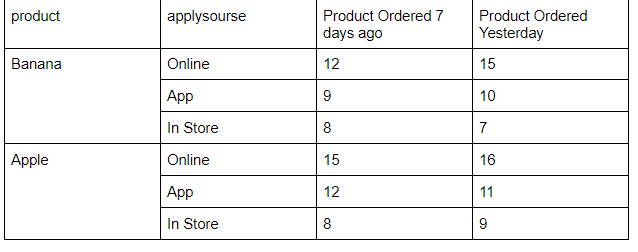
I want to get something like this:
- Mark as New
- Bookmark Message
- Subscribe to Message
- Mute Message
- Subscribe to RSS Feed
- Permalink
- Report Inappropriate Content
The standard table view doesn't merge cells across rows. Using stats list(*) as * by product should at least group the fields into multi-value lists which is close to what you want. If you still want separate rows for the counts, with blank entries in the product column for subsequent rows for the same product, you could use some CSS to hide them. This is a little fiddly to do but possible.


Join the Splunk Community Slack to learn, troubleshoot, and make connections with fellow Splunk practitioners in real time!
Join Splunk User Groups to connect and learn in-person by region or remotely by topic or industry.
A Four-Part Event Series: Full Stack Observability For the AI Era
SOC4Kafka - New Kafka Connector Powered by OpenTelemetry
Event Series: Level up your SOC: Advancing with Splunk Enterprise Security
