
Join the Conversation
- Find Answers
- :
- Using Splunk
- :
- Splunk Search
- :
- Re: How to search the table by the range set of si...
- Subscribe to RSS Feed
- Mark Topic as New
- Mark Topic as Read
- Float this Topic for Current User
- Bookmark Topic
- Subscribe to Topic
- Mute Topic
- Printer Friendly Page
- Mark as New
- Bookmark Message
- Subscribe to Message
- Mute Message
- Subscribe to RSS Feed
- Permalink
- Report Inappropriate Content
How to search the table by the range set of size in the input?

I want to search file by range of size assigned in the input but I'm not sure how.
Example: I pick 50M in the choices because I want to search files that are having 50M to 199M size.
Input Source:
</input>
<input type="dropdown" token="size_tk">
<label>File Size:</label>
<choice value="*">ALL</choice>
<choice value="50M">50M</choice>
<choice value="200M">200M</choice>
<choice value="500M">500M</choice>
<choice value="1G">1G</choice>
<choice value="2G">2G</choice>
<search>
<query>index=tech_filesystem
| makemv delim="," filesize
| stats count by filesize</query>
<earliest>rt-30s</earliest>
<latest>rt</latest>
</search>- Mark as New
- Bookmark Message
- Subscribe to Message
- Mute Message
- Subscribe to RSS Feed
- Permalink
- Report Inappropriate Content

maybe something like this?
<dashboard>
<label>Test filesize</label>
<fieldset>
<input type="dropdown" token="size_tk_from" searchWhenChanged="true">
<label>File Size from:</label>
<choice value="*">ALL</choice>
<choice value="50000">50M</choice>
<choice value="200000">200M</choice>
<choice value="500000">500M</choice>
<choice value="1000000">1G</choice>
<choice value="2000000">2G</choice>
<fieldForLabel>size</fieldForLabel>
<fieldForValue>size</fieldForValue>
<default>*</default>
<initialValue>*</initialValue>
</input>
<input type="dropdown" token="size_tk_to" searchWhenChanged="true">
<label>File Size to:</label>
<choice value="*">ALL</choice>
<choice value="50000">50M</choice>
<choice value="200000">200M</choice>
<choice value="500000">50M</choice>
<choice value="1000000">1G</choice>
<choice value="2000000">2G</choice>
<fieldForLabel>size</fieldForLabel>
<fieldForValue>size</fieldForValue>
<default>*</default>
<initialValue>*</initialValue>
</input>
</fieldset>
<row>
  <panel>
    <table>
      <search>
        <query>
       <![CDATA[
        index=tech_filesystem
       | makemv delim="," filesize
       | where filesize>$size_tk_from$ AND filesize<$size_tk_to$
       | stats count by filesize
      ]]>
      </query>
     <earliest>rt-1m</earliest>
     <latest>rt</latest>
    </search>
  </table>
  </panel>
</row>
</dashboard>
- Mark as New
- Bookmark Message
- Subscribe to Message
- Mute Message
- Subscribe to RSS Feed
- Permalink
- Report Inappropriate Content
You can use mvexpand to make multiple events from 1 and mvcombine to make 1 event from multiple.
I've used makeresults to be able to check my dashboard. Not exactly what you want but hopefully it wil give you a hint how to solve this.
<dashboard>
<label>Test filesize</label>
<fieldset>
<input type="dropdown" token="size_tk_from" searchWhenChanged="true">
<label>File Size from:</label>
<choice value="50000">50M</choice>
<choice value="200000">200M</choice>
<choice value="500000">500M</choice>
<choice value="1000000">1G</choice>
<choice value="2000000">2G</choice>
<fieldForLabel>size</fieldForLabel>
<fieldForValue>size</fieldForValue>
</input>
<input type="dropdown" token="size_tk_to" searchWhenChanged="true">
<label>File Size to:</label>
<choice value="50000">50M</choice>
<choice value="200000">200M</choice>
<choice value="500000">500M</choice>
<choice value="1000000">1G</choice>
<choice value="2000000">2G</choice>
<fieldForLabel>size</fieldForLabel>
<fieldForValue>size</fieldForValue>
</input>
</fieldset>
<row>
  <panel>
    <table>
      <search>
        <query>
       <![CDATA[
       | makeresults
       | eval filesize="2G,500M,200M,50M,1G"
       | eval filesize=replace(filesize,"50M","50000")
       | eval filesize=replace(filesize,"200M","200000")
       | eval filesize=replace(filesize,"500M","500000")
       | eval filesize=replace(filesize,"1G","1000000")
       | eval filesize=replace(filesize,"2G","2000000")
       | makemv delim="," filesize
       | mvexpand filesize
       | where filesize>$size_tk_from$ AND filesize<$size_tk_to$
       | table filesize
       | sort filesize
       | eval filesize=replace(filesize,"500000","500M")
       | eval filesize=replace(filesize,"50000","50M")
       | eval filesize=replace(filesize,"2000000","2G")
       | eval filesize=replace(filesize,"200000","200M")
       | eval filesize=replace(filesize,"1000000","1G")
       | table filesize
      ]]>
      </query>
     <earliest>-1d@d</earliest>
     <latest>@d</latest>
    </search>
  </table>
  </panel>
</row>
</dashboard>
- Mark as New
- Bookmark Message
- Subscribe to Message
- Mute Message
- Subscribe to RSS Feed
- Permalink
- Report Inappropriate Content
Thank you for your reply. I tried to use your resolution code but still not able to show the output needed. As per checking, the sizes are shown in 1 row. They are just separated by comma that's why their is "| makemv delim="," filesize" in the search string. I would like to ask if their are ways on how to sort the data from a single row?
- Mark as New
- Bookmark Message
- Subscribe to Message
- Mute Message
- Subscribe to RSS Feed
- Permalink
- Report Inappropriate Content
Maybe I don't understand your question quit right but if you are looking for a list of files between 2 values you could make an extra token and use this search:
index=tech_filesystem
| makemv delim="," filesize
| where filesize>$size_tok_from$ AND filesize<$size_tok_to$
| stats count by filesize
- Mark as New
- Bookmark Message
- Subscribe to Message
- Mute Message
- Subscribe to RSS Feed
- Permalink
- Report Inappropriate Content
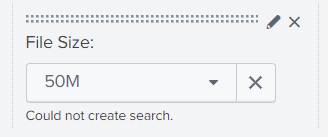
I tried to update the search string based on your reply but it could not create search.
<input type="dropdown" token="size_tk" searchWhenChanged="true">
<label>File Size:</label>
<choice value="*">ALL</choice>
<choice value="50M">50M</choice>
<choice value="200M">200M</choice>
<choice value="500M">500M</choice>
<choice value="1G">1G</choice>
<choice value="2G">2G</choice>
<search>
<query>index=tech_filesystem
| makemv delim="," filesize
| where filesize>$size_tok_from$ AND filesize<$size_tok_to$
| stats count by filesize</query>
<earliest>rt-1m</earliest>
<latest>rt</latest>
</search>
<fieldForLabel>size</fieldForLabel>
<fieldForValue>size</fieldForValue>
<default>*</default>
<initialValue>*</initialValue>
</input>
- Mark as New
- Bookmark Message
- Subscribe to Message
- Mute Message
- Subscribe to RSS Feed
- Permalink
- Report Inappropriate Content
I think you need to make 2 tokens, size_tok_from and size_tok_to.
In your search add
where filesize>$size_tok_from$ AND filesize<$size_tok_to$- Mark as New
- Bookmark Message
- Subscribe to Message
- Mute Message
- Subscribe to RSS Feed
- Permalink
- Report Inappropriate Content
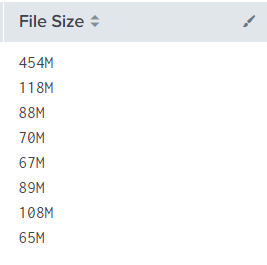
Should I use eval if statement to search the file size having 50M to 199M? I attached the sample file sizes in the table filesize below.
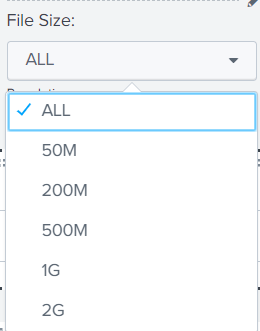
I want to filter the file base on the sizes available in the dropdown.

Enter the Agentic Era with Splunk AI Assistant for SPL 1.4
Stronger Security with Federated Search for S3, GCP SQL & Australian Threat ...
Accelerating Observability as Code with the Splunk AI Assistant
