
Join the Conversation
- Find Answers
- :
- Using Splunk
- :
- Splunk Search
- :
- How to search the table by the range set of size i...
- Subscribe to RSS Feed
- Mark Topic as New
- Mark Topic as Read
- Float this Topic for Current User
- Bookmark Topic
- Subscribe to Topic
- Mute Topic
- Printer Friendly Page
- Mark as New
- Bookmark Message
- Subscribe to Message
- Mute Message
- Subscribe to RSS Feed
- Permalink
- Report Inappropriate Content
How to search the table by the range set of size in the input?

I want to search file by range of size assigned in the input but I'm not sure how.
Example: I pick 50M in the choices because I want to search files that are having 50M to 199M size.
Input Source:
</input>
<input type="dropdown" token="size_tk">
<label>File Size:</label>
<choice value="*">ALL</choice>
<choice value="50M">50M</choice>
<choice value="200M">200M</choice>
<choice value="500M">500M</choice>
<choice value="1G">1G</choice>
<choice value="2G">2G</choice>
<search>
<query>index=tech_filesystem
| makemv delim="," filesize
| stats count by filesize</query>
<earliest>rt-30s</earliest>
<latest>rt</latest>
</search>- Mark as New
- Bookmark Message
- Subscribe to Message
- Mute Message
- Subscribe to RSS Feed
- Permalink
- Report Inappropriate Content

maybe something like this?
<dashboard>
<label>Test filesize</label>
<fieldset>
<input type="dropdown" token="size_tk_from" searchWhenChanged="true">
<label>File Size from:</label>
<choice value="*">ALL</choice>
<choice value="50000">50M</choice>
<choice value="200000">200M</choice>
<choice value="500000">500M</choice>
<choice value="1000000">1G</choice>
<choice value="2000000">2G</choice>
<fieldForLabel>size</fieldForLabel>
<fieldForValue>size</fieldForValue>
<default>*</default>
<initialValue>*</initialValue>
</input>
<input type="dropdown" token="size_tk_to" searchWhenChanged="true">
<label>File Size to:</label>
<choice value="*">ALL</choice>
<choice value="50000">50M</choice>
<choice value="200000">200M</choice>
<choice value="500000">50M</choice>
<choice value="1000000">1G</choice>
<choice value="2000000">2G</choice>
<fieldForLabel>size</fieldForLabel>
<fieldForValue>size</fieldForValue>
<default>*</default>
<initialValue>*</initialValue>
</input>
</fieldset>
<row>
  <panel>
    <table>
      <search>
        <query>
       <![CDATA[
        index=tech_filesystem
       | makemv delim="," filesize
       | where filesize>$size_tk_from$ AND filesize<$size_tk_to$
       | stats count by filesize
      ]]>
      </query>
     <earliest>rt-1m</earliest>
     <latest>rt</latest>
    </search>
  </table>
  </panel>
</row>
</dashboard>
- Mark as New
- Bookmark Message
- Subscribe to Message
- Mute Message
- Subscribe to RSS Feed
- Permalink
- Report Inappropriate Content
You can use mvexpand to make multiple events from 1 and mvcombine to make 1 event from multiple.
I've used makeresults to be able to check my dashboard. Not exactly what you want but hopefully it wil give you a hint how to solve this.
<dashboard>
<label>Test filesize</label>
<fieldset>
<input type="dropdown" token="size_tk_from" searchWhenChanged="true">
<label>File Size from:</label>
<choice value="50000">50M</choice>
<choice value="200000">200M</choice>
<choice value="500000">500M</choice>
<choice value="1000000">1G</choice>
<choice value="2000000">2G</choice>
<fieldForLabel>size</fieldForLabel>
<fieldForValue>size</fieldForValue>
</input>
<input type="dropdown" token="size_tk_to" searchWhenChanged="true">
<label>File Size to:</label>
<choice value="50000">50M</choice>
<choice value="200000">200M</choice>
<choice value="500000">500M</choice>
<choice value="1000000">1G</choice>
<choice value="2000000">2G</choice>
<fieldForLabel>size</fieldForLabel>
<fieldForValue>size</fieldForValue>
</input>
</fieldset>
<row>
  <panel>
    <table>
      <search>
        <query>
       <![CDATA[
       | makeresults
       | eval filesize="2G,500M,200M,50M,1G"
       | eval filesize=replace(filesize,"50M","50000")
       | eval filesize=replace(filesize,"200M","200000")
       | eval filesize=replace(filesize,"500M","500000")
       | eval filesize=replace(filesize,"1G","1000000")
       | eval filesize=replace(filesize,"2G","2000000")
       | makemv delim="," filesize
       | mvexpand filesize
       | where filesize>$size_tk_from$ AND filesize<$size_tk_to$
       | table filesize
       | sort filesize
       | eval filesize=replace(filesize,"500000","500M")
       | eval filesize=replace(filesize,"50000","50M")
       | eval filesize=replace(filesize,"2000000","2G")
       | eval filesize=replace(filesize,"200000","200M")
       | eval filesize=replace(filesize,"1000000","1G")
       | table filesize
      ]]>
      </query>
     <earliest>-1d@d</earliest>
     <latest>@d</latest>
    </search>
  </table>
  </panel>
</row>
</dashboard>
- Mark as New
- Bookmark Message
- Subscribe to Message
- Mute Message
- Subscribe to RSS Feed
- Permalink
- Report Inappropriate Content
Thank you for your reply. I tried to use your resolution code but still not able to show the output needed. As per checking, the sizes are shown in 1 row. They are just separated by comma that's why their is "| makemv delim="," filesize" in the search string. I would like to ask if their are ways on how to sort the data from a single row?
- Mark as New
- Bookmark Message
- Subscribe to Message
- Mute Message
- Subscribe to RSS Feed
- Permalink
- Report Inappropriate Content
Maybe I don't understand your question quit right but if you are looking for a list of files between 2 values you could make an extra token and use this search:
index=tech_filesystem
| makemv delim="," filesize
| where filesize>$size_tok_from$ AND filesize<$size_tok_to$
| stats count by filesize
- Mark as New
- Bookmark Message
- Subscribe to Message
- Mute Message
- Subscribe to RSS Feed
- Permalink
- Report Inappropriate Content
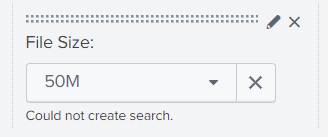
I tried to update the search string based on your reply but it could not create search.
<input type="dropdown" token="size_tk" searchWhenChanged="true">
<label>File Size:</label>
<choice value="*">ALL</choice>
<choice value="50M">50M</choice>
<choice value="200M">200M</choice>
<choice value="500M">500M</choice>
<choice value="1G">1G</choice>
<choice value="2G">2G</choice>
<search>
<query>index=tech_filesystem
| makemv delim="," filesize
| where filesize>$size_tok_from$ AND filesize<$size_tok_to$
| stats count by filesize</query>
<earliest>rt-1m</earliest>
<latest>rt</latest>
</search>
<fieldForLabel>size</fieldForLabel>
<fieldForValue>size</fieldForValue>
<default>*</default>
<initialValue>*</initialValue>
</input>
- Mark as New
- Bookmark Message
- Subscribe to Message
- Mute Message
- Subscribe to RSS Feed
- Permalink
- Report Inappropriate Content
I think you need to make 2 tokens, size_tok_from and size_tok_to.
In your search add
where filesize>$size_tok_from$ AND filesize<$size_tok_to$- Mark as New
- Bookmark Message
- Subscribe to Message
- Mute Message
- Subscribe to RSS Feed
- Permalink
- Report Inappropriate Content
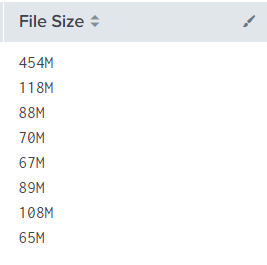
Should I use eval if statement to search the file size having 50M to 199M? I attached the sample file sizes in the table filesize below.
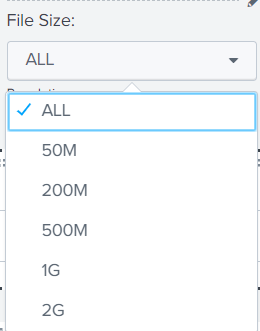
I want to filter the file base on the sizes available in the dropdown.

Upcoming Webinar: Unmasking Insider Threats with Slunk Enterprise Security’s UEBA
.conf25 technical session recap of Observability for Gen AI: Monitoring LLM ...
A Season of Skills: New Splunk Courses to Light Up Your Learning Journey
