
Turn on suggestions
Auto-suggest helps you quickly narrow down your search results by suggesting possible matches as you type.
Splunk Search
×
Join the Conversation
Without signing in, you're just watching from the sidelines. Sign in or Register to connect, share, and be part of the Splunk Community.
Turn on suggestions
Auto-suggest helps you quickly narrow down your search results by suggesting possible matches as you type.
- Find Answers
- :
- Using Splunk
- :
- Splunk Search
- :
- How to extract from multivalue field result
Options
- Subscribe to RSS Feed
- Mark Topic as New
- Mark Topic as Read
- Float this Topic for Current User
- Bookmark Topic
- Subscribe to Topic
- Mute Topic
- Printer Friendly Page
- Mark as New
- Bookmark Message
- Subscribe to Message
- Mute Message
- Subscribe to RSS Feed
- Permalink
- Report Inappropriate Content

Noob_splunker
Explorer
07-05-2020
03:39 PM
Hi,
Below is the result from my transaction command. How do I extract only one date from the multiple dates below?
I only need the first one which is 2020-07-05 22:02:01.
2020-07-05 22:02:01
2020-07-05 22:02:36
2020-07-05 22:02:58
2020-07-06 03:02:41
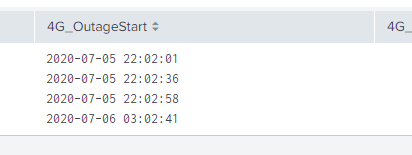
I tried mvindex and split but it doesnt give me a result.
Thanks,
1 Solution
- Mark as New
- Bookmark Message
- Subscribe to Message
- Mute Message
- Subscribe to RSS Feed
- Permalink
- Report Inappropriate Content

renjith_nair
Legend
07-05-2020
07:41 PM
It looks like your field name is the culprit.
Try renaming the field it to start with a letter.
| rename 4G_OutageStart as FG_OutageStart
| eval firstValue=mvindex(FG_OutageStart,0)
---
What goes around comes around. If it helps, hit it with Karma 🙂
What goes around comes around. If it helps, hit it with Karma 🙂
- Mark as New
- Bookmark Message
- Subscribe to Message
- Mute Message
- Subscribe to RSS Feed
- Permalink
- Report Inappropriate Content
renjith_nair
Legend
07-05-2020
07:41 PM
It looks like your field name is the culprit.
Try renaming the field it to start with a letter.
| rename 4G_OutageStart as FG_OutageStart
| eval firstValue=mvindex(FG_OutageStart,0)
---
What goes around comes around. If it helps, hit it with Karma 🙂
What goes around comes around. If it helps, hit it with Karma 🙂
- Mark as New
- Bookmark Message
- Subscribe to Message
- Mute Message
- Subscribe to RSS Feed
- Permalink
- Report Inappropriate Content
Noob_splunker
Explorer
07-05-2020
09:29 PM
yup it worked after i renamed it! thanks much!
- Mark as New
- Bookmark Message
- Subscribe to Message
- Mute Message
- Subscribe to RSS Feed
- Permalink
- Report Inappropriate Content

bowesmana

SplunkTrust
07-05-2020
07:56 PM
Surrounding fields with single quotes ' will ensure eval command works with field names that start with numbers or have spaces in, as in my example
- Mark as New
- Bookmark Message
- Subscribe to Message
- Mute Message
- Subscribe to RSS Feed
- Permalink
- Report Inappropriate Content
renjith_nair
Legend
07-05-2020
08:38 PM
Yes sure
---
What goes around comes around. If it helps, hit it with Karma 🙂
What goes around comes around. If it helps, hit it with Karma 🙂
- Mark as New
- Bookmark Message
- Subscribe to Message
- Mute Message
- Subscribe to RSS Feed
- Permalink
- Report Inappropriate Content
bowesmana
SplunkTrust
07-05-2020
05:45 PM
Split and mvindex should work, try this
| makeresults
| eval 4G_OutageStart="2020-07-05 22:02:01,2020-07-05 22:02:36,2020-07-05 22:02:58,2020-07-06 03:02:41"
| eval 4G_OutageStart=split('4G_OutageStart',",")
| eval DataPoints=mvcount('4G_OutageStart')
| eval FirstDateTime=mvindex('4G_OutageStart',0,0)
If things are not working, it may be that your data looks like an MV field, but is not. You can check with the mvcount eval statement I included above.

Get Updates on the Splunk Community!
Index This | What is broken 80% of the time by February?
December 2025 Edition
Hayyy Splunk Education Enthusiasts and the Eternally Curious!
We’re back with this ...
Unlock Faster Time-to-Value on Edge and Ingest Processor with New SPL2 Pipeline ...
Hello Splunk Community,
We're thrilled to share an exciting update that will help you manage your data more ...
Splunk MCP & Agentic AI: Machine Data Without Limits
Discover how the Splunk Model Context Protocol (MCP) Server can revolutionize the way your organization uses ...
