
Join the Conversation
- Find Answers
- :
- Using Splunk
- :
- Splunk Search
- :
- How to dynamically select column in an XY series?
- Subscribe to RSS Feed
- Mark Topic as New
- Mark Topic as Read
- Float this Topic for Current User
- Bookmark Topic
- Subscribe to Topic
- Mute Topic
- Printer Friendly Page
- Mark as New
- Bookmark Message
- Subscribe to Message
- Mute Message
- Subscribe to RSS Feed
- Permalink
- Report Inappropriate Content

Hello!
I am currently trying to dynamically select columns in my output that are generated by an xyseries.
I am comparing the difference in columns over a period of times, and I am running my y_field as the dates that dynamically change depending on the range selected. For example:
2023-06-04 2023-06-11
10 5
15 18
Without resulting to renaming the columns to something static like "Week 1" and "Week 2" and be able to still eval the two columns to get the mathematical difference. Sometime like:
eval DIFF=datecolumn[1]-datecolumn[0].
Thank you!
- Mark as New
- Bookmark Message
- Subscribe to Message
- Mute Message
- Subscribe to RSS Feed
- Permalink
- Report Inappropriate Content


Hi @ajones,
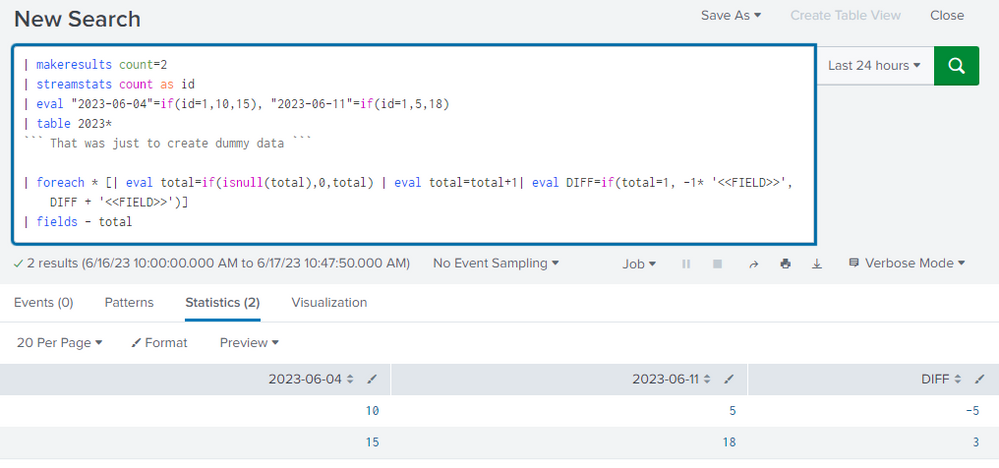
Here's a way you can get the difference - as long as your columns are in the right order (<week1>, <week2>)
The first section of the search is just to recreate your data.
| makeresults count=2
| streamstats count as id
| eval "2023-06-04"=if(id=1,10,15), "2023-06-11"=if(id=1,5,18)
| table 2023*
``` That was just to create dummy data ```

| foreach * [| eval total=if(isnull(total),0,total) | eval total=total+1| eval DIFF=if(total=1, -1* '<<FIELD>>', DIFF + '<<FIELD>>')]
| fields - total
The second piece creates a "total" field, then we work out the difference for all columns.
We minus the first column, and add the second column - which gives us week2 - week1.
This method needs the first week to be listed first and the second week second. You can have the dates in any format, so "2023-06-04" will work just as well as "June 4, 2023".
Cheers,
Daniel
- Mark as New
- Bookmark Message
- Subscribe to Message
- Mute Message
- Subscribe to RSS Feed
- Permalink
- Report Inappropriate Content
Hi @ajones,
Here's a way you can get the difference - as long as your columns are in the right order (<week1>, <week2>)
The first section of the search is just to recreate your data.
| makeresults count=2
| streamstats count as id
| eval "2023-06-04"=if(id=1,10,15), "2023-06-11"=if(id=1,5,18)
| table 2023*
``` That was just to create dummy data ```

| foreach * [| eval total=if(isnull(total),0,total) | eval total=total+1| eval DIFF=if(total=1, -1* '<<FIELD>>', DIFF + '<<FIELD>>')]
| fields - total
The second piece creates a "total" field, then we work out the difference for all columns.
We minus the first column, and add the second column - which gives us week2 - week1.
This method needs the first week to be listed first and the second week second. You can have the dates in any format, so "2023-06-04" will work just as well as "June 4, 2023".
Cheers,
Daniel
- Mark as New
- Bookmark Message
- Subscribe to Message
- Mute Message
- Subscribe to RSS Feed
- Permalink
- Report Inappropriate Content
Awesome, thank you so much! I had to make some slight modifications for it to not concatenate my other column, namely splitting and using mvindex to capture the right data. Overall works great!

Join the Splunk Community Slack to learn, troubleshoot, and make connections with fellow Splunk practitioners in real time!
Join Splunk User Groups to connect and learn in-person by region or remotely by topic or industry.
Announcing Modern Navigation: A New Era of Splunk User Experience
Modernize your Splunk Apps – Introducing Python 3.13 in Splunk
Step into “Hunt the Insider: An Splunk ES Premier Mystery” to catch a cybercriminal ...
