
Join the Conversation
- Find Answers
- :
- Using Splunk
- :
- Splunk Search
- :
- How to drilldown an external link with part of url...
- Subscribe to RSS Feed
- Mark Topic as New
- Mark Topic as Read
- Float this Topic for Current User
- Bookmark Topic
- Subscribe to Topic
- Mute Topic
- Printer Friendly Page
- Mark as New
- Bookmark Message
- Subscribe to Message
- Mute Message
- Subscribe to RSS Feed
- Permalink
- Report Inappropriate Content

Hi,
I have a table like this :
| part_of_url | count |
| /test1 | 1 |
| /test2 | 2 |
| /test3 | 3 |
I want to drilldown with a link which open a new tab by clicking on cell of "part_of_url" column.
I treid this code :
<drilldown>
<condition field="part_of_url">
<link target="_blank">
<![CDATA[https://url.net$click.value$-/results/ ]]>
</link>
</condition>
</drilldown>
But it did not work.
Can you help me ?
- Mark as New
- Bookmark Message
- Subscribe to Message
- Mute Message
- Subscribe to RSS Feed
- Permalink
- Report Inappropriate Content

Your example is not working because of the "/" in your url-field.
As a workaround you could delete the "/" from your field and put in your link to drilldown
<![CDATA[https://answers.splunk.com/$url$ ]]>
Is that an option for you?
But maybe it's not necessary if you need the drilldown you gave in your first example (/test1,/test2,/test3)?
- Mark as New
- Bookmark Message
- Subscribe to Message
- Mute Message
- Subscribe to RSS Feed
- Permalink
- Report Inappropriate Content


Hi @mah,
could you share al the source for that panel?
Probably the problem in in the click or in the field.
please try with:
<![CDATA[https://url.net$row.part_of_url$/results/ ]]>Ciao.
Giuseppe
- Mark as New
- Bookmark Message
- Subscribe to Message
- Mute Message
- Subscribe to RSS Feed
- Permalink
- Report Inappropriate Content
hi @gcusello
It did not work with the example below :
| part_of_url |
| /index.html |
I tried this :
<drilldown>
  <condition field="part_of_url">
    <link target="_blank">
       <![CDATA[https://answers.splunk.com$row.part_of_url$ ]]>
    </link>
  </condition>
</drilldown>
Still not working
- Mark as New
- Bookmark Message
- Subscribe to Message
- Mute Message
- Subscribe to RSS Feed
- Permalink
- Report Inappropriate Content
- Mark as New
- Bookmark Message
- Subscribe to Message
- Mute Message
- Subscribe to RSS Feed
- Permalink
- Report Inappropriate Content
Hi @gcusello
<dashboard>
  <label>Test Dashboard</label>
  <row>
    <panel>
      <table>
        <search>
          <query>| makeresults | eval url="/index.html" | table *</query>
          <earliest>$earliest$</earliest>
          <latest>$latest$</latest>
        </search>
        <option name="refresh.display">progressbar</option>
        <drilldown>

            <link target="_blank">
              <![CDATA[https://answers.splunk.com$url$ ]]>
            </link>

        </drilldown>
      </table>
    </panel>
  </row>
</dashboard>
I have this url generated : https://answers.splunk.com%24url%24/
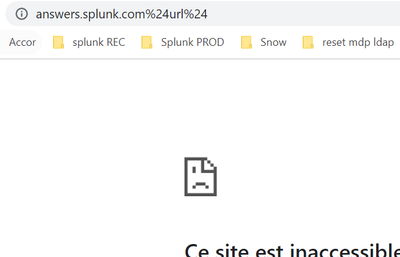
instead of :
https://answers.splunk.com/index.html
- Mark as New
- Bookmark Message
- Subscribe to Message
- Mute Message
- Subscribe to RSS Feed
- Permalink
- Report Inappropriate Content
Your example is not working because of the "/" in your url-field.
As a workaround you could delete the "/" from your field and put in your link to drilldown
<![CDATA[https://answers.splunk.com/$url$ ]]>
Is that an option for you?
But maybe it's not necessary if you need the drilldown you gave in your first example (/test1,/test2,/test3)?
- Mark as New
- Bookmark Message
- Subscribe to Message
- Mute Message
- Subscribe to RSS Feed
- Permalink
- Report Inappropriate Content
It is working by removing "/" from the value and put it in the drilldown before the token.
Thanks !

Index This | What is broken 80% of the time by February?
Unlock Faster Time-to-Value on Edge and Ingest Processor with New SPL2 Pipeline ...
Splunk MCP & Agentic AI: Machine Data Without Limits
