
Join the Conversation
- Find Answers
- :
- Using Splunk
- :
- Splunk Search
- :
- How to disable or enable panels based on drop down...
- Subscribe to RSS Feed
- Mark Topic as New
- Mark Topic as Read
- Float this Topic for Current User
- Bookmark Topic
- Subscribe to Topic
- Mute Topic
- Printer Friendly Page
- Mark as New
- Bookmark Message
- Subscribe to Message
- Mute Message
- Subscribe to RSS Feed
- Permalink
- Report Inappropriate Content
How to disable or enable panels based on drop down value in the dashboard?

I have a drop/drill down with 3 values namely:
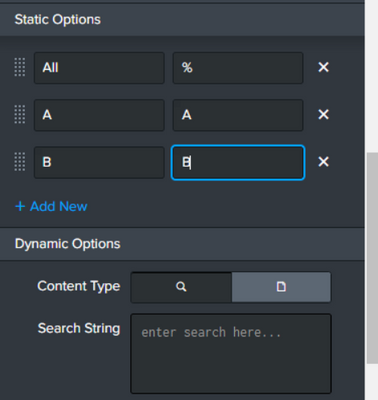
All,A,B
And there are 2 panels, let's say 1 and 2 which take input in the form of tokenfilter from above drop down. 1 should be displayed and 2 hidden when A is selected. 2 should be displayed and 1 hidden when B is selected. And lastly when All is selected both the panels should be displayed. Is there a way to achieve this in the panels or dashboard?
Any pointers would be helpful on the same.
- Mark as New
- Bookmark Message
- Subscribe to Message
- Mute Message
- Subscribe to RSS Feed
- Permalink
- Report Inappropriate Content


In the change handler of the dropdown, set and unset tokens for the whether the panel should be displayed, e.g. displayA and displayB, then use the depends attribute on the panels
<panel depends="$displayA$">- Mark as New
- Bookmark Message
- Subscribe to Message
- Mute Message
- Subscribe to RSS Feed
- Permalink
- Report Inappropriate Content
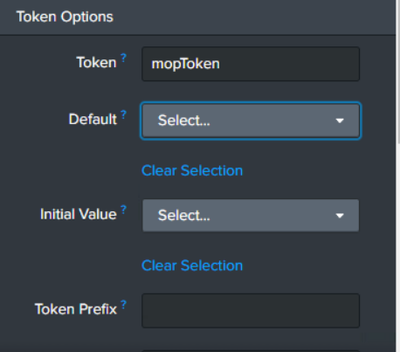
Thanks!! but I dont see any handler in the dropdown settings. Only options I see are below. I am referring below token in the search queries of the 2 panels. Where do I need to define the "displayA" and "displayB"?
- Mark as New
- Bookmark Message
- Subscribe to Message
- Mute Message
- Subscribe to RSS Feed
- Permalink
- Report Inappropriate Content
Currently only available in SimpleXML dashboards, not Studio
- Mark as New
- Bookmark Message
- Subscribe to Message
- Mute Message
- Subscribe to RSS Feed
- Permalink
- Report Inappropriate Content
Ok. Any idea on how to do it in Studio?

Accelerating Observability as Code with the Splunk AI Assistant
Integrating Splunk Search API and Quarto to Create Reproducible Investigation ...
Congratulations to the 2025-2026 SplunkTrust!
